

本文由网友投稿。
作者:江湖人士
原文标题:2022 年底 C# 解压 zip 文件遇到的一个 bug
原文链接:https://jhrs.com/2022/46060.html
最近在排查一个上传功能时,客户端上传的是 zip 文件,到服务器端后使用 C# 解压 zip 文件的代码将上传文件解压后验证是否是允许上传的文件类型,并且要验证乱改文件后缀啊,文件头什么的都要走一遭,结果解压 zip 文件时就出妖蛾子了。
C# 解压 zip 文件
先说一下前文(或者上下文),在 IIS 上部署了一个文件服务站点,用于上传各类文件,流程上是先上传到站点根目录里面随机创建的一个临时目录(这里采用偷懒方案,直接使用 guid 作为目录名创建),先通过文件验证后再将其通过代码剪切或者复制到正式存档目录,C# 复制或者移动文件的代码可以参考江湖人士网的这篇文章。昨天快下班时发现上传 zip 文件时报错,在文件服务根站点创建了很多很多的 guid 开头的目录,我的妹呀,这下玩犊子了,事出反常必有妖啊,肯定代码出错了。
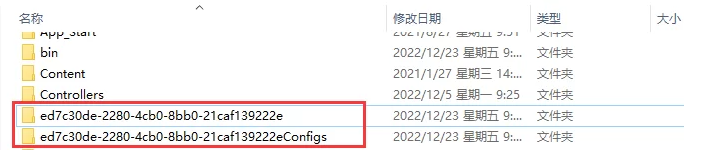
有 bug 的解压代码
这都马上 2022 年底了,出了这 bug 后,赶紧搭建个模拟环境跑一下,发现如下原来的代码确实有问题,原始代码如下:
/// <summary>
/// 解压文件
/// </summary>
/// <param name="saveDir">保存目录</param>
/// <param name="stream"></param>
public static void UnZipFiles(string saveDir, Stream stream)
{
    using (ZipInputStream s = new ZipInputStream(stream))
    {
        ZipEntry theEntry;
        while ((theEntry = s.GetNextEntry()) != null)
        {
            string directoryName = $"{saveDir}{Path.GetDirectoryName(theEntry.Name)}\\";
            string fileName = Path.GetFileName(theEntry.Name);
            Directory.CreateDirectory(directoryName);
            using (FileStream streamWriter = File.Create(directoryName + fileName))
            {
                byte[] data = new byte[2048];
                while (true)
                {
                    int size = s.Read(data, 0, data.Length);
                    if (size > 0)
                    {
                        streamWriter.Write(data, 0, size);
                    }
                    else
                    {
                        break;
                    }
                }
            }
        }
    }
}
对了,这里需要说明一下,这是以前的老项目,因此压缩,解压使用了 ICSharpCode.SharpZipLib.Zip 这个组件。
当打开源码来看,一眼就发现了问题所在,逻辑不严谨导致,解压文件保存目录直接拼接。
如何修复此 bug?
知道了问题所在,修复自然简单,调用Path.Combine方法即可,解压时再判断一下是目录还是文件即可,最终修复后的代码如下:
/// <summary>
/// 解压文件
/// </summary>
/// <param name="saveDir">保存目录</param>
/// <param name="stream"></param>
public static void UnZipFiles(string saveDir, Stream stream)
{
    using (ZipInputStream s = new ZipInputStream(stream))
    {
        ZipEntry theEntry;
        string directoryName, file, fileName;
        while ((theEntry = s.GetNextEntry()) != null)
        {
            directoryName = Path.Combine(saveDir, Path.GetDirectoryName(theEntry.Name));
            fileName = Path.GetFileName(theEntry.Name);
            Directory.CreateDirectory(directoryName);
            file = Path.Combine(directoryName, fileName);

            if (theEntry.IsFile)
            {
                using (FileStream streamWriter = File.Create(file))
                {
                    byte[] data = new byte[2048];
                    while (true)
                    {
                        int size = s.Read(data, 0, data.Length);
                        if (size > 0)
                        {
                            streamWriter.Write(data, 0, size);
                        }
                        else
                        {
                            break;
                        }
                    }
                }
            }
        }
    }
}