
介绍
Objects Comparer是用于对象比较的工具,C#常见的数据结构都是可以用这个三方库进行对比,比较复杂的对象也是可以比较的。
简而言之,Objects Comparer 是一个对象到对象的比较器,它允许逐个成员递归得比较对象,并为某些属性、字段或类型定义自定义比较规则。
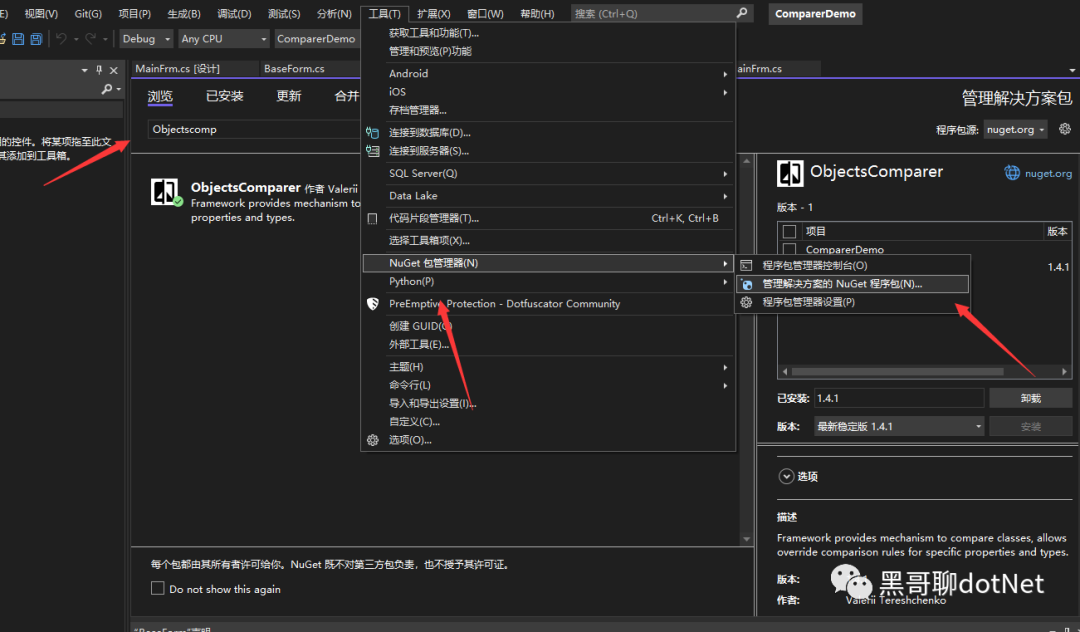
安装
nuget 搜索ObjectsComparer:
使用
首先我们定义一个简单类:
public class UserInfomation
{
    public string Name { get; set; }
    public int Age { get; set; }
    public string Sex { get; set; }
}
实例化两个UserInfomation对象并赋不同的值,再实例化 ObjectsComparer.Comparer比较器:
var comparer1 = new ObjectsComparer.Comparer<UserInfomation>();
然后我们将实例化的两个对象传入到 ObjectsComparer.Comparer 方法中:
IEnumerable<Difference> differences1;
var isEqual1 = comparer1.Compare(userInfomationOld, userInfomationNew, out differences1);
然后通过返回值判断对象是否一致,如果不一致可以通过 differences1 获取到不一致的值。
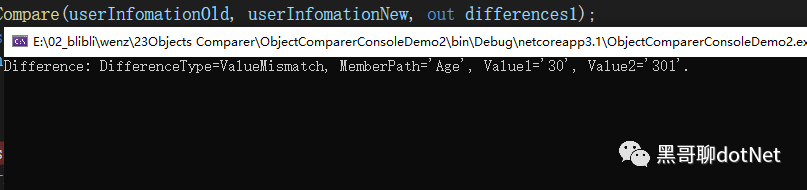
查看输出 能够知道实例化的两个对象是 age 属性的值不一样:
那我们再试试List<T>类型的:
List<UserInfomation> lstUserInfomationsOld=new List<UserInfomation>();
for (int i = 0; i < 3; i++)
{
    UserInfomation user=new UserInfomation();
    user.Name = "张三";
    user.Age = 30;
    user.Sex = "男";
    lstUserInfomationsOld.Add(user);
}
List<UserInfomation> lstUserInfomationsNew = new List<UserInfomation>();
for (int i = 0; i < 2; i++)
{
    UserInfomation user = new UserInfomation();
    user.Name = "李四";
    user.Age = 30;
    user.Sex = "男";
    lstUserInfomationsNew.Add(user);
}


var comparer = new ObjectsComparer.Comparer<List<UserInfomation>>();
IEnumerable<Difference> differences;
var isEqual = comparer.Compare(lstUserInfomationsNew, lstUserInfomationsOld, out differences);
string differencesMsg = string.Join(Environment.NewLine, differences);
Console.WriteLine(differencesMsg);
查看输出能够看出是数量不一致的问题:

应用场景
像做过.NET 客户端开发的人都知道,我们在维护一些基础数据的时候都避免不了要编辑数据!
有的时候我们打开编辑页面,实际未修改数据,再去点击保存按钮要不一个一个字段去对比有没有修改数据, 要不就直接暴力处理, 不校验有没有修改数据,直接调用 update 接口。
那么我们的 Objects Comparer 就派上用场了, 我们首先封装一个 BaseForm,然后在基类控件中 封装一个比较方法:
protected Result ComPare<T>(T t, T s)
{
    Result result =new Result();
    var comparer = new ObjectsComparer.Comparer<T>();
    IEnumerable<Difference> differences;
    bool isEqual = comparer.Compare(t, s, out differences);
    result.IsEqual = isEqual;
    if (!isEqual)
    {
        string differencesMsg = string.Join(Environment.NewLine, differences);
        result.Msg=differencesMsg;
    }
    return result;
}

public class Result
{
    public bool IsEqual { get; set; }
    public string Msg { get; set; }
}
我们在打开编辑页面的时候会加载当前页面的数据, 这时候我们可以获取到未编辑之前的数据将它设置为全局变量,然后保存的时候我们可以获取到编辑之后的对象,这时候我们再去调用基类的比较方法。
获取两个对象之间值是否有改变,如果没有改变,我们就给出"数据未修改,请问是否关闭窗体“等提示:
public partial class MainFrm : BaseForm
{
    Test _testOld;
    public MainFrm()
    {
        InitializeComponent();
        _testOld = LoadData();
        txtName.Text= _testOld.Name;
        txtAge.Text = _testOld.Age.ToString();
        txtSex.Text = _testOld.Sex;
    }
    private Test LoadData()
    {
        Test test = new Test();
        test.Name = "张三";
        test.Age = 30;
        test.Sex = "男";
        return test;


    }


    private void uiButton1_Click(object sender, EventArgs e)
    {
        Test test=new Test();
        test.Name =txtName.Text;
        test.Age =int.Parse( txtAge.Text);
        test.Sex=txtSex.Text;
            Result result=  ComPare(_testOld, test);
        if (result.IsEqual)
        {
            MessageBox.Show("数据未修改");
            return;
        }
        //然后再写保存逻辑
        MessageBox.Show("保存成功");
    }
}
public class Test
{
    public string Name { get; set; }
    public int Age { get; set; }
    public string Sex { get; set; }
}
当然还有很多应用场景,我只是分享我常使用的场景罢了。
最后希望各位 neter 分享更多有用的工具,共同改善 net 环境!