[Introduction to MCU](4) The path to MCU learning in application-layer software development-ESP32 development board PWM control of motors and the use of interrupts

[Introduction to MCU](4) The path to MCU learning in application-layer software development-ESP32 development board PWM control of motors and the use of interrupts

The end of this course is to build a smart car with infrared remote control

最后更新 10/31/2022 10:49 PM
陈显达
预计阅读 11 分钟
分类
share
标签
hardware-related

This article was submitted by netizens.

Author: Chen Xianda

Original title: Introduction to Single-Chip Microcomputer The Learning Path of Single-Chip Microcomputer in Application Layer Software Development----ESP32 Development Board PWM Control of Motors and Use of Interrupts

Original link: https://www.example.com

introduction

Good evening, everyone. In the last blog post, we talked about what UART serial communication is, and the use of USB to TTL allows a single chip microcomputer to communicate with the c#host computer. Next, we will bring you the concept and principle of PWM, as well as practical cases, using PWM to modulate the speed of the motor. Because the end of this course is to make a smart car with infrared remote control, we need four motors, four drivers, and four tires. Therefore, PWM is also extremely important to the final achievement, and in actual development, PWM is also a relatively common speed regulation method.

concept

The full name of PWM is Pulse width modulation, which translates into pulse width modulation in Chinese. Its basic principle is that the control method is to control the switching devices of the inverter circuit, so that the output terminal can obtain a series of pulses with equal amplitudes but inconsistent widths, and use these pulses to replace the sine wave or the required waveform. That is, multiple pulses are generated in half a cycle of the output waveform, so that the equivalent voltage of each pulse is a sinusoidal waveform, and the obtained output is smooth and has few low-order harmonics. Modulating the width of each pulse according to certain rules can not only change the output voltage of the inverter circuit, but also change the output frequency.

Perhaps the above explanation of the principle is too official and you may not understand it. To be easy-to-understand, it is to control the high and low levels of the circuits of electronic components. During a period of time, the high and low levels will form a fluctuation in the output. This fluctuation can become a PWM waveform, and we need to use code to control the PWM output waveform. During this fluctuation, how much does the power-on time, that is, the high-level time, account for the total time? At the same time, in this PWM waveform, what is the frequency at which the high and low levels are switched back and forth, forming such a waveform, which introduces two concepts, Duty Ratio and frequency. The duty ratio represents, The total time of high-level power supply and a proportion of the total time (in this waveform, the total time occupied by the high and low levels), and the frequency is a frequency at which the high and low levels are switched back and forth in this waveform.

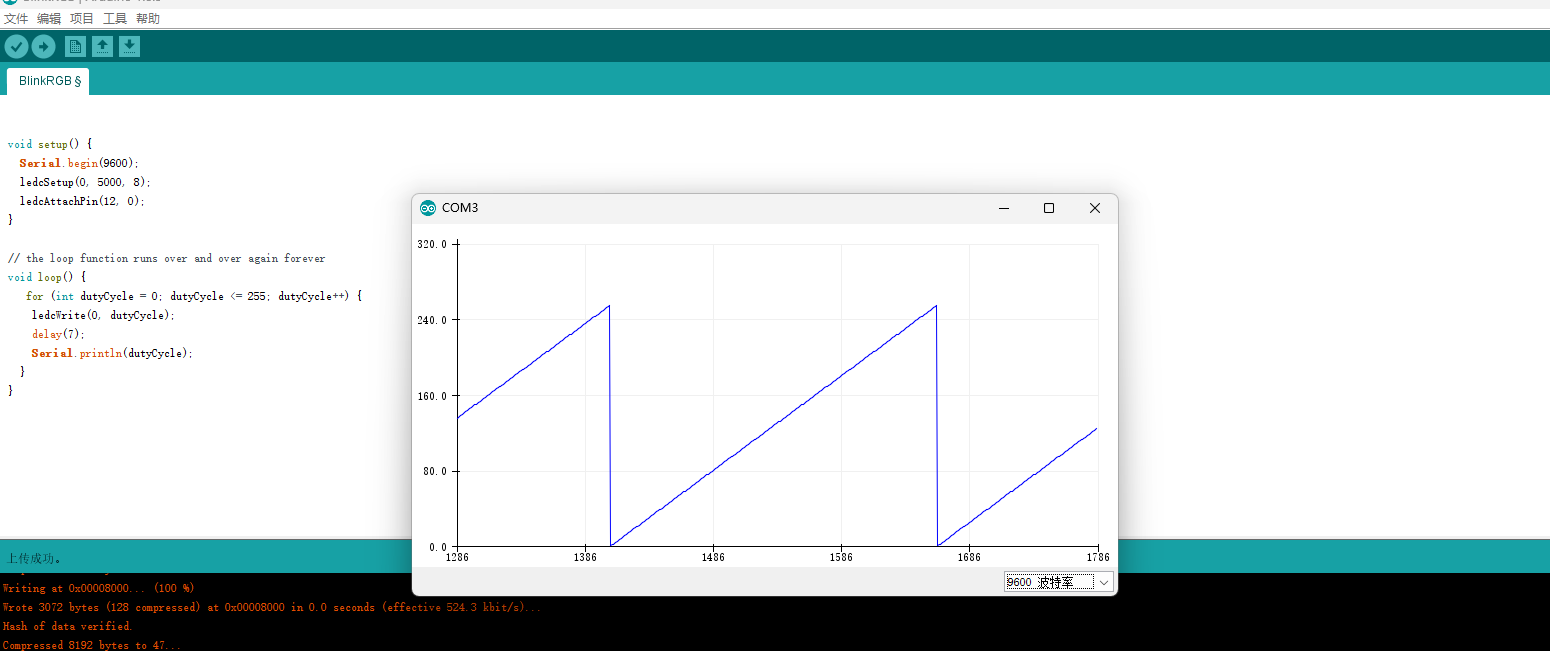
As shown in the figure below, a sawtooth waveform is displayed in the Arduino serial port plotter below. Looking at the GIF below, we can see that the corresponding motor motion also has a motion state from fast to slow.

Code parsing

void setup() {
  Serial.begin(9600);
  ledcSetup(0, 5000, 8);
  ledcAttachPin(12, 0);
}

// the loop function runs over and over again forever
void loop() {
   for (int dutyCycle = 0; dutyCycle <= 255; dutyCycle++) {
    ledcWrite(0, dutyCycle);
    delay(7);
    Serial.println(dutyCycle);
  }
}

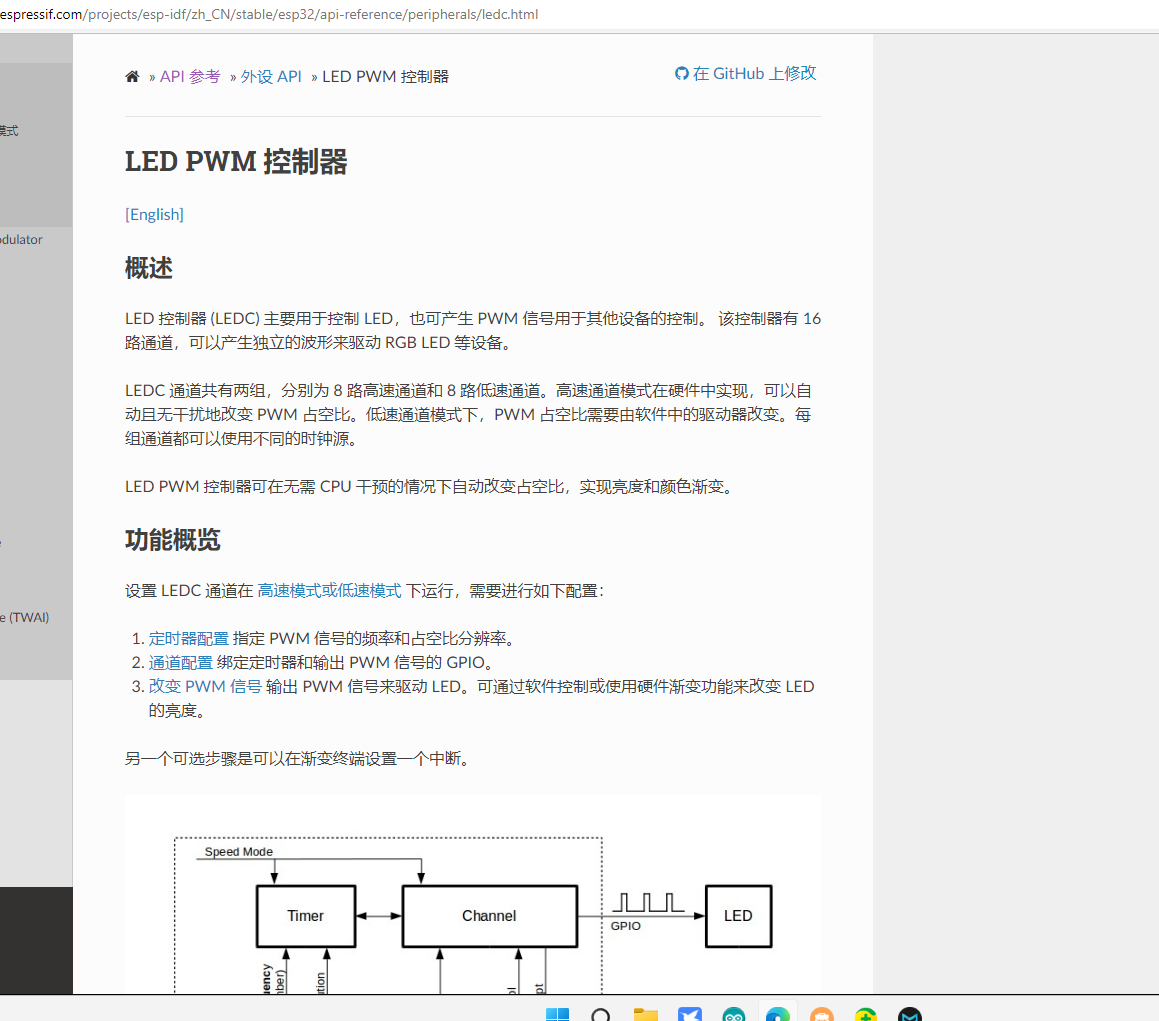
In Arduino, we can use LEDC to control PWM, while in Pure C Lexin's development board, we can use MCPWM for control. However, since Arduino cannot use MCPWM here, we have LEDC as a substitute. The ESP32 has a 16-channel LED PWM controller, which correspondingly uses Lexin's LED PWM control. The ESP32 LED PWM is divided into 8 high-speed channels and 8 low-speed channels. Then we use different frequencies and duty cycles to achieve control of the motor speed.

In the above code, we first set the ledc channel to 0, the frequency to 5000, and the eighth low-speed LED controller, that is, the code is ledcSetup (0, 5000, 8); Then you need to manage channels and pins using ledcAttachPin (12, 0); Associate pin 12 with the 0th channel. In the loop code, you can see that the maximum duty cycle we wrote is 255, and the total number of 0 - 255 is 256. That is because the duty cycle is related to the channel. As mentioned above, there are 16 PWM controllers for LEDs. Here we use 8, and 256 is the value of 2 to the 8th power. Therefore, the maximum duty cycle is 256. If the value is 10, the maximum value of the duty cycle is 1024 - 1; ledcwrite (0, dutyCycle); then the duty cycle is written to the corresponding channel, and the PWM speed adjustment setting of the motor is completed.

Arduino packages for ESP32 Lexin PWM are currently known to include LEDC, which does not require installation and can be used by default. Other packages also have PWM packages. After personally testing one or two, they are not as useful as this. Follow-up friends can also continue to explore other useful PWM libraries for development.

interrupt

After talking about PWM above, let's talk about interrupts and a practical case of interrupts. Interruption, as the name suggests, means that during program execution, when a certain event is encountered, the work at hand will be suspended to perform something first. This event is something that we interrupt the current work to perform. This action is called interrupt. Although in the code, you can register a background task (in pure C) and perform non-stop while, this still cannot play the role of a microcontroller in terms of performance, so in this scenario, we need to use interrupts to realize our A certain function, such as using a button, to determine whether to turn on the LED or to perform other behaviors.

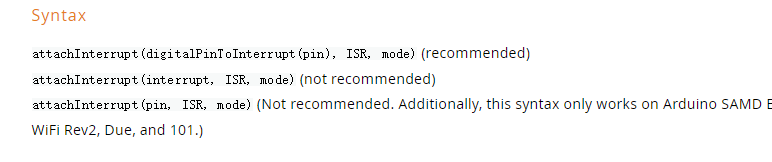
In Arduino, we can use the attachinterrupt function to add interrupts to pins and use detinterrupt to remove interrupts,

The attachInterrupt function requires three parameters. The first is the pin needed for the interrupt, the second is the function triggered by the interrupt, and the third is the type of interrupt. For the ESP32 interrupt, in Arduino, the method name must be preceded by an IRAM_ATTR to mark it as an interrupt function. The digitalPinTointerrupt in the first function is to bind 27 to the interrupt. There are other methods, but they are not recommended by the authorities.

In the code below, we define a change function to handle the interrupt on the ESP32227 pin, and use the level of pin 27 to control the level of LED pin 2 to control whether the LED light is lit. First, we set pin 2 to output mode, and pin 27 to pull-up input mode. It can be understood that this mode is generally needed for pull-up resistors. Then we associate pin 27 with the interrupt. Set the interrupt function to change and the mode to CHANGE. Then in the LOOP function, we write the value of state to pin 2. When we enter the change interrupt function, we invert the state and then enter the loop to write the value. In this way, we can control the display and non-display of the LED. Here, I would like to remind you that since in the MCU, the interrupt and timer are in non-blocking mode, and the Serial.println function blocks writing to the buffer, the interrupt function will cause the interrupt function to continue Output error, error: Guru Meditation Error: Core 1 panic 'ed (Interrupt wdt timeout on CPU1).

This is because the println function is blocked and the timer cannot continue to execute. If you have to use this function, you can try to set the intermediate variable, then determine whether to change the value in the loop function, and then output the information to the serial port.

As you can see in the GIF below, we use buttons to control the display and non-display of the LEDs.

volatile byte state = LOW;

void IRAM_ATTR change()
{
   state=!state;
}
void setup() {
  // put your setup code here, to run once:
  Serial.begin(9600);
  pinMode(2, OUTPUT);
  pinMode(27, INPUT_PULLUP);
  attachInterrupt(digitalPinToInterrupt(27), change, CHANGE);
}

void loop() {
  digitalWrite(2, state);// put your main code here, to run repeatedly:
}

You can see that the second method is to pass in an interrupt interrupt number, but the interrupt number on the ESP32 is not in the official data, so we only need the first method to associate the pin with the interrupt function. Of course, the last one may also be fine, but I didn't try it here. If you are interested, you can try it.

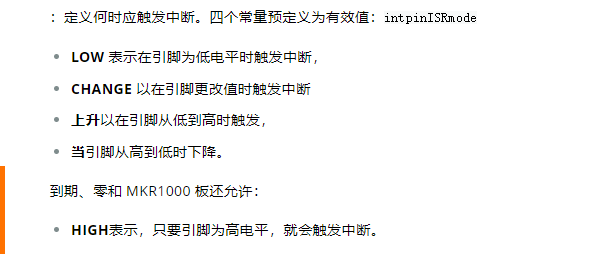
In mode, Arduino supports five modes. The first mode is LOW. Looking at the translation, we know that this triggers the interrupt function when the level is at a low level.

The second CHANGE is triggered whether it is high to low or low to high

The third type is that the pin triggers when it goes from low to high, rather than when it has already reached high.

The fourth type is drop, which triggers the interrupt function when the level goes from high to low,

The fifth is that the interrupt function will be triggered when the level is at a high level.

conclusion

Today, I talked about the use of PWM and interruptions. I may talk a little too much at one time and it's a little difficult to digest. If you don't understand anything, you can ask me in time, and I will update it a little slower later to prevent talking too quickly. If I don't understand it for a while, there will be a case explanation of IIC and SPI later. After these are finished, I will start to prepare for the ultimate goal of building a smart car. The accessories that will be needed will be summarized and posted to the group in the next two days. and a purchase link. Interested students can join the QQ group to study and discuss together. The blogger is also an apprentice who has just started playing single-chip computers and will also study the stm32 series single-chip computers later. Everyone is welcome to join the discussion and learn.

Keep Exploring

延伸阅读

更多文章