

大家好,我是沙漠尽头的狼。
上文介绍了《C#使用CefSharp内嵌网页-并给出C#与JS的交互示例》,本文介绍CefSharp的缓存实现,先来说说添加缓存的好处:
- 提高页面加载加速:CefSharp缓存可以缓存已经加载过的页面和资源,当用户再次访问相同的页面时,可以直接从缓存中加载,而不需要重新下载和解析页面和资源,从而加快页面加载速度。
- 减少网络流量:使用缓存可以减少网络流量,因为已经下载过的资源可以直接从缓存中读取,而不需要重新下载。
- 提高用户体验:由于缓存可以提高页面加载速度,因此可以提高用户的体验,用户可以更快地访问页面和资源,从而更加愉快地使用应用程序。
- 减少服务器负载:使用缓存可以减少服务器的负载,因为已经下载过的资源可以直接从缓存中读取,而不需要重新生成和发送。
- 离线访问:可以使应用程序支持离线访问,因为它可以缓存已经下载过的页面和资源,当用户没有网络连接时,可以直接从缓存中加载页面和资源。
总之,使用缓存可以提高应用程序的性能和用户体验,减少网络流量和服务器负载,并支持离线访问,是一个非常有用的特性。
本文示例:GitHub
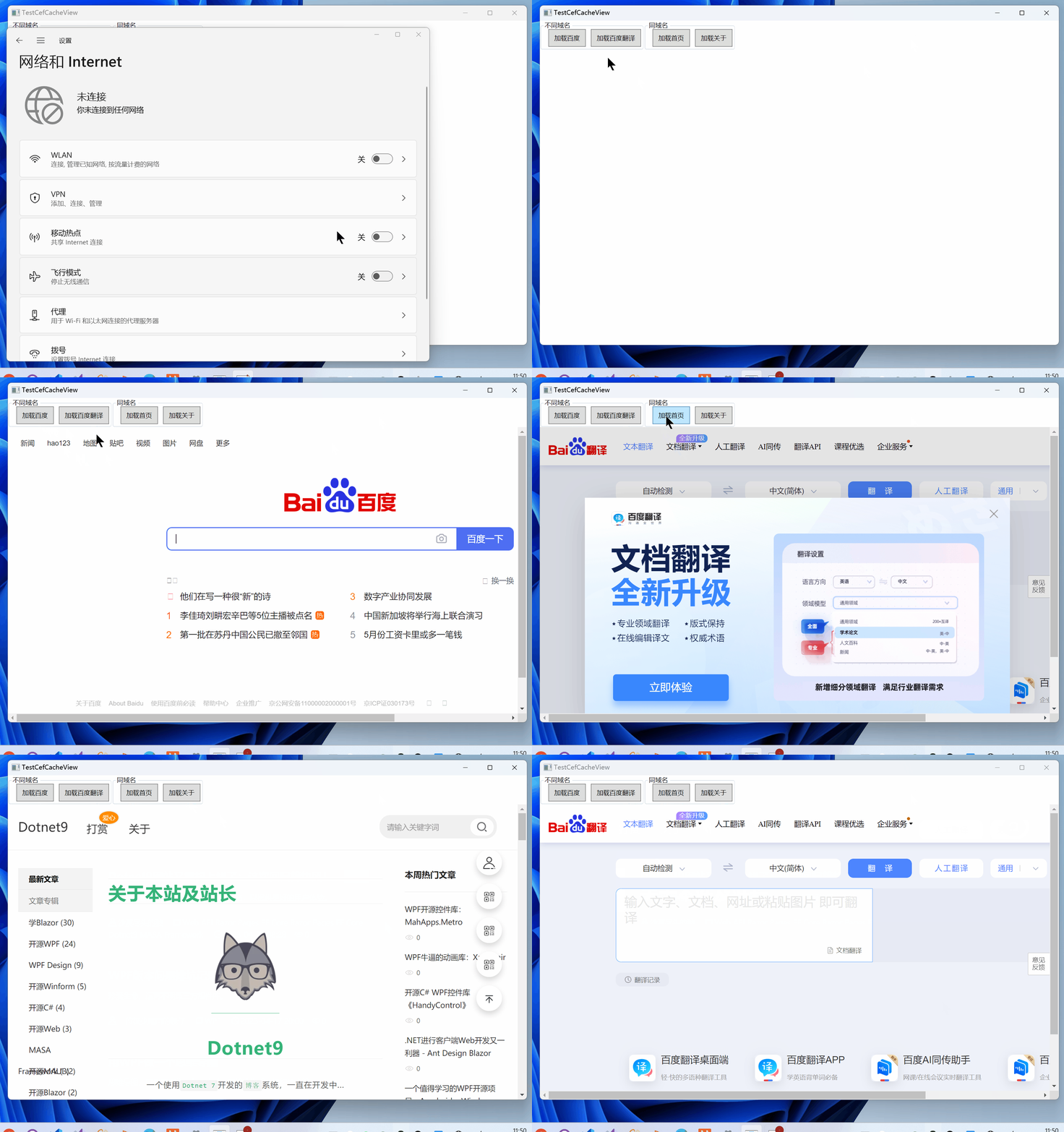
断网情况下,演示加载已经缓存的百度、百度翻译、Dotnet9首页、Dotnet9关于4个页面:
接下来讲解缓存的实现方式。
1. 默认缓存实现
CefSharp的默认缓存实现方式是基于Chromium的缓存机制。Chromium使用了两种类型的缓存:内存缓存和磁盘缓存。
1.1. 内存缓存
内存缓存是一个基于LRU(最近最少使用)算法的缓存,它缓存了最近访问的页面和资源。内存缓存的大小是有限的,当缓存达到最大大小时,最近最少使用的页面和资源将被删除。
内存缓存无法通过CefSharp.WPF的API进行设置。具体来说,Chromium会在内存中维护一个LRU(Least Recently Used)缓存,用于存储最近访问的网页数据。当缓存空间不足时,Chromium会根据LRU算法自动清除最近最少使用的缓存数据,以腾出空间存储新的数据。
在CefSharp.WPF中,我们可以通过调用Cef.GetGlobalRequestContext().ClearCacheAsync()方法来清除内存缓存中的数据。该方法会清除所有缓存数据,包括内存缓存和磁盘缓存。如果只需要清除内存缓存,可以调用Cef.GetGlobalRequestContext().ClearCache(CefCacheType.MemoryCache)方法。
需要注意的是,由于内存缓存是由Chromium自身维护的,因此我们无法直接控制其大小。如果需要控制缓存大小,可以通过设置磁盘缓存的大小来间接控制内存缓存的大小。
1.2. 磁盘缓存
磁盘缓存是一个基于文件系统的缓存,它缓存了已经下载的页面和资源。磁盘缓存的大小也是有限的,当缓存达到最大大小时,最早的页面和资源将被删除。
CefSharp.WPF的磁盘缓存是通过设置CefSettings中的CachePath属性来实现的。具体来说,我们可以通过以下代码设置磁盘缓存的路径:
public partial class App : Application
{
    protected override void OnStartup(StartupEventArgs e)
    {
        base.OnStartup(e);

        // CachePath需要为绝对路径
        var settings = new CefSettings
        {
            CachePath = $"{AppDomain.CurrentDomain.BaseDirectory}DefaultCaches"
        };
        Cef.Initialize(settings);
    }
}
缓存目录结构如下:
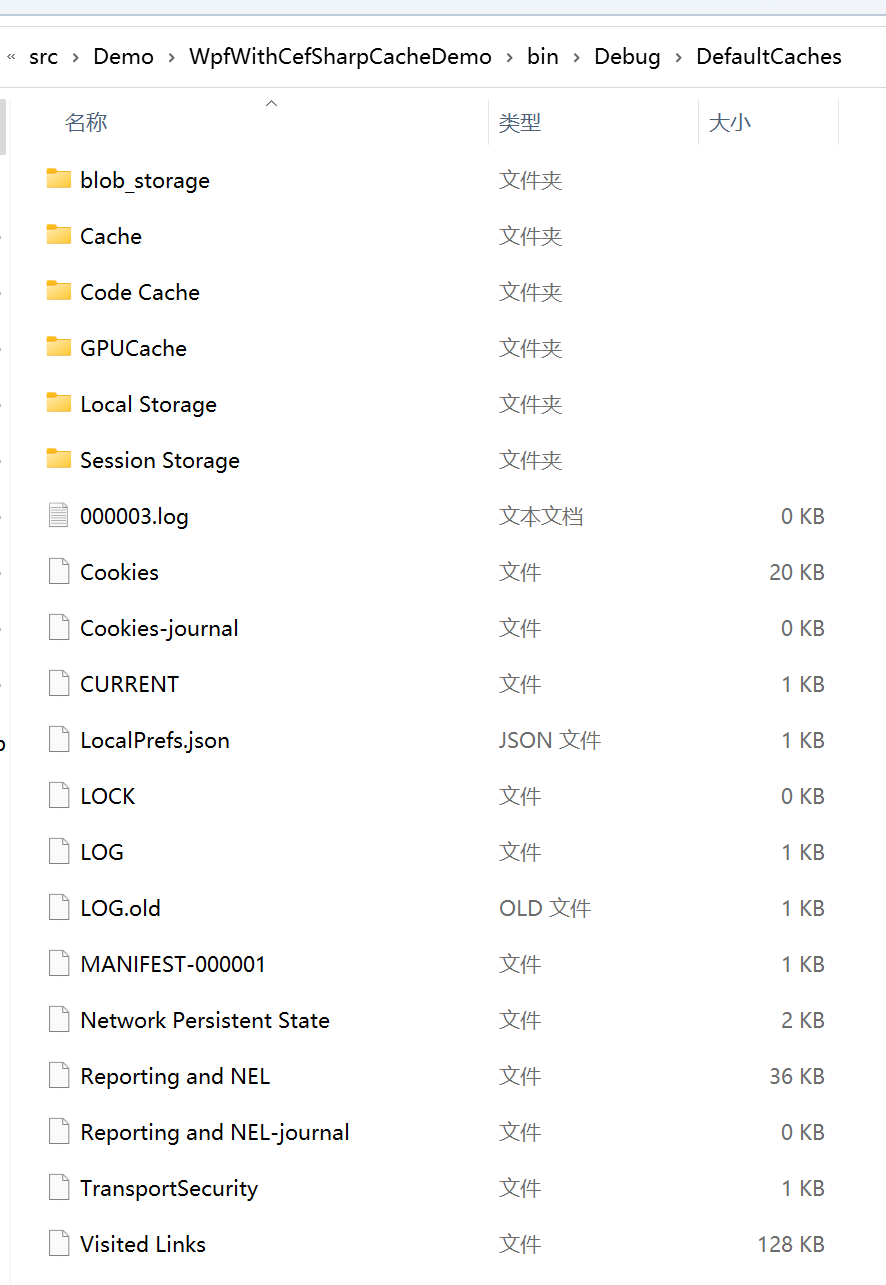
其中,CachePath属性指定了磁盘缓存的路径(绝对路径)。如果不设置该属性,Chromium会将缓存数据存储在默认路径下(通常是用户目录下的AppData\Local\CefSharp目录)。
需要注意的是,磁盘缓存的大小是由Chromium自身控制的,我们可以通过设置CacheController的SetCacheLimit方法来控制缓存数据存储在磁盘上的最大空间。该方法接受一个long类型的参数,表示缓存数据的最大大小(单位为字节)。例如,以下代码将磁盘缓存的最大大小设置为100MB:
var cacheController = Cef.GetGlobalRequestContext().CacheController;
cacheController.SetCacheLimit(100 * 1024 * 1024); // 100MB
需要注意的是,Chromium会根据LRU算法自动清除最近最少使用的缓存数据,以腾出空间存储新的数据。因此,即使设置了缓存大小,也不能保证所有数据都会被缓存。如果需要清除磁盘缓存中的数据,可以调用Cef.GetGlobalRequestContext().ClearCacheAsync()方法。
默认的缓存站长研究不多,上面的代码和描述通过ChatGPT搜索得来,我们来看自定义缓存的实现,默认缓存只是个引子。
2. 自定义缓存
这是本文介绍的重点,相对于默认缓存,自定义缓存有以下好处:
- 更加灵活:可以根据应用程序的需求来灵活地配置缓存策略和缓存大小,从而更好地满足应用程序的需求。
- 更好的性能:可以根据应用程序的需求和特定的场景进行配置,以获得更好的性能。默认的缓存可能不适合某些特定的场景或者不适合您的应用程序的需求,而自定义缓存则可以根据您的需求进行调整,以获得更好的性能。
- 更好的安全性:可以更好地保护用户的隐私和安全,因为可以控制缓存中存储的内容和缓存的生命周期。
- 更加可控:可以更好地控制缓存的行为,例如可以控制缓存的清除时间和清除策略,从而更好地管理缓存。
- 更好的兼容性:可以更好地适应不同的浏览器和设备,默认的缓存可能不能提供足够的兼容性,而自定义缓存则可以根据您的需求进行调整,以提供更好的兼容性。
- 更加高效:可以更好地利用系统资源,例如可以使用更快的存储设备来存储缓存,从而提高缓存的读写速度。
总结:自定义缓存可以提供更好的性能、响应性、安全性和兼容性,从而提高应用程序的质量和用户体验,人话就是更好的操控。
2.1. 代码实现
注释前面加的默认缓存代码。
2.1.1. 注册资源请求拦截处理程序
首先在使用ChromiumWebBrowser控件的后台代码里,注册请求拦截处理程序,CefBrowser是控件名,CefRequestHandlerc是处理程序:
public TestCefCacheView()
{
    InitializeComponent();

    var handler = new CefRequestHandlerc();
    CefBrowser.RequestHandler = handler;
}
2.1.2. 请求拦截处理程序
CefSharp里的IRequestHandler是一个接口,用于处理浏览器发出的请求。它定义了一些方法,可以在请求被发送到服务器之前或之后对请求进行处理。
IRequestHandler的实现类可以用于以下几个方面:
拦截请求:可以通过实现OnBeforeBrowse方法来拦截请求,从而控制浏览器的行为。例如,可以在请求被发送到服务器之前检查请求的URL,如果不符合要求,则可以取消请求或者重定向到其他页面。
修改请求:可以通过实现OnBeforeResourceLoad方法来修改请求,例如可以添加一些自定义的HTTP头信息,或者修改请求的URL。
处理响应:可以通过实现OnResourceResponse方法来处理服务器返回的响应,例如可以检查响应的状态码和内容,从而决定是否继续加载页面。
缓存控制:可以通过实现OnQuotaRequest方法来控制缓存的大小和清除策略,从而优化缓存的使用。
总之,IRequestHandler的实现类可以用于控制浏览器的行为,优化网络请求和缓存的使用,从而提高应用程序的性能和用户体验。
我们不直接实现接口IRequestHandler,而是继承它的一个默认实现类RequestHandler,这可以简化我们的开发,毕竟实现接口要列出一系列接口方法。
我们重载方法GetResourceRequestHandler, 在这个方法里返回CefResourceRequestHandler实例,页面中资源请求时会调用此方法:
using CefSharp;
using CefSharp.Handler;

namespace WpfWithCefSharpCacheDemo.Caches;

internal class CefRequestHandlerc : RequestHandler
{
    protected override IResourceRequestHandler GetResourceRequestHandler(IWebBrowser chromiumWebBrowser, IBrowser browser, IFrame frame,
        IRequest request, bool isNavigation, bool isDownload, string requestInitiator, ref bool disableDefaultHandling)
    {
        // 一个请求用一个CefResourceRequestHandler
        return new CefResourceRequestHandler();
    }
}
2.1.3. 资源请求拦截程序
在CefSharp中,IResourceRequestHandler接口是用于处理资源请求的,它可以拦截浏览器发出的资源请求,例如图片、CSS、JavaScript等,从而实现对资源请求的控制和优化。
具体来说,IResourceRequestHandler接口定义了一些方法,例如OnBeforeResourceLoad、OnResourceResponse等方法,这些方法可以用于拦截请求、修改请求、处理响应等方面。例如:
OnBeforeResourceLoad:在浏览器请求资源之前被调用,可以用于修改请求,例如添加一些自定义的HTTP头信息,或者修改请求的URL。
OnResourceResponse:在浏览器接收到服务器返回的响应之后被调用,可以用于处理响应,例如检查响应的状态码和内容,从而决定是否继续加载页面。
OnResourceLoadComplete:在资源加载完成后被调用,可以用于处理资源加载完成后的操作,例如保存资源到本地缓存。
通过实现IResourceRequestHandler接口,可以对资源请求进行拦截和优化,从而提高应用程序的性能和用户体验。
这里我们也不直接实现IResourceRequestHandler接口,我们定义CefResourceRequestHandler类,继承该接口的默认实现类ResourceRequestHandler。
在下面的CefResourceRequestHandler类中:
GetResourceHandler方法:处理资源是否需要缓存,返回null不缓存,返回CefResourceHandler表示需要缓存,在这个类中做跨域处理。GetResourceResponseFilter方法:注册资源缓存的操作类,即资源下载的实现。OnBeforeResourceLoad方法:在这个方法里,我们可以实现给页面传递header参数。
using System.Collections.Specialized;
using CefSharp;
using CefSharp.Handler;

namespace WpfWithCefSharpCacheDemo.Caches;

internal class CefResourceRequestHandler : ResourceRequestHandler
{
    private string _localCacheFilePath;

    private bool IsLocalCacheFileExist => System.IO.File.Exists(_localCacheFilePath);

    protected override IResourceHandler? GetResourceHandler(IWebBrowser chromiumWebBrowser, IBrowser browser,
        IFrame frame, IRequest request)
    {
        try
        {
            _localCacheFilePath = CacheFileHelper.CalculateResourceFileName(request.Url, request.ResourceType);
            if (string.IsNullOrWhiteSpace(_localCacheFilePath))
            {
                return null;
            }
        }
        catch
        {
            return null;
        }

        if (!IsLocalCacheFileExist)
        {
            return null;
        }

        return new CefResourceHandler(_localCacheFilePath);
    }

    protected override IResponseFilter? GetResourceResponseFilter(IWebBrowser chromiumWebBrowser, IBrowser browser,
        IFrame frame,
        IRequest request, IResponse response)
    {
        return IsLocalCacheFileExist ? null : new CefResponseFilter { LocalCacheFilePath = _localCacheFilePath };
    }

    protected override CefReturnValue OnBeforeResourceLoad(IWebBrowser chromiumWebBrowser, IBrowser browser,
        IFrame frame, IRequest request,
        IRequestCallback callback)
    {
        var headers = new NameValueCollection(request.Headers);
        headers["Authorization"] = "Bearer xxxxxx.xxxxx.xxx";
        request.Headers = headers;

        return CefReturnValue.Continue;
    }
}
2.1.4. CefResourceHandler
在CefSharp中,IResourceHandler接口是用于处理资源的,它可以拦截浏览器发出的资源请求,并返回自定义的资源内容,从而实现对资源的控制和优化。
具体来说,IResourceHandler接口定义了一些方法,例如ProcessRequest、GetResponseHeaders、ReadResponse等方法,这些方法可以用于处理资源请求、获取响应头信息、读取响应内容等方面。例如:
ProcessRequest:在浏览器请求资源时被调用,可以用于处理资源请求,例如从本地缓存中读取资源内容,或者从网络中下载资源内容。
GetResponseHeaders:在浏览器请求资源时被调用,可以用于获取响应头信息,例如设置响应的MIME类型、缓存策略等。
ReadResponse:在浏览器请求资源时被调用,可以用于读取响应内容,例如从本地缓存中读取资源内容,或者从网络中下载资源内容。
通过实现IResourceHandler接口,可以对资源进行自定义处理,例如从本地缓存中读取资源内容,从而提高应用程序的性能和用户体验。
这里我们也不直接实现IResourceHandler接口,我们定义CefResourceHandler类,继承该接口的默认实现类ResourceHandler。
在CefResourceHandler的构造函数里只处理跨域问题,其他需求可通过上面接口的方法查找资料处理即可:
using CefSharp;
using System.IO;

namespace WpfWithCefSharpCacheDemo.Caches;

internal class CefResourceHandler : ResourceHandler
{
    public CefResourceHandler(string filePath, string mimeType = null, bool autoDisposeStream = false,
        string charset = null) : base()
    {
        if (string.IsNullOrWhiteSpace(mimeType))
        {
            var fileExtension = Path.GetExtension(filePath);
            mimeType = Cef.GetMimeType(fileExtension);
            mimeType = mimeType ?? DefaultMimeType;
        }

        var stream = File.OpenRead(filePath);
        StatusCode = 200;
        StatusText = "OK";
        MimeType = mimeType;
        Stream = stream;
        AutoDisposeStream = autoDisposeStream;
        Charset = charset;

        Headers.Add("Access-Control-Allow-Origin", "*");
    }
}
2.1.5. CefResponseFilter
在CefSharp中,IResponseFilter接口是用于过滤响应内容的,它可以拦截浏览器接收到的响应内容,并对其进行修改或者过滤,从而实现对响应内容的控制和优化。
具体来说,IResponseFilter接口定义了一些方法,例如InitFilter、Filter、GetSize等方法,这些方法可以用于初始化过滤器、过滤响应内容、获取过滤后的响应内容大小等方面。例如:
InitFilter:在浏览器接收到响应内容时被调用,可以用于初始化过滤器,例如设置过滤器的状态、获取响应头信息等。
Filter:在浏览器接收到响应内容时被调用,可以用于过滤响应内容,例如修改响应内容、删除响应内容等。
GetSize:在浏览器接收到响应内容时被调用,可以用于获取过滤后的响应内容大小,例如用于计算响应内容的压缩比例等。
站长使用的CefSharp.Wpf的89.0.170.0版本中的IResponseFilter接口没有GetSize方法。在该版本中,IResponseFilter接口只定义了两个方法:InitFilter和Filter。
如果在该版本中您需要获取过滤后的响应内容大小,可以考虑在Filter方法中自行计算。例如,在Filter方法中,您可以将过滤后的响应内容写入一个缓冲区,并记录缓冲区的大小,最后返回过滤后的响应内容和缓冲区的大小。
public class MyResponseFilter : IResponseFilter
{
    private MemoryStream outputStream = new MemoryStream();

    public void Dispose()
    {
        outputStream.Dispose();
    }

    public bool InitFilter()
    {
        return true;
    }

    public FilterStatus Filter(Stream dataIn, out long dataInRead, Stream dataOut, out long dataOutWritten)
    {
        dataInRead = 0;
        dataOutWritten = 0;

        byte[] buffer = new byte[4096];
        int bytesRead = 0;

        do
        {
            bytesRead = dataIn.Read(buffer, 0, buffer.Length);
            if (bytesRead > 0)
            {
                outputStream.Write(buffer, 0, bytesRead);
            }
        } while (bytesRead > 0);

        byte[] outputBytes = outputStream.ToArray();
        dataOut.Write(outputBytes, 0, outputBytes.Length);

        dataInRead = outputBytes.Length;
        dataOutWritten = outputBytes.Length;

        return FilterStatus.Done;
    }

    public int GetResponseFilterBufferSize()
    {
        return 0;
    }

    public int GetResponseFilterDelay()
    {
        return 0;
    }
}
在上述示例代码中,我们在Filter方法中将过滤后的响应内容写入了一个MemoryStream对象中,并记录了缓冲区的大小。最后,我们在Filter方法的返回值中返回了过滤后的响应内容和缓冲区的大小。
总结,通过实现IResponseFilter接口,可以对响应内容进行自定义处理,例如对响应内容进行压缩、加密等操作,从而提高应用程序的性能和安全性。
本文示例这里定义类CefResponseFilter直接实现接口处理文件缓存实际操作类,即资源下载实现:
using CefSharp;
using System.IO;

namespace WpfWithCefSharpCacheDemo.Caches;

internal class CefResponseFilter : IResponseFilter
{
    public string LocalCacheFilePath { get; set; }
    private const int BUFFER_LENGTH = 1024;
    private bool isFailCacheFile;


    public FilterStatus Filter(Stream? dataIn, out long dataInRead, Stream? dataOut, out long dataOutWritten)
    {
        dataInRead = 0;
        dataOutWritten = 0;

        if (dataIn == null)
        {
            return FilterStatus.NeedMoreData;
        }

        var length = dataIn.Length;
        var data = new byte[BUFFER_LENGTH];
        var count = dataIn.Read(data, 0, BUFFER_LENGTH);

        dataInRead = count;
        dataOutWritten = count;

        dataOut?.Write(data, 0, count);

        try
        {
            CacheFile(data, count);
        }
        catch
        {
            // ignored
        }

        return length == dataIn.Position ? FilterStatus.Done : FilterStatus.NeedMoreData;
    }

    public bool InitFilter()
    {
        try
        {
            var dirPath = Path.GetDirectoryName(LocalCacheFilePath);
            if (!string.IsNullOrWhiteSpace(dirPath) && !Directory.Exists(dirPath))
            {
                Directory.CreateDirectory(dirPath);
            }
        }
        catch
        {
            // ignored
        }

        return true;
    }

    public void Dispose()
    {
    }

    private void CacheFile(byte[] data, int count)
    {
        if (isFailCacheFile)
        {
            return;
        }

        try
        {
            if (!File.Exists(LocalCacheFilePath))
            {
                using var fs = File.Create(LocalCacheFilePath);
                fs.Write(data, 0, count);
            }
            else
            {
                using var fs = File.Open(LocalCacheFilePath, FileMode.Append);
                fs.Write(data,0,count);
            }
        }
        catch
        {
            isFailCacheFile = true;
            File.Delete(LocalCacheFilePath);
        }
    }
}
2.1.6. CacheFileHelper
缓存文件帮助类,用于管理页面的ajax接口缓存白名单、缓存文件路径规范等:
using CefSharp;
using System;
using System.Collections.Generic;
using System.IO;

namespace WpfWithCefSharpCacheDemo.Caches;

internal static class CacheFileHelper
{
    private const string DEV_TOOLS_SCHEME = "devtools";
    private const string DEFAULT_INDEX_FILE = "index.html";

    private static HashSet<string> needInterceptedAjaxInterfaces = new();

    private static string CachePath = Path.Combine(AppDomain.CurrentDomain.BaseDirectory, "caches");

    public static void AddInterceptedAjaxInterfaces(string url)
    {
        if (needInterceptedAjaxInterfaces.Contains(url))
        {
            return;
        }

        needInterceptedAjaxInterfaces.Add(url);
    }

    private static bool IsNeedInterceptedAjaxInterface(string url, ResourceType resourceType)
    {
        var uri = new Uri(url);
        if (DEV_TOOLS_SCHEME == url)
        {
            return false;
        }

        if (ResourceType.Xhr == resourceType && !needInterceptedAjaxInterfaces.Contains(url))
        {
            return false;
        }

        return true;
    }

    public static string? CalculateResourceFileName(string url, ResourceType resourceType)
    {
        if (!IsNeedInterceptedAjaxInterface(url, resourceType))
        {
            return default;
        }

        var uri = new Uri(url);
        var urlPath = uri.LocalPath;

        if (urlPath.StartsWith("/"))
        {
            urlPath = urlPath.Substring(1);
        }

        var subFilePath = urlPath;
        if (ResourceType.MainFrame == resourceType || string.IsNullOrWhiteSpace(urlPath))
        {
            subFilePath = Path.Combine(urlPath, DEFAULT_INDEX_FILE);
        }

        var hostCachePath = Path.Combine(CachePath, uri.Host);
        var fullFilePath = Path.Combine(hostCachePath, subFilePath);
        return fullFilePath;
    }
}
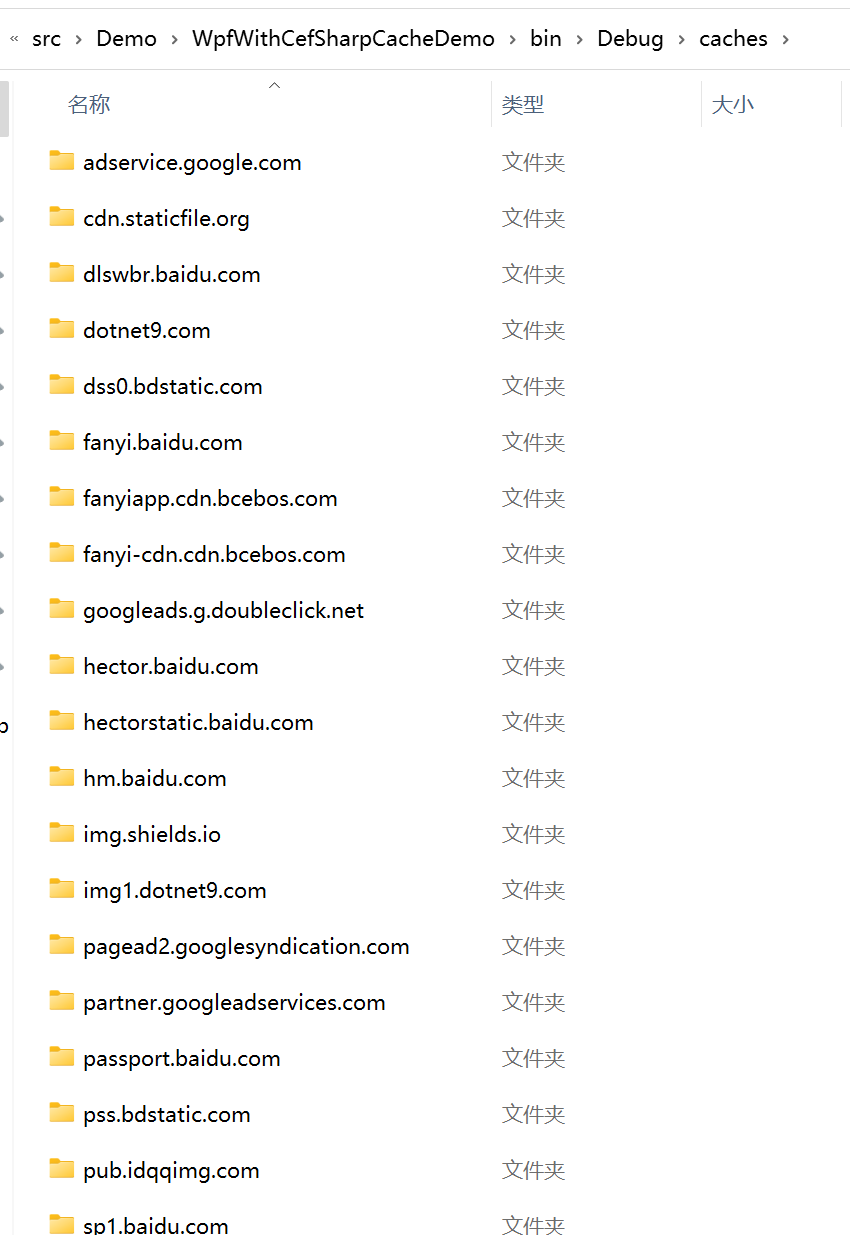
自定义缓存的子目录以资源的域名(Host)为目录名称创建:
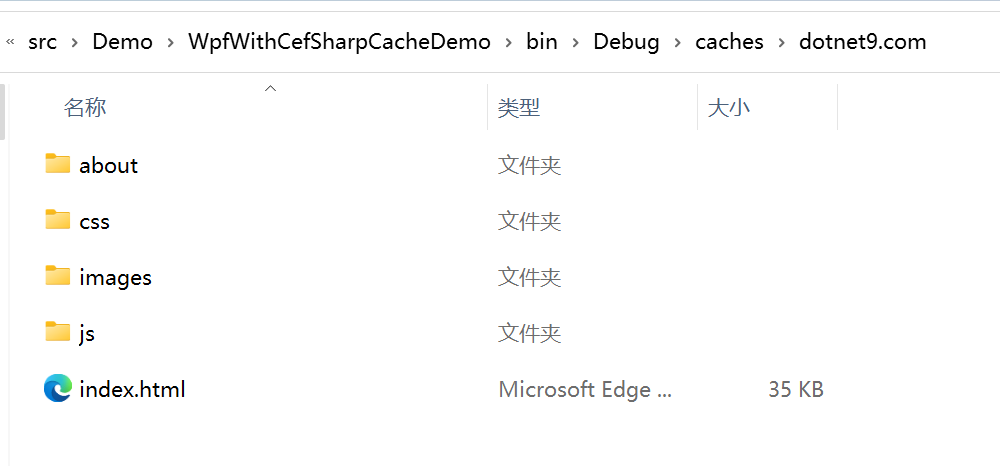
打开缓存的dotnet9.com目录,通过查看目录结构和程序发布目录基本一致,这更适合人看了,是不?
2.2. 可能存在的问题
第一点,站长目前遇到的问题,后面4点由Token AI提供解释。
2.2.1. 对缓存的资源URL带QueryString的方式支持不好
建议用Route(路由的方式:https://dotnet9.com/albums/wpf)代替QueryString(查询参数的试工:https://dotnet9.com/albums?slug=wpf)的方式,站长有空再研究下QueryString的缓存方式。
如果确实资源带QueryString,那对于这种资源就放开缓存,直接通过网络请求吧。
2.2.2. 缓存一致性问题
如果自定义缓存不正确地处理了缓存一致性,可能会导致浏览器显示过期的内容或者不一致的内容。例如,如果缓存了一个网页,但是该网页在服务器上已经被更新了,如果自定义缓存没有正确地处理缓存一致性,可能会导致浏览器显示过期的网页内容。
2.2.3. 缓存空间问题
如果自定义缓存没有正确地管理缓存空间,可能会导致浏览器占用过多的内存或者磁盘空间。例如,如果自定义缓存缓存了大量的数据,但是没有及时清理过期的数据或者限制缓存的大小,可能会导致浏览器占用过多的内存或者磁盘空间。
2.2.4. 缓存性能问题
如果自定义缓存没有正确地处理缓存性能,可能会导致浏览器的性能下降。例如,如果自定义缓存没有正确地处理缓存的读取和写入,可能会导致浏览器的响应速度变慢。
2.2.5. 缓存安全问题
如果自定义缓存没有正确地处理缓存安全,可能会导致浏览器的安全性受到威胁。例如,如果自定义缓存缓存了敏感数据,但是没有正确地处理缓存的加密和解密,可能会导致敏感数据泄露。
因此,在自定义缓存时,需要注意处理缓存一致性、缓存空间、缓存性能和缓存安全等问题,以确保浏览器的正常运行和安全性。
参考:
微信技术交流群:添加微信(codewf)备注“入群”
QQ技术交流群:771992300。
