

本文由网友投稿
作者:陈显达
原文标题:【微信自动化】使用 c#实现微信自动化
原文链接:https://www.cnblogs.com/1996-Chinese-Chen/p/17663064.html
引言
上个月,在一个群里摸鱼划水空度日,看到了一个老哥分享的一个微信自动化的一个类库,便下载了他的 Demo,其本意就是模拟鼠标来操作 UI,实现 UI 自动化;然后自己在瞎琢磨研究,写了一个简单的例子,用来获取好友列表,获取聊天列表,以及最后一次接收或者发送消息的时间,以及最后一次聊天的内容,还有自动刷朋友圈,获取朋友圈谁发的,发的什么文字,以及配的图片是什么,什么时候发的,再就是一个根据获取的好友列表,来实现给指定好友发送消息的功能。
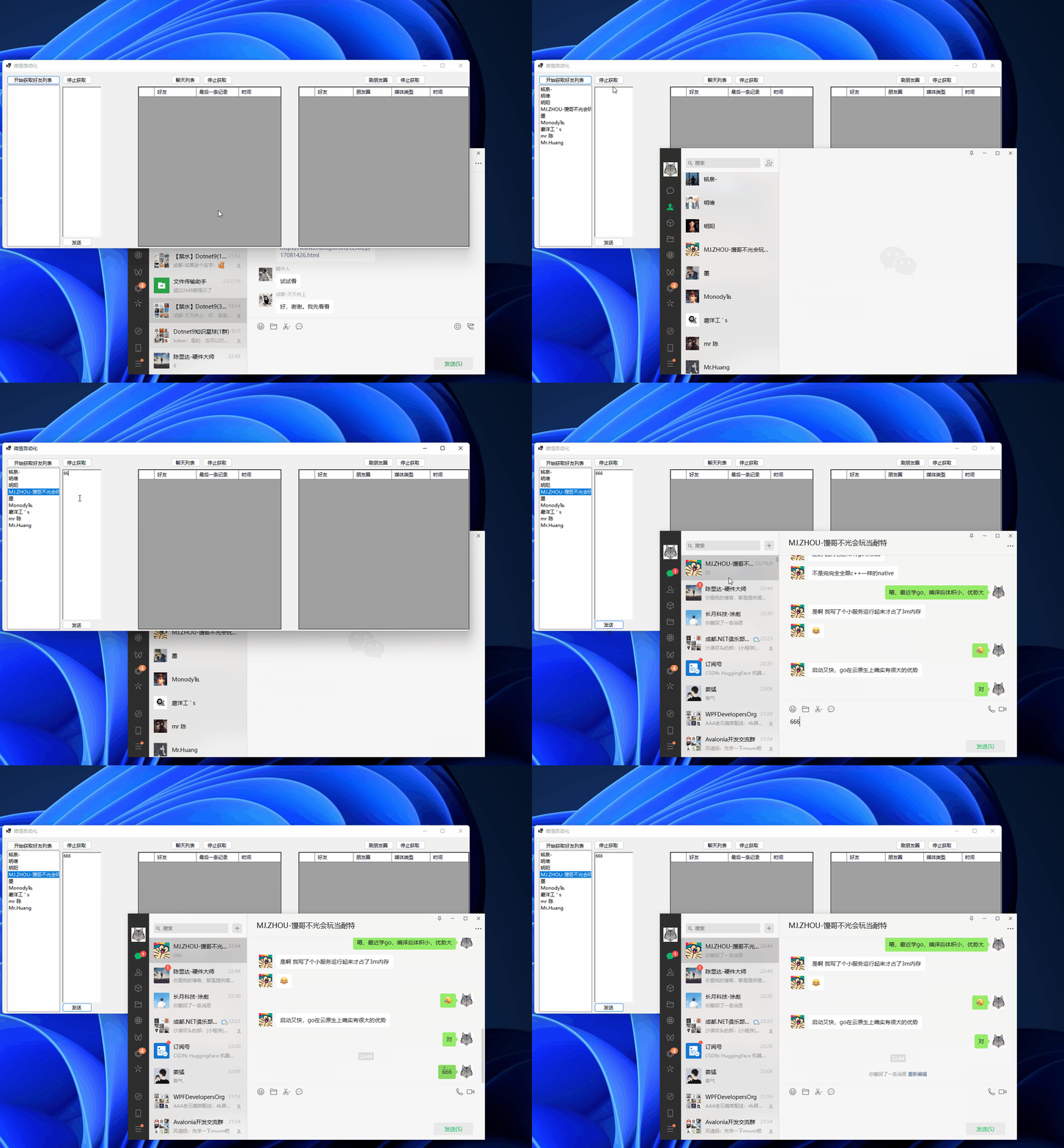
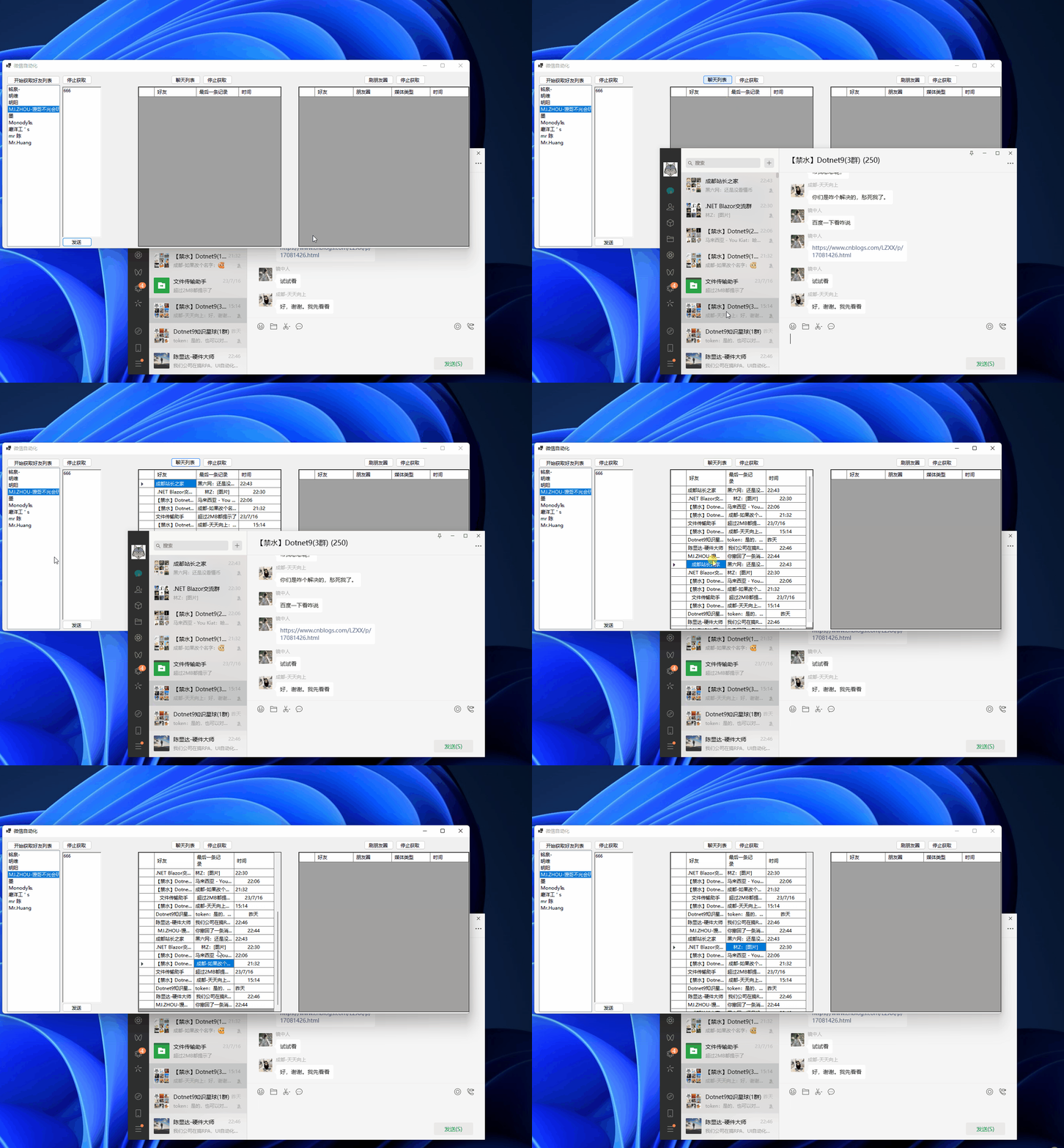
先贴几张图给点吸引力:
获取好友列表,发送消息
获取聊天记录
刷朋友圈

正文
话不多说,咱们开始,首先映入眼帘的是界面,左侧是获取好友列表,然后在右边就是一个 RichTextBox 用来根据左侧选中的好友列表来发送消息,中间是获取聊天列表,好友名称,最后一次聊天的内容,以及最后一次聊天的时间,最右边是获取朋友圈的内容,刷朋友圈,找到好友发的朋友圈内容,以及附带的媒体是图片还是视频,发朋友圈的时间。
首先需要在 NuGet 下载两个包,FlaUI.Core 和 FlaUI.UIA3,用这两个包,来实现鼠标模拟,UI 自动化的,接下来,咱们看代码。
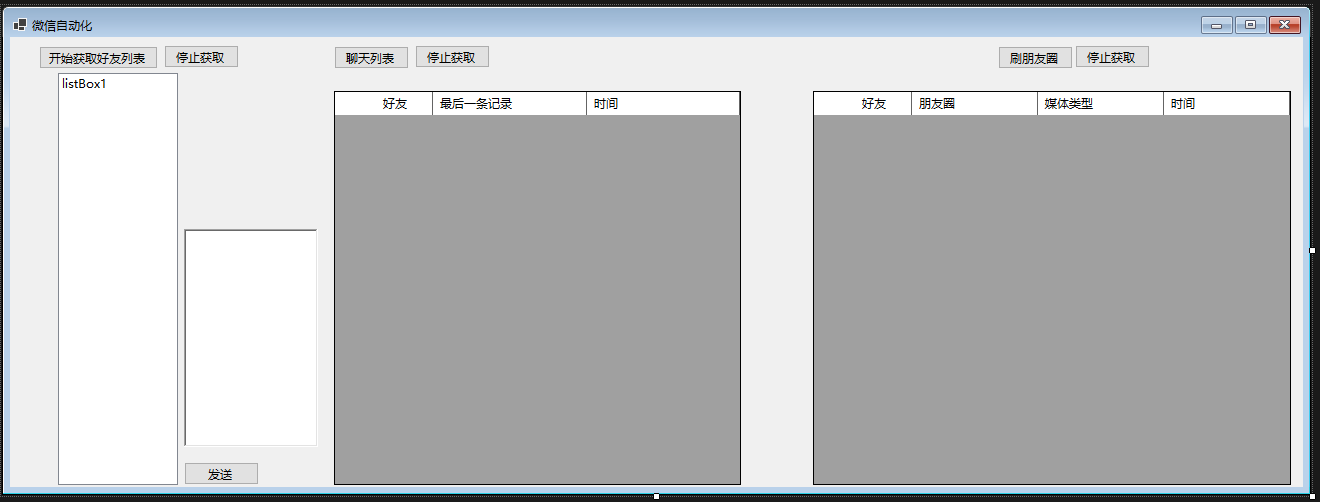
上面就是一整个界面的截图,接下来,咱们讲讲代码,在界面被创建的时候,去获取微信的进程 ID,然后,给获取好友列表,聊天列表,朋友圈的 CancelTokenSource 赋值以及所关联的 CancelToken,以此来实现中断取消的功能,同时在上面的 List 是用来存储朋友圈信息的,下面的 Content 存储聊天列表的内容的,Key 是聊天的用户昵称,Value 是最后一次的聊天内容,在往下的 SendInput 是我们用来模拟鼠标滚动的这样我们才可以滚动获取聊天列表,朋友圈内容,好友列表,在下面的 FindWindow,GetWindowThreadProcessID 是用来根据界面名称找到对应的进程 Id 的,因为如果双击了朋友圈在弹出界面中,使用 Process 找不太方便,直接就引用这个来查找朋友圈的弹出界面。
private List<dynamic> list = new List<dynamic>();
private Dictionary<string, string> Content = new Dictionary<string, string>();
/// <summary>
/// 滚动条模拟
/// </summary>
/// <param name="nInputs"></param>
/// <param name="pInputs"></param>
/// <param name="cbSize"></param>
/// <returns></returns>
[DllImport("user32.dll", SetLastError = true, CharSet = CharSet.Auto)]
public static extern uint SendInput(uint nInputs, INPUT[] pInputs, int cbSize);
//根据名称获取窗体句柄
[DllImport("user32.dll", EntryPoint = "FindWindow")]
private extern static IntPtr FindWindow(string lpClassName, string lpWindowName);
//根据句柄获取进程ID
[DllImport("User32.dll", CharSet = CharSet.Auto)]
public static extern int GetWindowThreadProcessId(IntPtr hwnd, out int ID);
public Form1()
{
     InitializeComponent();
     GetWxHandle();
     GetFriendTokenSource = new CancellationTokenSource();
     GetFriendCancellationToken = GetFriendTokenSource.Token;
     ChatListTokenSource = new CancellationTokenSource();
     ChatListCancellationToken = ChatListTokenSource.Token;
     FriendTokenSource = new CancellationTokenSource();
     FriendCancellationToken = FriendTokenSource.Token;
}
private CancellationToken FriendCancellationToken { get; set; }
private CancellationTokenSource FriendTokenSource { get; set; }
private CancellationToken ChatListCancellationToken { get; set; }
private CancellationTokenSource ChatListTokenSource { get; set; }
private CancellationToken GetFriendCancellationToken { get; set; }
private CancellationTokenSource GetFriendTokenSource { get; set; }
private int ProcessId { get; set; }
private Window wxWindow { get; set; }
private bool IsInit { get; set; } = false;
void GetWxHandle()
{
     var process = Process.GetProcessesByName("Wechat").FirstOrDefault();
     if (process != null)
     {
          ProcessId = process.Id;
     }

}
接下来则是使用获取的进程 ID 和 Flaui 绑定起来,然后获取到微信的主 UI 界面,
void InitWechat()
{
     IsInit = true;
     //根据微信进程ID绑定FLAUI
     var application = FlaUI.Core.Application.Attach(ProcessId);
     var automation = new UIA3Automation();

     //获取微信window自动化操作对象
     wxWindow = application.GetMainWindow(automation);
     //唤起微信

}
接下来是获取好友列表,判断微信界面是否加载,如果没有,就调用 InitWeChat 方法,然后在下面判断主界面不为空,设置界面为活动界面,然后在主界面找到 ui 控件的 name 是通讯录的,然后模拟点击,这样就从聊天界面切换到了通讯录界面,默认的界面第一条都是新朋友,而我没有做就是说当前列表在哪里就从哪里获取,虽然你点击了获取好友列表哪怕没有在最顶部的新朋友那里,也依旧是可以模拟滚动来实现获取好友列表的,然后接下来调用 FindAllDescendants,获取主界面的所有子节点,在里面找到所有父节点不为空并且父节点的 Name 是联系人的节点,之所以是 Parent 的 Name 是联系人, 是因为我们的好友列表,都是隶属于联系人这个父节点之下的,找到之后呢,我们去遍历找到的这些联系人,名字不为空的过滤掉了,如果存在同名的也可能会过滤掉,没有做处理,并且,找到的类型必须是 ListItem,因为联系人本身就是一个列表,他的子类具体的联系人肯定就是一个列表项目,就需要这样过滤,就可以找到好友列表,同时添加到界面上,在最后我们调用了 Scroll 方法,模拟滚动 700 像素,这块可能有的电脑大小不一样或者是微信最大化,可以根据具体情况设置。最后在写了取消获取好友列表的事件。
/// <summary>
/// 获取好友列表
/// </summary>
/// <param name="sender"></param>
/// <param name="e"></param>
private void button1_Click(object sender, EventArgs e)
{
     if (!IsInit)
     {
          InitWechat();
     }
     if (wxWindow != null)
     {
          if (wxWindow.AsWindow().Patterns.Window.PatternOrDefault != null)
          {
          //将微信窗体设置为默认焦点状态
          wxWindow.AsWindow().Patterns.Window.Pattern.SetWindowVisualState(FlaUI.Core.Definitions.WindowVisualState.Normal);
          }
     }
     wxWindow.FindAllDescendants().Where(s => s.Name == "通讯录").FirstOrDefault().Click(false);
     wxWindow.FindAllDescendants().Where(s => s.Name == "新的朋友").FirstOrDefault()?.Click(false);
     string LastName = string.Empty;
     var list = new List<AutomationElement>();
     var sync = SynchronizationContext.Current;
     Task.Run(() =>
     {
          while (true)
          {
          if (GetFriendCancellationToken.IsCancellationRequested)
          {
               break;
          }
          var all = wxWindow.FindAllDescendants();
          var allItem = all.Where(s => s.Parent != null && s.Parent.Name == "联系人").ToList();
          var sss = all.Where(s => s.ControlType == ControlType.Text && !string.IsNullOrWhiteSpace(s.Name)).ToList();
          foreach (var item in allItem)
          {
               if (item.Name != null && item.ControlType == ControlType.ListItem && !string.IsNullOrWhiteSpace(item.Name) && !listBox1.Items.Contains(item.Name.ToString()))
               {
                    sync.Post(s =>
                    {
                         listBox1.Items.Add(s);
                    }, item.Name.ToString());
               }
          }
          Scroll(-700);
          }
     }, GetFriendCancellationToken);
}
private void button4_Click(object sender, EventArgs e)
{
     GetFriendTokenSource.Cancel();
}

接下来是获取朋友圈的事件,找到了进程 ID 实际上和之前 Process 获取的一样,此处应该可以是不需要调用 Finwindow 也可以,找到之后获取 Window 的具体操作对象,即点击朋友圈弹出的朋友圈界面,然后找到第一个项目模拟点击一下,本意在将鼠标移动过去,不然后面不可以实现自动滚动,在循环里,获取这个界面的所有子元素,同时找到父类属于朋友圈,列表这个的 ListItem,找到之后,开始遍历找到的集合,由于找到的朋友圈的昵称还有媒体类型,以及时间,还有具体的朋友圈文字内容都包含在了 Name 里面,所以就需要我们根据他的格式去进行拆分,获取对应的时间,昵称,还有朋友圈内容,媒体类型等,最后添加到 DataGridView 里面。
private void button3_Click(object sender, EventArgs e)
{
     if (!IsInit)
     {
          InitWechat();
     }
     if (wxWindow != null)
     {
          if (wxWindow.AsWindow().Patterns.Window.PatternOrDefault != null)
          {
          //将微信窗体设置为默认焦点状态
          wxWindow.AsWindow().Patterns.Window.Pattern.SetWindowVisualState(FlaUI.Core.Definitions.WindowVisualState.Normal);
          }
     }
     var a = Process.GetProcesses().Where(s => s.ProcessName == "朋友圈");
     wxWindow.FindAllDescendants().Where(s => s.Name == "朋友圈").FirstOrDefault().Click(false);
     var handls = FindWindow(null, "朋友圈");
     if (handls != IntPtr.Zero)
     {
          GetWindowThreadProcessId(handls, out int FridId);
          var applicationFrid = FlaUI.Core.Application.Attach(FridId);
          var automationFrid = new UIA3Automation();

          //获取微信window自动化操作对象
          var Friend = applicationFrid.GetMainWindow(automationFrid);
          Friend.FindAllDescendants().FirstOrDefault(s => s.ControlType == ControlType.List).Click(false);

          var sync = SynchronizationContext.Current;
          Task.Run(async () =>
          {
          while (true)
          {
               try
               {
                    if (FriendCancellationToken.IsCancellationRequested)
                    {
                         break;
                    }
                    var allInfo = Friend.FindAllDescendants();
                    var itema = allInfo.Where(s => s.ControlType == ControlType.ListItem && s.Parent.Name == "朋友圈" && s.Parent.ControlType == ControlType.List);
                    if (itema != null)
                    {
                         foreach (var item in itema)
                         {
                              var ass = item.FindAllDescendants().FirstOrDefault(s => s.ControlType == ControlType.Text);
                              //ass.FocusNative();
                              //ass.Focus();
                              var index = item.Name.IndexOf(':');
                              var name = item.Name.Substring(0, index);
                              var content = item.Name.Substring(index + 1);
                              var split = content.Split("\n");
                              if (split.Length > 3)
                              {
                              var time = split[split.Length - 2];
                              var mediaType = split[split.Length - 3];
                              var FriendContent = split[0..(split.Length - 3)];
                              var con = string.Join(",", FriendContent);
                              if (list.Any(s => s.Content == con))
                              {
                                   continue;
                              }
                              sync.Post(s =>
                              {
                                   dataGridView2.Rows.Add(name, s, mediaType, time);
                                   dynamic entity = new
                                   {
                                        Name = name,
                                        Content = s,
                                        MediaType = mediaType,
                                        Time = time
                                   };
                                   list.Add(entity);
                              }, con);
                              }
                         }
                         Scroll(-500);
                         await Task.Delay(100);

                    }

               }
               catch (Exception ex)
               {
                    continue;
               }

          }
          });
     }
}
private void button6_Click(object sender, EventArgs e)
{
     FriendTokenSource.Cancel();
}
然后接下来就是获取聊天列表,以及给指定好友发送消息的功能了,在下面这段代码里,上面都是判断有没有设置为活动界面,然后找到所有的子元素,找到属于会话的子节点,并且子节点是 ListItem,过滤掉折叠的群聊,如果点击倒折叠的群聊,就得在模拟点击回退回来,这里我没有写具体的代码,不过也很简单,找到对应的聊天列表之后,开始遍历每一个聊天对象,根据 Xpath,我们找到了符合条件的 Text,这 Text 包括我们的时间,内容,还有昵称,关于 Xpath,不熟悉结构的可以看看我们的 C:\Program Files (x86)\Windows Kits\10\bin\10.0.19041.0\x64 路径下,可能有的 Bin 里面的版本不是我这个版本,你们可以根据自己的系统版本去找对应 64 或者 32 位里面的有一个程序叫做 inspect.exe 这块可以看需要操作界面的 UI 结构,然后根据这个去写 Xpath 就行,在获取倒这些内容之后,我们添加到界面上面去,然后模拟滚动去获取聊天列表,
private void button2_Click(object sender, EventArgs e)
{
     if (!IsInit)
     {
          InitWechat();
     }
     if (wxWindow != null)
     {
          if (wxWindow.AsWindow().Patterns.Window.PatternOrDefault != null)
          {
          //将微信窗体设置为默认焦点状态
          wxWindow.AsWindow().Patterns.Window.Pattern.SetWindowVisualState(FlaUI.Core.Definitions.WindowVisualState.Normal);
          }
     }
     wxWindow.FindAllDescendants().Where(s => s.Name == "聊天").FirstOrDefault().Click(false);
     wxWindow.FindAllDescendants().Where(s => s.Name == "妈妈").FirstOrDefault().Click(false);
     var sync = SynchronizationContext.Current;
     Task.Run(async () =>
     {
          object obj;
          while (true)
          {
          var all = wxWindow.FindAllDescendants();
          try
          {
               if (ChatListCancellationToken.IsCancellationRequested)
               {
                    break;
               }
               var allItem = all.Where(s => s.ControlType == ControlType.ListItem && !string.IsNullOrEmpty(s.Name) && s.Parent.Name == "会话" && s.Name != "折叠的群聊");

               foreach (var item in allItem)
               {
                    var allText = item.FindAllByXPath("//*/Text");
                    if (allText != null && allText.Length >= 3)
                    {
                         var name = allText[0].Name;
                         var time = allText[1].Name;
                         var content = allText[2].Name;
                         if (Content.ContainsKey(name))
                         {
                              var val = Content[name];
                              if (val != content)
                              {
                              Content.Remove(name);
                              Content.Add(name, content);
                              }
                         }
                         else
                         {
                              Content.Add(name, content);
                         }
                         sync.Post(s =>
                         {
                              dataGridView1.Rows.Add(item.Name, content, time);
                         }, null);
                    }
               }

               Scroll(-700);
               await Task.Delay(100);
          }
          catch (Exception)
          {
               continue;
          }
          }
     }, ChatListCancellationToken);
}

private void button5_Click(object sender, EventArgs e)
{
     ChatListTokenSource.Cancel();
}
接下来有一个发送的按钮的事件,主要功能就是根据所选择的好友列表,去发送 RichTextBox 的消息,在主要代码块中,我们是获取了 PC 微信的搜索框,然后设置焦点,然后模拟点击,模拟点击之后将我们选择的好友名称输入到搜索框中,等待 500 毫秒之后,在重新获取界面的子元素,这样我们的查找结果才可以在界面上显示出来,不等待的话是获取不到的,找到了之后呢,我们拿到默认的第一个然后模拟点击,就到了聊天界面,获取到了聊天界面,然后获取输入信息的 文本框,也就是代码的 MsgBox,将他的 Text 的值设置为我们在 Richtextbox 输入的值,然后找到发送的按钮,模拟点击发送,即可实现自动发送。
private async void button7_Click(object sender, EventArgs e)
{
     var sendMsg=richTextBox1.Text.Trim();
     var itemName = listBox1.SelectedItem?.ToString();
     if (!IsInit)
     {
          InitWechat();
     }
     if (wxWindow != null)
     {
          if (wxWindow.AsWindow().Patterns.Window.PatternOrDefault != null)
          {
          //将微信窗体设置为默认焦点状态
          wxWindow.AsWindow().Patterns.Window.Pattern.SetWindowVisualState(FlaUI.Core.Definitions.WindowVisualState.Normal);
          }
     }
     var search=wxWindow.FindAllDescendants().FirstOrDefault(s => s.Name == "搜索");
     search.FocusNative();
     search.Focus();
     search.Click();
     await Task.Delay(500);
     var text=wxWindow.FindAllDescendants().FirstOrDefault(s => s.Name == "搜索").Parent;
     if (text!=null)
     {
          await Task.Delay(500);
          var txt=text.FindAllChildren().FirstOrDefault(s=>s.ControlType==ControlType.Text) .AsTextBox();
          txt.Text = itemName;
          await Task.Delay(500);
          var item = wxWindow.FindAllDescendants().Where(s =>  s.Name==itemName&&s.ControlType==ControlType.ListItem).ToList();
          wxWindow.FocusNative();
          if (item!=null&& item.Count>0&&!string.IsNullOrWhiteSpace(sendMsg))
          {
          if (item.Count<=1)
          {
               item.FirstOrDefault().Click();
          }
          else
          {
               item.FirstOrDefault(s => s.Parent != null && s.Parent.Name.Contains("@str:IDS_FAV_SEARCH_RESULT")).Click();
          }

          var msgBox = wxWindow.FindFirstDescendant(x => x.ByControlType(FlaUI.Core.Definitions.ControlType.Text)).AsTextBox();
          msgBox.Text = sendMsg;
          var button = wxWindow.FindAllDescendants().Where(s => s.Name == "发送(S)").FirstOrDefault();
          button?.Click();
          }
     }
}
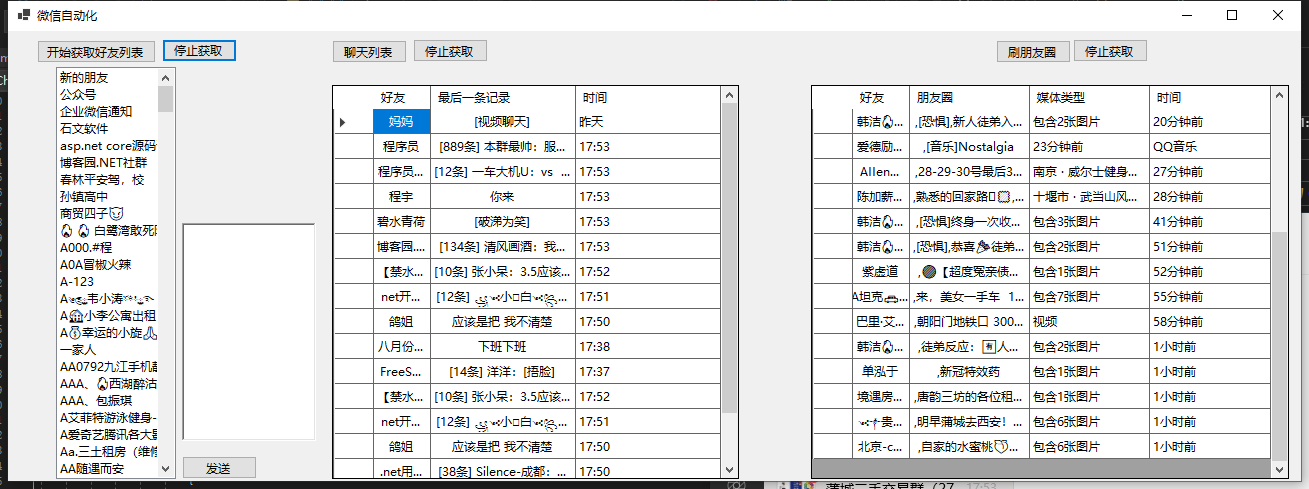
下图是我获取的好友列表,朋友圈列表,以及聊天列表的信息。
下面是使用 c#调用 win api 模拟鼠标滚动的代码。有关 SendInput 的讲解,详情请看官网 SendInput function (winuser.h)。
#region Scroll Event
void Scroll(int scroll)
{


     INPUT[] inputs = new INPUT[1];

     // 设置鼠标滚动事件
     inputs[0].type = InputType.INPUT_MOUSE;
     inputs[0].mi.dwFlags = MouseEventFlags.MOUSEEVENTF_WHEEL;
     inputs[0].mi.mouseData = (uint)scroll;

     // 发送输入事件
     SendInput(1, inputs, Marshal.SizeOf(typeof(INPUT)));
}
public struct INPUT
{
     public InputType type;
     public MouseInput mi;
}

// 输入类型
public enum InputType : uint
{
     INPUT_MOUSE = 0x0000,
     INPUT_KEYBOARD = 0x0001,
     INPUT_HARDWARE = 0x0002
}

// 鼠标输入结构体
public struct MouseInput
{
     public int dx;
     public int dy;
     public uint mouseData;
     public MouseEventFlags dwFlags;
     public uint time;
     public IntPtr dwExtraInfo;
}

// 鼠标事件标志位
[Flags]
public enum MouseEventFlags : uint
{
     MOUSEEVENTF_MOVE = 0x0001,
     MOUSEEVENTF_LEFTDOWN = 0x0002,
     MOUSEEVENTF_LEFTUP = 0x0004,
     MOUSEEVENTF_RIGHTDOWN = 0x0008,
     MOUSEEVENTF_RIGHTUP = 0x0010,
     MOUSEEVENTF_MIDDLEDOWN = 0x0020,
     MOUSEEVENTF_MIDDLEUP = 0x0040,
     MOUSEEVENTF_XDOWN = 0x0080,
     MOUSEEVENTF_XUP = 0x0100,
     MOUSEEVENTF_WHEEL = 0x0800,
     MOUSEEVENTF_HWHEEL = 0x1000,
     MOUSEEVENTF_MOVE_NOCOALESCE = 0x2000,
     MOUSEEVENTF_VIRTUALDESK = 0x4000,
     MOUSEEVENTF_ABSOLUTE = 0x8000
}
const int MOUSEEVENTF_WHEEL = 0x800;
#endregion
结尾
使用这个类库当然可以实现一个自动回复机器人,以及消息朋友圈某人更新订阅,消息订阅等等,公众号啊 一些信息的收录。
以上是使用 FlaUi 模拟微信自动化的一个简单 Demo,记得好像也可以模拟 QQ 的,之前简单的尝试了一下,可以获取一些东西,代码地址:https://gitee.com/cxd199645/we-chat-auto.git。欢迎各位大佬讨论