

1. 引言
在操作系统中,进程信息对于系统监控和性能分析至关重要。假设我们需要开发一个监控程序,该程序能够捕获当前操作系统的进程信息,并将其高效地传输到其他端(如服务端或监控端)。在这个过程中,如何将捕获到的进程对象转换为二进制数据,并进行优化,以减小数据包的大小,成为了一个关键问题。本文将通过逐步分析,探讨如何使用位域技术对 C#对象进行二进制序列化优化。
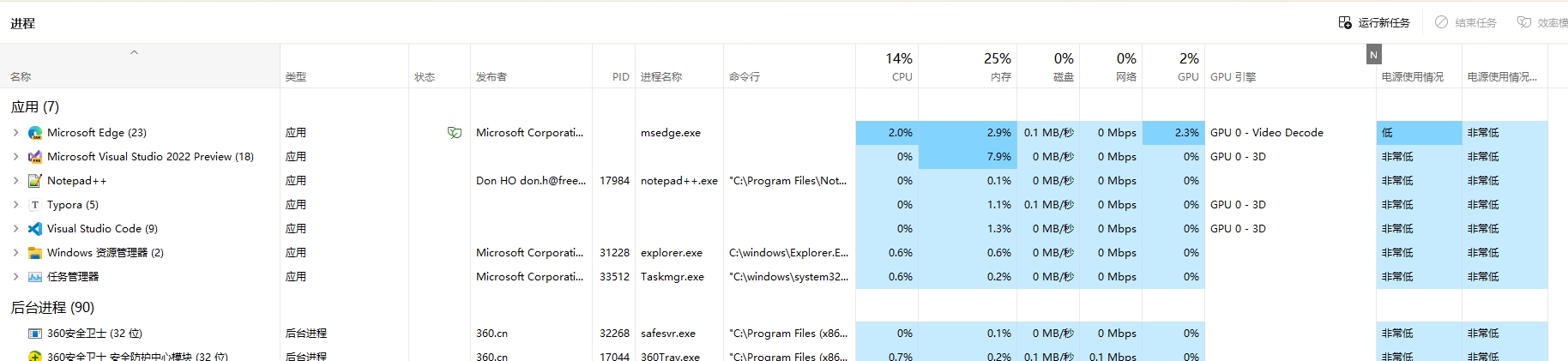
首先,我们给出了一个进程对象的字段定义示例。为了通过网络(TCP/UDP)传输该对象,我们需要将其转换为二进制格式。在这个过程中,如何做到最小的数据包大小是一个挑战。
| 字段名 | 说明 | 示例 |
|---|---|---|
| PID | 进程 ID | 10565 |
| Name | 进程名称 | 码坊 |
| Publisher | 发布者 | 沙漠尽头的狼 |
| CommandLine | 命令行 | dotnet CodeWF.Tools.dll |
| CPU | CPU(所有内核的总处理利用率) | 2.3% |
| Memory | 内存(进程占用的物理内存) | 0.1% |
| Disk | 磁盘(所有物理驱动器的总利用率) | 0.1 MB/秒 |
| Network | 网络(当前主要网络上的网络利用率 | 0 Mbps |
| GPU | GPU(所有 GPU 引擎的最高利用率) | 2.2% |
| GPUEngine | GPU 引擎 | GPU 0 - 3D |
| PowerUsage | 电源使用情况(CPU、磁盘和 GPU 对功耗的影响) | 低 |
| PowerUsageTrend | 电源使用情况趋势(一段时间内 CPU、磁盘和 GPU 对功耗的影响) | 非常低 |
| Type | 进程类型 | 应用 |
| Status | 进程状态 | 效率模式 |
2. 优化过程
2.1. 进程对象定义与初步分析
我们根据字段的示例值确定了每个字段的数据类型。
| 字段名 | 数据类型 | 说明 | 示例 |
|---|---|---|---|
| PID | int | 进程 ID | 10565 |
| Name | string? | 进程名称 | 码坊 |
| Publisher | string? | 发布者 | 沙漠尽头的狼 |
| CommandLine | string? | 命令行 | dotnet CodeWF.Tools.dll |
| CPU | string? | CPU(所有内核的总处理利用率) | 2.3% |
| Memory | string? | 内存(进程占用的物理内存) | 0.1% |
| Disk | string? | 磁盘(所有物理驱动器的总利用率) | 0.1 MB/秒 |
| Network | string? | 网络(当前主要网络上的网络利用率 | 0 Mbps |
| GPU | string? | GPU(所有 GPU 引擎的最高利用率) | 2.2% |
| GPUEngine | string? | GPU 引擎 | GPU 0 - 3D |
| PowerUsage | string? | 电源使用情况(CPU、磁盘和 GPU 对功耗的影响) | 低 |
| PowerUsageTrend | string? | 电源使用情况趋势(一段时间内 CPU、磁盘和 GPU 对功耗的影响) | 非常低 |
| Type | string? | 进程类型 | 应用 |
| Status | string? | 进程状态 | 效率模式 |
创建一个 C#类SystemProcess表示进程信息:
public class SystemProcess
{
    public int PID { get; set; }
    public string? Name { get; set; }
    public string? Publisher { get; set; }
    public string? CommandLine { get; set; }
    public string? CPU { get; set; }
    public string? Memory { get; set; }
    public string? Disk { get; set; }
    public string? Network { get; set; }
    public string? GPU { get; set; }
    public string? GPUEngine { get; set; }
    public string? PowerUsage { get; set; }
    public string? PowerUsageTrend { get; set; }
    public string? Type { get; set; }
    public string? Status { get; set; }
}
定义测试数据
private SystemProcess _codeWFObject = new SystemProcess()
{
    PID = 10565,
    Name = "码坊",
    Publisher = "沙漠尽头的狼",
    CommandLine = "dotnet CodeWF.Tools.dll",
    CPU = "2.3%",
    Memory = "0.1%",
    Disk = "0.1 MB/秒",
    Network = "0 Mbps",
    GPU = "2.2%",
    GPUEngine = "GPU 0 - 3D",
    PowerUsage = "低",
    PowerUsageTrend = "非常低",
    Type = "应用",
    Status = "效率模式"
};
2.2. 排除 Json 序列化
将对象转为Json字段串,这在 Web 开发是最常见的,因为简洁,前后端都方便处理:
public class SysteProcessUnitTest
{
    private readonly ITestOutputHelper _testOutputHelper;

    private SystemProcess _codeWFObject // 前面已给出定义,这里省

    public SysteProcessUnitTest(ITestOutputHelper testOutputHelper)
    {
        _testOutputHelper = testOutputHelper;
    }

    /// <summary>
    /// Json序列化大小测试
    /// </summary>
    [Fact]
    public void Test_SerializeJsonData_Success()
    {
        var jsonData = JsonSerializer.Serialize(_codeWFObject);
        _testOutputHelper.WriteLine($"Json长度:{jsonData.Length}");

        var jsonDataBytes = Encoding.UTF8.GetBytes(jsonData);
        _testOutputHelper.WriteLine($"json二进制长度:{jsonDataBytes.Length}");
    }
}
标准输出:
Json长度:366
json二进制长度:366
尽管 Json 序列化在 Web 开发中非常流行,因为它简洁且易于处理,但在 TCP/UDP 网络传输中,Json 序列化可能导致不必要的数据包大小增加(冗余的字段名声明)。因此,我们排除了 Json 序列化,并寻找其他更高效的二进制序列化方法。
{
  "PID": 10565,
  "Name": "\u7801\u754C\u5DE5\u574A",
  "Publisher": "\u6C99\u6F20\u5C3D\u5934\u7684\u72FC",
  "CommandLine": "dotnet CodeWF.Tools.dll",
  "CPU": "2.3%",
  "Memory": "0.1%",
  "Disk": "0.1 MB/\u79D2",
  "Network": "0 Mbps",
  "GPU": "2.2%",
  "GPUEngine": "GPU 0 - 3D",
  "PowerUsage": "\u4F4E",
  "PowerUsageTrend": "\u975E\u5E38\u4F4E",
  "Type": "\u5E94\u7528",
  "Status": "\u6548\u7387\u6A21\u5F0F"
}
2.3. 使用 BinaryWriter 进行二进制序列化
使用站长前面一篇文章写的二进制序列化帮助类SerializeHelper转换,该类使用BinaryWriter将对象转换为二进制数据(反序列化使用BinaryReader)。
首先,我们使SystemProcess类实现了一个空接口INetObject,并在类上添加了NetHeadAttribute特性(加上了数据包头部定义,便于多个网络对象反序列化识别,序列化后会多出数个字节,主要是系统 Id、网络对象 Id、对象版本号等序列化辅助字段)。
/// <summary>
/// 网络对象序列化接口
/// </summary>
public interface INetObject
{
}
[NetHead(1, 1)]
public class SystemProcess : INetObject
{
 	// 省略字段定义
}
然后,我们编写了一个测试方法来验证序列化和反序列化的正确性,并打印了序列化后的二进制数据长度。
/// <summary>
/// 二进制序列化测试
/// </summary>
[Fact]
public void Test_SerializeToBytes_Success()
{
    var buffer = SerializeHelper.SerializeByNative(_codeWFObject, 1);
    _testOutputHelper.WriteLine($"序列化后二进制长度:{buffer.Length}");

    var deserializeObj = SerializeHelper.DeserializeByNative<SystemProcess>(buffer);
    Assert.Equal("码坊", deserializeObj.Name);
}
标准输出:
序列化后二进制长度:152
比 Json 体积小了一半多(366 到 152,还多了几个字段哦),上面单元测试也测试了数据反序列化后验证数据是否正确,我们就以这个基础继续优化。
2.4. 数据类型调整
为了进一步优化二进制数据的大小,我们对数据类型进行了调整。通过对进程数据示例的分析,我们发现一些字段的数据类型可以更加紧凑地表示。例如,CPU 利用率可以只传递数字部分(如 2.3),而不需要传递百分号;进程类型只传递枚举值,而不用传递个性化字符串。这种调整可以减小数据包的大小。
| 字段名 | 数据类型 | 说明 | 示例 |
|---|---|---|---|
| PID | int | 进程 ID | 10565 |
| Name | string? | 进程名称 | 码坊 |
| Publisher | string? | 发布者 | 沙漠尽头的狼 |
| CommandLine | string? | 命令行 | dotnet CodeWF.Tools.dll |
| CPU | float | CPU(所有内核的总处理利用率) | 2.3 |
| Memory | float | 内存(进程占用的物理内存) | 0.1 |
| Disk | float | 磁盘(所有物理驱动器的总利用率) | 0.1 |
| Network | float | 网络(当前主要网络上的网络利用率 | 0 |
| GPU | float | GPU(所有 GPU 引擎的最高利用率) | 2.2 |
| GPUEngine | byte | GPU 引擎,0:无,1:GPU 0 - 3D | 1 |
| PowerUsage | byte | 电源使用情况(CPU、磁盘和 GPU 对功耗的影响),0:非常低,1:低,2:中,3:高,4:非常高 | 1 |
| PowerUsageTrend | byte | 电源使用情况趋势(一段时间内 CPU、磁盘和 GPU 对功耗的影响),0:非常低,1:低,2:中,3:高,4:非常高 | 0 |
| Type | byte | 进程类型,0:应用,1:后台进程 | 0 |
| Status | byte | 进程状态,0:正常运行,1:效率模式,2:挂起 | 1 |
修改测试数据定义:
[NetHead(1, 2)]
public class SystemProcess2 : INetObject
{
    public int PID { get; set; }
    public string? Name { get; set; }
    public string? Publisher { get; set; }
    public string? CommandLine { get; set; }
    public float CPU { get; set; }
    public float Memory { get; set; }
    public float Disk { get; set; }
    public float Network { get; set; }
    public float GPU { get; set; }
    public byte GPUEngine { get; set; }
    public byte PowerUsage { get; set; }
    public byte PowerUsageTrend { get; set; }
    public byte Type { get; set; }
    public byte Status { get; set; }
}
/// <summary>
/// 普通优化字段数据类型
/// </summary>
private SystemProcess2 _codeWFObject2 = new SystemProcess2()
{
    PID = 10565,
    Name = "码坊",
    Publisher = "沙漠尽头的狼",
    CommandLine = "dotnet CodeWF.Tools.dll",
    CPU = 2.3f,
    Memory = 0.1f,
    Disk = 0.1f,
    Network = 0,
    GPU = 2.2f,
    GPUEngine = 1,
    PowerUsage = 1,
    PowerUsageTrend = 0,
    Type = 0,
    Status = 1
};
添加单元测试如下:
/// <summary>
/// 二进制序列化测试
/// </summary>
[Fact]
public void Test_SerializeToBytes2_Success()
{
    var buffer = SerializeHelper.SerializeByNative(_codeWFObject2, 1);
    _testOutputHelper.WriteLine($"序列化后二进制长度:{buffer.Length}");

    var deserializeObj = SerializeHelper.DeserializeByNative<SystemProcess2>(buffer);
    Assert.Equal("码坊", deserializeObj.Name);
    Assert.Equal(2.2f, deserializeObj.GPU);
}
测试结果:
标准输出:
序列化后二进制长度:99
包体积又优化了1/3,由 152 字节减小到 99 字节长度,这是部分字段数据类型由string?调整为float或byte的成果。
2.5. 再次数据类型调整与位域优化
更进一步地,我们引入了位域技术。位域允许我们更加精细地控制字段在内存中的布局,从而进一步减小二进制数据的大小。我们重新定义了字段规则,并使用位域来表示一些枚举值字段。通过这种方式,我们能够显著地减小数据包的大小。
看前面一张表和下表比对,主要是两种数据类型调整,规则如下:
第一种:部分字段只是一些枚举值,使用的
byte表示,即 8 位(bit),其中比如进程类型只有 2 个状态(0:应用,1:后台进程),正好可以用 1 位表示(0、1);像电源使用情况,无非就是 5 个状态,用 3 位可表示全(可表示 6 种状态);第二种:部分 float 数据类型,实际情况我们只会要求精确到小数位 1 位。数值表示的百分比,那么不会超过 1(即 100.0%),可以考虑取整,如 23.3%,传递的 23.3,乘以 10,传 233 即可,最大不会超过 1000(即 100.0,100%),另一进程解析数据后,再除以 10 使用,那么就可以将数据类型由 float 表示的 4 字节 32 位优化为 10 位(最大值 1024)。
按这个规则我们重新定义字段规则如下:
| 字段名 | 数据类型 | 说明 | 示例 |
|---|---|---|---|
| PID | int | 进程 ID | 10565 |
| Name | string? | 进程名称 | 码坊 |
| Publisher | string? | 发布者 | 沙漠尽头的狼 |
| CommandLine | string? | 命令行 | dotnet CodeWF.Tools.dll |
| Data | byte[8] | 固定大小的几个字段,为啥是 8 个字节长度?(注:反序列化还会多定义 4 个字节表示 byte[]长度,所以 Data 字段总共占 12 个字节)? |
固定字段(Data)的详细说明如下:
| 字段名 | Offset | Size | 说明 | 示例 |
|---|---|---|---|---|
| CPU | 0 | 10 | CPU(所有内核的总处理利用率),最后一位表示小数位,比如 23 表示 2.3% | 23 |
| Memory | 10 | 10 | 内存(进程占用的物理内存),最后一位表示小数位,比如 1 表示 0.1%,值可根据基本信息计算 | 1 |
| Disk | 20 | 10 | 磁盘(所有物理驱动器的总利用率),最后一位表示小数位,比如 1 表示 0.1%,值可根据基本信息计算 | 1 |
| Network | 30 | 10 | 网络(当前主要网络上的网络利用率),最后一位表示小数位,比如 253 表示 25.3%,值可根据基本信息计算 | 0 |
| GPU | 40 | 10 | GPU(所有 GPU 引擎的最高利用率),最后一位表示小数位,比如 253 表示 25.3 | 22 |
| GPUEngine | 50 | 1 | GPU 引擎,0:无,1:GPU 0 - 3D | 1 |
| PowerUsage | 51 | 3 | 电源使用情况(CPU、磁盘和 GPU 对功耗的影响),0:非常低,1:低,2:中,3:高,4:非常高 | 1 |
| PowerUsageTrend | 54 | 3 | 电源使用情况趋势(一段时间内 CPU、磁盘和 GPU 对功耗的影响),0:非常低,1:低,2:中,3:高,4:非常高 | 0 |
| Type | 57 | 1 | 进程类型,0:应用,1:后台进程 | 0 |
| Status | 58 | 2 | 进程状态,0:正常运行,1:效率模式,2:挂起 | 1 |
上面这张表是部分固定示例字段的位域规则表,Offset 表示字段在 Data 字节数组中的位置(以 bit 为单位计算),Size 表示字段在 Data 中占有的大小(同样以 bit 单位计算),如 Memory 字段,在 Data 字节数组中,占据 10 到 20 位的空间。
由此就将固定大小的、原本 25 个字节长度的 10 个字段优化到 8 字节了(5 个 float 4 字节 32 位优化为 10 位,单字节 8 位优化到 2 位、4 位、6 位,即 200 位(25*8)优化到 64 位(实际是 60 位,由于网络传输最小单位是 byte,所以向上取整 8 字节 64 位))。
修改类定义如下,注意看代码中的注释:
[NetHead(1, 3)]
public class SystemProcess3 : INetObject
{
    public int PID { get; set; }
    public string? Name { get; set; }
    public string? Publisher { get; set; }
    public string? CommandLine { get; set; }
    private byte[]? _data;
    /// <summary>
    /// 序列化,这是实际需要序列化的数据
    /// </summary>
    public byte[]? Data
    {
        get => _data;
        set
        {
            _data = value;

            // 这是关键:在反序列化将byte转换为对象,方便程序中使用(位域操作)
            _processData = _data?.ToFieldObject<SystemProcessData>();
        }
    }

    private SystemProcessData? _processData;

    /// <summary>
    /// 进程数据,添加NetIgnoreMember在序列化会忽略
    /// </summary>
    [NetIgnoreMember]
    public SystemProcessData? ProcessData
    {
        get => _processData;
        set
        {
            _processData = value;

            // 这里关键:将对象转换为byte[](位域序列化操作)
            _data = _processData?.FieldObjectBuffer();
        }
    }
}

public record SystemProcessData
{
    [NetFieldOffset(0, 10)] public short CPU { get; set; }
    [NetFieldOffset(10, 10)] public short Memory { get; set; }
    [NetFieldOffset(20, 10)] public short Disk { get; set; }
    [NetFieldOffset(30, 10)] public short Network { get; set; }
    [NetFieldOffset(40, 10)] public short GPU { get; set; }
    [NetFieldOffset(50, 1)] public byte GPUEngine { get; set; }
    [NetFieldOffset(51, 3)] public byte PowerUsage { get; set; }
    [NetFieldOffset(54, 3)] public byte PowerUsageTrend { get; set; }
    [NetFieldOffset(57, 1)] public byte Type { get; set; }
    [NetFieldOffset(58, 2)] public byte Status { get; set; }
}
添加单元测试如下:
/// <summary>
/// 极限优化字段数据类型
/// </summary>
private SystemProcess3 _codeWFObject3 = new SystemProcess3()
{
    PID = 10565,
    Name = "码坊",
    Publisher = "沙漠尽头的狼",
    CommandLine = "dotnet CodeWF.Tools.dll",
    ProcessData = new SystemProcessData()
    {
        CPU = 23,
        Memory = 1,
        Disk = 1,
        Network = 0,
        GPU = 22,
        GPUEngine = 1,
        PowerUsage = 1,
        PowerUsageTrend = 0,
        Type = 0,
        Status = 1
    }
};

/// <summary>
/// 二进制极限序列化测试
/// </summary>
[Fact]
public void Test_SerializeToBytes3_Success()
{
    var buffer = SerializeHelper.SerializeByNative(_codeWFObject3, 1);
    _testOutputHelper.WriteLine($"序列化后二进制长度:{buffer.Length}");

    var deserializeObj = SerializeHelper.DeserializeByNative<SystemProcess3>(buffer);
    Assert.Equal("码坊", deserializeObj.Name);
    Assert.Equal(23, deserializeObj.ProcessData.CPU);
    Assert.Equal(1, deserializeObj.ProcessData.PowerUsage);
}
测试输出:
标准输出:
序列化后二进制长度:86
99 又优化到 86 个字节,13 个字节哦,有极限网络环境下非常可观,比如 100 万数据,那不就是 12.4MB 了?关于位域序列化和反序列的代码这里不细说了,很枯燥,站长可能也说不清楚,代码长这样:
public partial class SerializeHelper
{
    public static byte[] FieldObjectBuffer<T>(this T obj) where T : class
    {
        var properties = typeof(T).GetProperties();
        var totalSize = 0;

        // 计算总的bit长度
        foreach (var property in properties)
        {
            if (!Attribute.IsDefined(property, typeof(NetFieldOffsetAttribute)))
            {
                continue;
            }

            var offsetAttribute =
                (NetFieldOffsetAttribute)property.GetCustomAttribute(typeof(NetFieldOffsetAttribute))!;
            totalSize = Math.Max(totalSize, offsetAttribute.Offset + offsetAttribute.Size);
        }

        var bufferLength = (int)Math.Ceiling((double)totalSize / 8);
        var buffer = new byte[bufferLength];

        foreach (var property in properties)
        {
            if (!Attribute.IsDefined(property, typeof(NetFieldOffsetAttribute)))
            {
                continue;
            }

            var offsetAttribute =
                (NetFieldOffsetAttribute)property.GetCustomAttribute(typeof(NetFieldOffsetAttribute))!;
            dynamic value = property.GetValue(obj)!; // 使用dynamic类型动态获取属性值
            SetBitValue(ref buffer, value, offsetAttribute.Offset, offsetAttribute.Size);
        }

        return buffer;
    }

    public static T ToFieldObject<T>(this byte[] buffer) where T : class, new()
    {
        var obj = new T();
        var properties = typeof(T).GetProperties();

        foreach (var property in properties)
        {
            if (!Attribute.IsDefined(property, typeof(NetFieldOffsetAttribute)))
            {
                continue;
            }

            var offsetAttribute =
                (NetFieldOffsetAttribute)property.GetCustomAttribute(typeof(NetFieldOffsetAttribute))!;
            dynamic value = GetValueFromBit(buffer, offsetAttribute.Offset, offsetAttribute.Size,
                property.PropertyType);
            property.SetValue(obj, value);
        }

        return obj;
    }

    /// <summary>
    /// 将值按位写入buffer
    /// </summary>
    /// <param name="buffer"></param>
    /// <param name="value"></param>
    /// <param name="offset"></param>
    /// <param name="size"></param>
    private static void SetBitValue(ref byte[] buffer, int value, int offset, int size)
    {
        var mask = (1 << size) - 1;
        buffer[offset / 8] |= (byte)((value & mask) << (offset % 8));
        if (offset % 8 + size > 8)
        {
            buffer[offset / 8 + 1] |= (byte)((value & mask) >> (8 - offset % 8));
        }
    }

    /// <summary>
    /// 从buffer中按位读取值
    /// </summary>
    /// <param name="buffer"></param>
    /// <param name="offset"></param>
    /// <param name="size"></param>
    /// <param name="propertyType"></param>
    /// <returns></returns>
    private static dynamic GetValueFromBit(byte[] buffer, int offset, int size, Type propertyType)
    {
        var mask = (1 << size) - 1;
        var bitValue = (buffer[offset / 8] >> (offset % 8)) & mask;
        if (offset % 8 + size > 8)
        {
            bitValue |= (buffer[offset / 8 + 1] << (8 - offset % 8)) & mask;
        }

        dynamic result = Convert.ChangeType(bitValue, propertyType); // 根据属性类型进行转换
        return result;
    }
}
3. 优化效果与总结
通过逐步优化,我们从最初的 Json 序列化 366 字节减小到了使用普通二进制序列化的 152 字节,再进一步使用位域技术优化到了 86 字节。这种优化在网络传输中是非常可观的,尤其是在需要传输大量数据的情况下。
本文通过一个示例案例,探讨了 C#对象二进制序列化的优化方法。通过使用位域技术,我们实现了对数据包大小的极限压缩,提高了网络传输的效率。这对于开发 C/S 程序来说是一种乐趣,也是追求极致性能的一种体现。
最后,我们提供了本文测试源码的 GitHub 链接,供读者参考和学习。
彩蛋:该仓库有上篇《C#百万对象序列化深度剖析:如何在网络传输中实现速度与体积的完美平衡 (dotnet9.com)》案例代码,也附带了 TCP、UDP 服务端与客户端联调测试程序哦。