
本文由网友【Sky.楚子航】投稿
1. 了解.NET Aspire
.NET Aspire 是微软推出的一个技术栈,旨在简化云原生应用的开发和管理。以下是关于.NET Aspire 的详细介绍:
定义与目的:
- .NET Aspire 是一个固定的云端就绪技术栈,它用于构建可观察且生产就绪的分布式应用程序。
- 其主要目的是简化云原生应用内各元素的协调和管理,帮助开发者更高效地使用.NET 构建云原生应用程序。
特点与优势:
- .NET Aspire 提供了统一的项目格式和固定的技术栈,这有助于减少开发人员在选择和配置技术组件时的复杂性。
- 它包含一组针对云原生增强的精选组件,如服务发现、遥测、复原能力和运行状况检查等,这些功能都是云原生应用开发中的关键要素。
- .NET Aspire 还提供了丰富的 API 和工具,支持开发人员在分布式应用程序中表达资源和依赖项,进一步简化了云原生应用的开发和运维工作。
与.NET 的关系:
- .NET Aspire 是基于.NET 平台构建的,它充分利用了.NET 的强大功能和生态系统。
- 作为.NET 的一部分,.NET Aspire 与.NET 8 及更高版本紧密集成,为开发者提供了从开发到部署的全流程支持。
发布与可用性:
- 微软在.NET 8 的预览版中首次引入了.NET Aspire,并计划将其作为.NET 8 正式版的一部分发布。
- 开发者可以在.NET 8 的预览版中尝试使用.NET Aspire,并体验其带来的简化和便捷性。
总的来说,.NET Aspire 是微软为简化云原生应用开发和管理而推出的一项重要技术,它充分利用了.NET 平台的优势,为开发者提供了一种高效、统一的解决方案。
2. 本文背景
我从 preview1 - preview6(目前最新 2024/5/1) 一直都有使用,在第一版的时候我就用它放入了我的一个微服务中(https://gitee.com/SkyNingDuan/PublicActivityServices.git),一直迭代更新。
在其中,我一直使用外部 RabbitMQ 的方式给我的微服务传递消息(用的是Zack.EventBus),但是它一直有直接通过 Aspire 方式创建 RabbitMQ 容器在你的项目中使用, 我一直想着用杨中科老师的框架为指导,开发一个在 Aspire 环境下的 EventBus, 但是一直拖着(已经有现成的了,就一直不想走出舒适区)最后经过不断的自我抗争,simpleUseAspireRabbitmq 第一版开发好了,功能比较简单,也比较好用,如果大家热情高的话, 后面再加便是。欢迎大家拥抱新技术,有任何问题都可以提 issue 和我互动,源代码地址https://github.com/skyDuanXianBing/SimpleUseAspireRabbitMQ.git ,NuGet 名称:SimpleUseAspireRabbitMQ) (目前由于 Aspire 也是处于预览版,所以这个也是预览版,后面有任何改进也会跟进的)。
3. 使用教程
3.1. 创建 Aspire 项目
在 aspire.host 中安装Aspire.Hosting.RabbitMQ 包,在program.cs中创建RabbitMQ容器,并且在你要使用 RabbitMQ 的项目后 WithReference RabbitMQ容器:

3.2. 注册服务
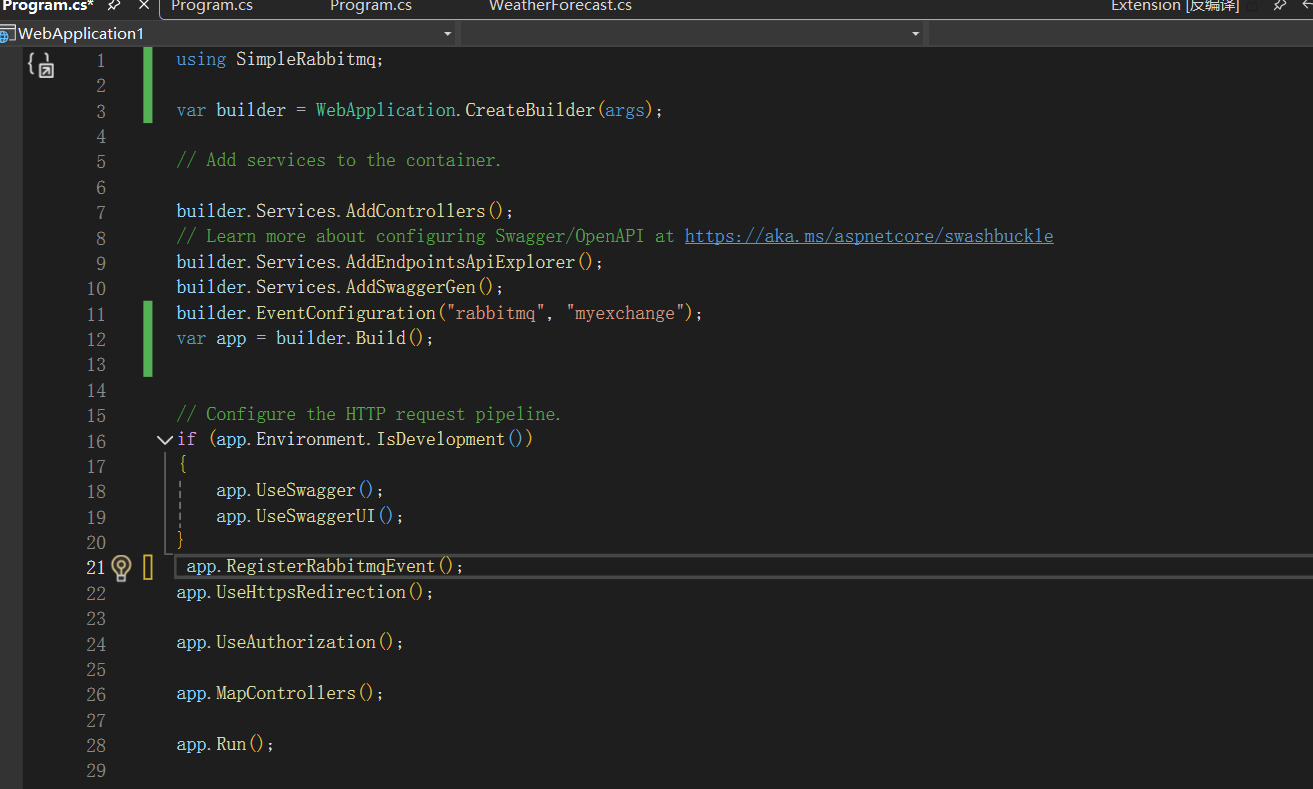
在你要使用RabbitMQ项目的 program.cs 中分别加入builder.EventConfiguration("rabbitmq", "myexchange");(第一个参数是RabbitMQ容器名称,第二是交换机名称),app.RegisterRabbitmqEvent();来注册服务:
3.3. 测试发送消息
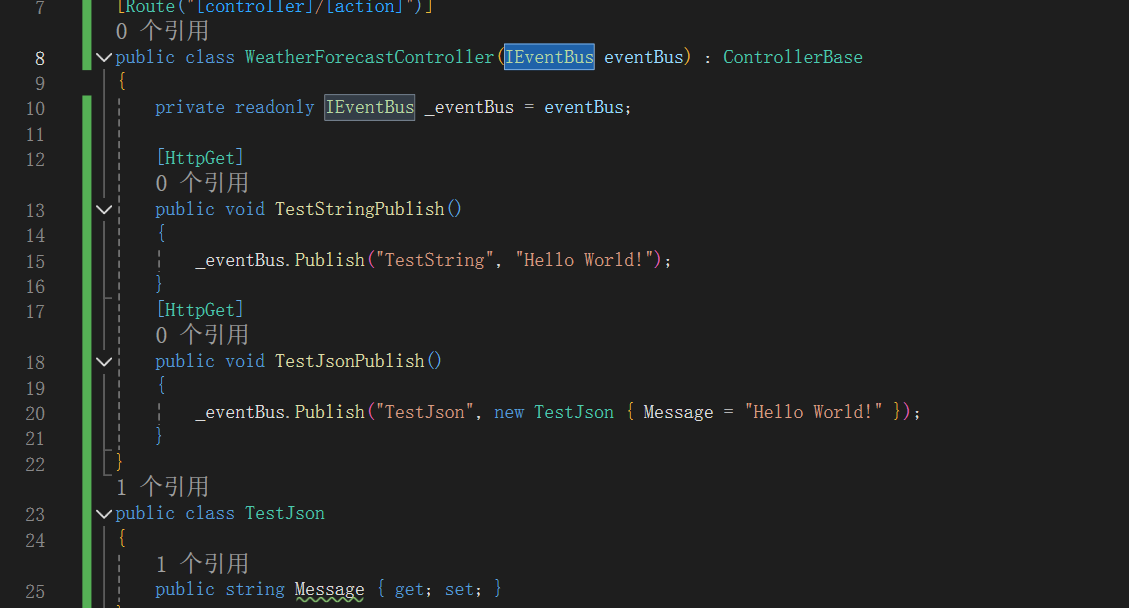
使用IEventBus发送消息,目前仅支持 string/泛型数据(都会转换成 json,后面在反序列化),publish 第一个参数是队列名称:
3.4. 定义处理类
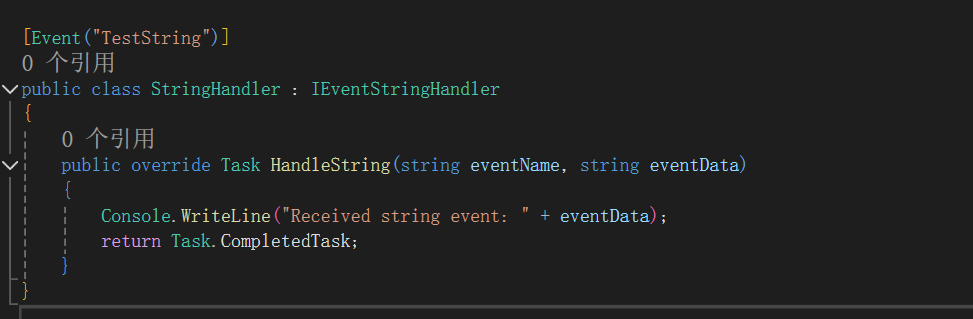
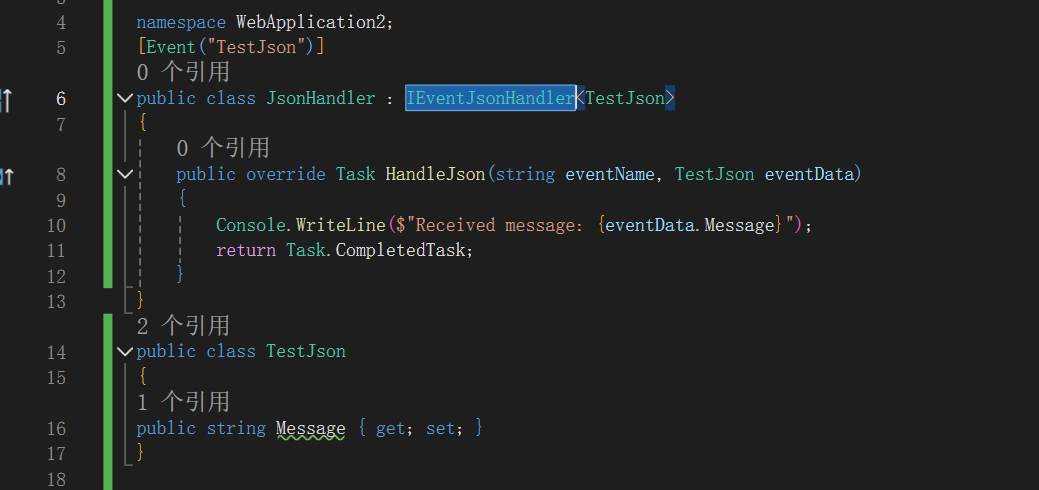
一定要定义在网站项目中(因为是通过反射网站项目拿到全部的处理类),继承IEventJsonHandler/IEventStringHandler 分别实现就行。
一定要在处理类上贴 [event("XXX")], 这个 attribute 用来指示接收哪个队列信息:
3.5. 完美接收消息
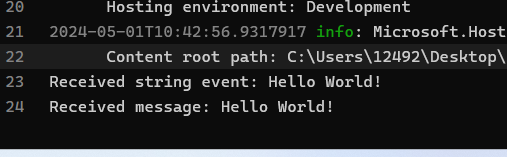
4. 总结
使用就是这么简单,欢迎留言交流。
- 博客园链接:https://www.cnblogs.com/SkyDuan/p/18169087