

引言
随着技术的不断进步,微软的.NET 框架在每次迭代中都带来了令人惊喜的新特性。在.NET 9 版本中,一个特别引人注目的亮点是 AOT( Ahead-of-Time)支持,它允许开发人员将应用程序在编译阶段就优化为能够在老旧的 Windows 系统上运行,包括 Windows 7 和甚至 Windows XP。这不仅提升了性能,也为那些依然依赖这些老平台的企业和个人开发者提供了新的可能性。
小知识普及:
- NET 9 AOT 简介
.NET 9 的 AOT 编译器通过静态编译,将.NET 应用程序转换为可以直接在目标机器上执行的可执行文件,消除了在运行时的 JIT(Just-In-Time)编译所需的时间和资源。这对于对性能要求高且需要支持旧版系统的场景具有显著优势。
- 支持 Windows 7 与 Windows XP 的背景
尽管 Windows 7 和 XP 已经不再是主流操作系统,但它们在某些特定领域,如企业遗留系统、嵌入式设备或者资源受限的环境中仍有广泛应用。.NET 9 的 AOT 编译这一扩展,旨在满足这些场景的兼容性和性能需求。
- 如何实现
- 编译过程优化:NET 9 在 AOT 编译时,对代码进行了更为细致的优化,使得生成的可执行文件更小,启动速度更快。
- 向下兼容性:通过精心设计的编译策略,确保了对 Win7 及 XP API 的兼容性,使代码能够无缝运行。
- 安全性考量:虽然支持老旧系统,但.NET 9 依然注重安全,提供了一定程度的保护机制以抵御潜在的风险。
- 实例应用与优势
- 性能提升:AOT 编译后的程序通常比 JIT 执行的程序更快,尤其对于 CPU 密集型任务。
- 部署简易:无需用户安装.NET 运行时,简化了部署流程。
- 维护成本降低:对于依赖老旧系统的企业,避免了频繁升级运行时的困扰。
本文只在分享网友及站长实践的一个成果,如有更多发现,欢迎投稿或给本文PR。
Windows 7 支持
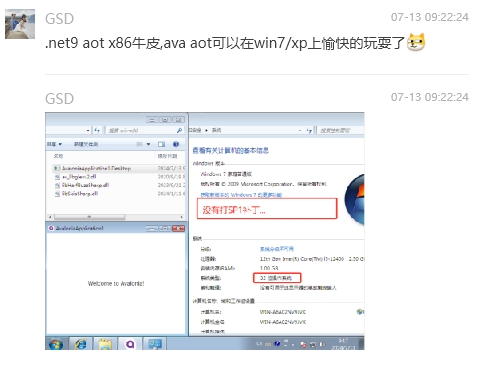
下图是网友编译的 Avalonia UI 跨平台项目在 Win 7 非 SP1 环境运行效果截图:
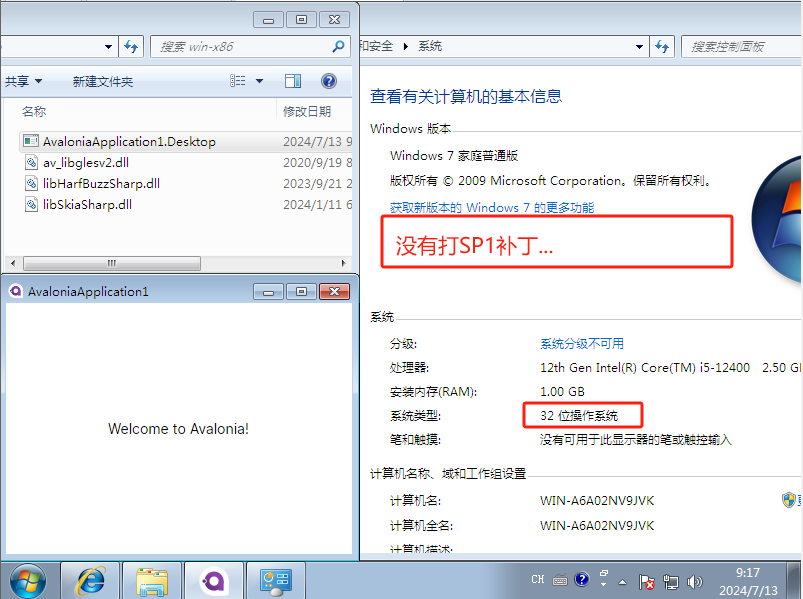
如上图,左侧是程序运行界面,右侧是操作系统版本。
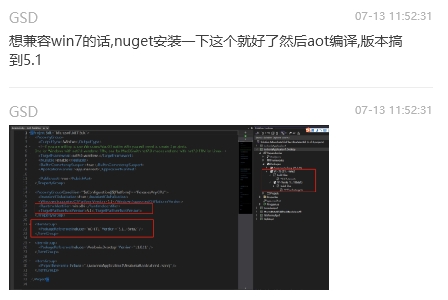
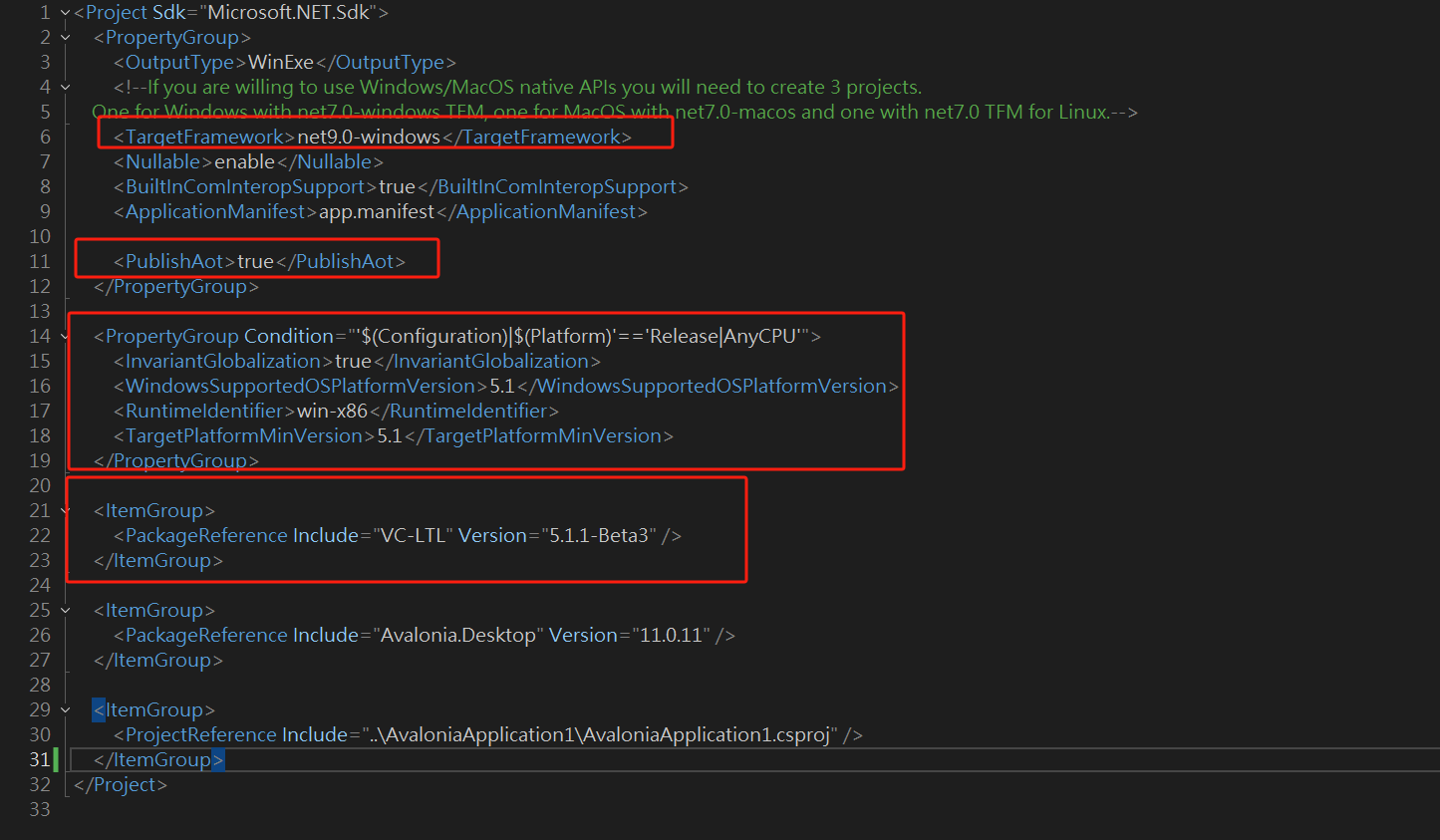
为了便于读者代码拷贝,参考配置贴出如下:
<Project Sdk="Microsoft.NET.Sdk">
	<PropertyGroup>
		<OutputType>WinExe</OutputType>
		<TargetFramework>net9.0-windows</TargetFramework>
		<Nullable>enable</Nullable>
		<BuiltInComInteropSupport>true</BuiltInComInteropSupport>
		<ApplicationManifest>app.manifest</ApplicationManifest>
		<AvaloniaUseCompiledBindingsByDefault>true</AvaloniaUseCompiledBindingsByDefault>
		<PublishAot>true</PublishAot>
	</PropertyGroup>
	<PropertyGroup Condition="'$(Configuration)|$(Platform)'=='Release|AnyCPU'">
		<InvariantGlobalization>true</InvariantGlobalization>
        <!--支持在Windows XP或更高版本的Windows操作系统上运行,XP下尝试Ava失败-->
		<WindowsSupportedOSPlatformVersion>5.1</WindowsSupportedOSPlatformVersion>
		<RuntimeIdentifier>win-x64</RuntimeIdentifier>
		<TargetPlatformMinVersion>5.1</TargetPlatformMinVersion>
	</PropertyGroup>
	<ItemGroup>
		<PackageReference Include="VC-LTL" Version="5.1.1-Beta3" />
	</ItemGroup>
	<ItemGroup>
		<PackageReference Include="Avalonia" Version="11.1.1" />
		<PackageReference Include="Avalonia.Desktop" Version="11.1.1" />
		<PackageReference Include="Avalonia.Themes.Fluent" Version="11.1.1" />
		<PackageReference Include="Avalonia.Fonts.Inter" Version="11.1.1" />
		<!--Condition below is needed to remove Avalonia.Diagnostics package from build output in Release configuration.-->
		<PackageReference Condition="'$(Configuration)' == 'Debug'" Include="Avalonia.Diagnostics" Version="11.1.1" />
		<PackageReference Include="Avalonia.ReactiveUI" Version="11.1.1" />
	</ItemGroup>
</Project>
上面关键配置说明:
<PublishAot>true</PublishAot>
该开关用于支持AOT编译发布
<WindowsSupportedOSPlatformVersion>5.1</WindowsSupportedOSPlatformVersion>
支持在Windows XP或更高版本的Windows操作系统上运行
VC-LTL
VC-LTL是一个基于微软VC修改的开源运行时,有效减少应用程序体积并摆脱微软运行时DLL,比如msvcr120.dll、api-ms-win-crt-time-l1-1-0.dll等依赖。
Win7及以上版本,可能AOT就能正常运行(不需要安装.NET运行时)。但也有可能在目标系统运行失败,可添加该库尝试重新AOT编译。详细原理参考该仓库:https://github.com/Chuyu-Team/VC-LTL
经站长实测:Windows7可能还需要添加YY-Thunks包引用:
<PackageReference Include="YY-Thunks" Version="1.1.4-Beta3" />
关于YY-Thunks:链接,说明:
众所周知,从 Windows 的每次更新又会新增大量 API,这使得兼容不同版本的 Windows 需要花费很大精力。导致现在大量开源项目已经不再兼容一些早期的 Windows 版本,比如 Windows XP RTM。
难道就没有一种快速高效的方案解决无法定位程序输入点的问题吗?
YY-Thunks(鸭船),存在的目的就是抹平不同系统的差异,编译时单纯添加一个 obj 即可自动解决这些兼容性问题。让你兼容旧版本 Windows 更轻松!
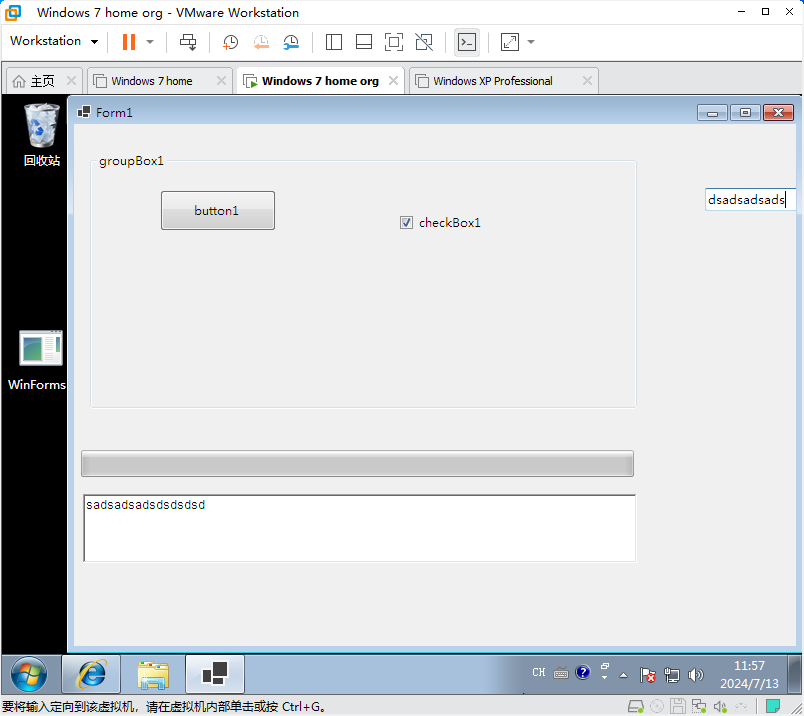
经测试,Winform 可以.NET 9 x86 AOT发布后运行,效果截图如下:
Winform 工程配置如下:
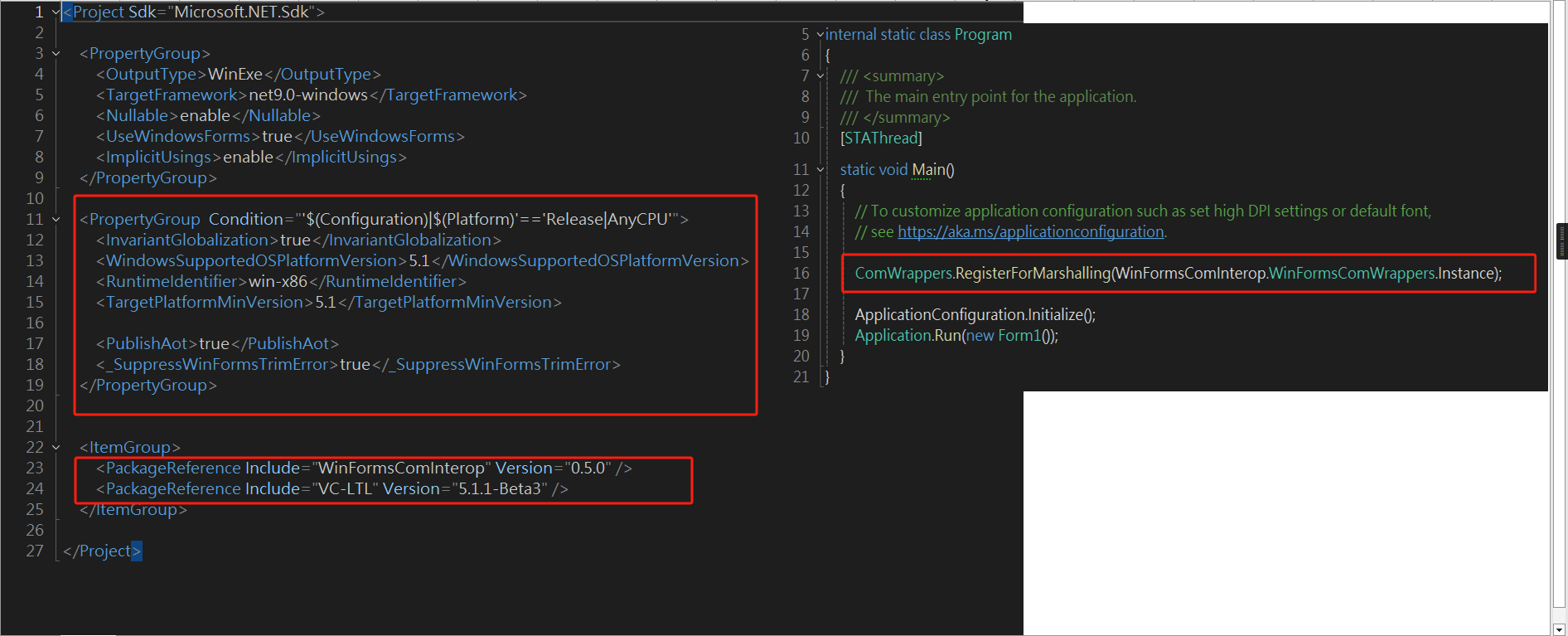
可拷贝配置如下:
<Project Sdk="Microsoft.NET.Sdk">
	<PropertyGroup>
		<OutputType>WinExe</OutputType>
		<TargetFramework>net9.0-windows</TargetFramework>
		<Nullable>enable</Nullable>
		<UseWindowsForms>true</UseWindowsForms>
		<ImplicitUsings>enable</ImplicitUsings>
	</PropertyGroup>
	<PropertyGroup Condition="'$(Configuration)|$(Platform)'=='Release|AnyCPU'">
		<InvariantGlobalization>true</InvariantGlobalization>
		<WindowsSupportedOSPlatformVersion>5.1</WindowsSupportedOSPlatformVersion>
		<RuntimeIdentifier>win-x64</RuntimeIdentifier>
		<TargetPlatformMinVersion>5.1</TargetPlatformMinVersion>
		<PublishAot>true</PublishAot>
		<_SuppressWinFormsTrimError>true</_SuppressWinFormsTrimError>
	</PropertyGroup>
	<ItemGroup>
		<PackageReference Include="VC-LTL" Version="5.1.1-Beta3" />
		<PackageReference Include="WinFormsComInterop" Version="0.5.0" />
	</ItemGroup>
</Project>
入口再加一句代码ComWrappers.RegisterForMarshalling(WinFormsComInterop.WinFormsComWrappers.Instance);:
using System.Runtime.InteropServices;

namespace WinFormsAotDemo;

internal static class Program
{
    /// <summary>
    ///  The main entry point for the application.
    /// </summary>
    [STAThread]
    static void Main()
    {
        // To customize application configuration such as set high DPI settings or default font,
        // see https://aka.ms/applicationconfiguration.

        ComWrappers.RegisterForMarshalling(WinFormsComInterop.WinFormsComWrappers.Instance);

        ApplicationConfiguration.Initialize();
        Application.Run(new Form1());
    }
}
Windows XP 支持
目前测试可运行控制台程序:
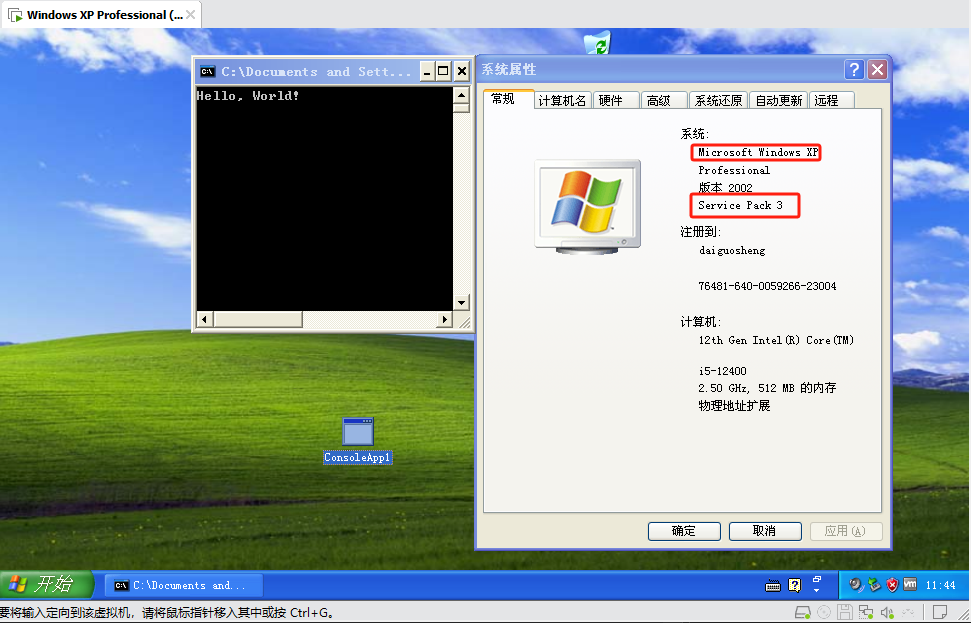
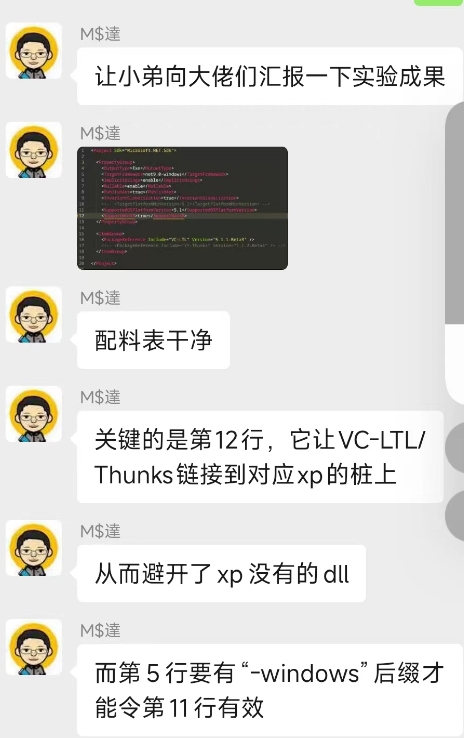
网友得出结论:

XP 需要链接 YY-Thunks,参考链接:https://github.com/Chuyu-Team/YY-Thunks(前面有提及,Win7如果失败也可以添加该包引用尝试)

大家可关注 YY-Thunks 这个 ISSUE:https://github.com/Chuyu-Team/YY-Thunks/issues/66

控制台支持 XP 的工程配置如下:
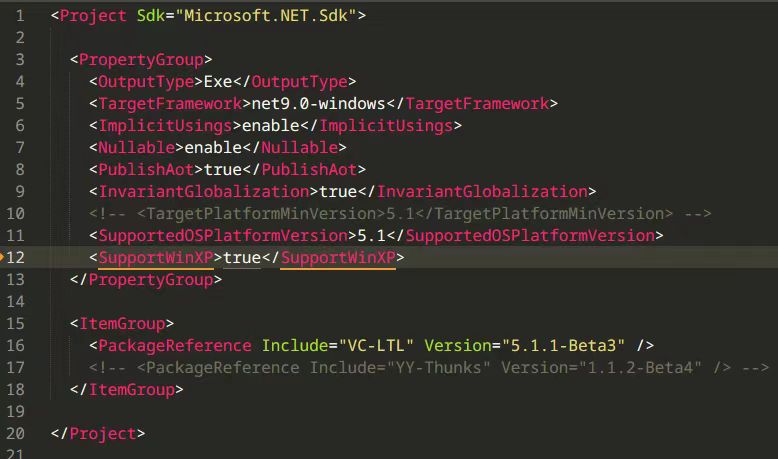
<Project Sdk="Microsoft.NET.Sdk">
	<PropertyGroup>
		<OutputType>Exe</OutputType>
		<TargetFramework>net9.0</TargetFramework>
		<ImplicitUsings>enable</ImplicitUsings>
		<Nullable>enable</Nullable>
	</PropertyGroup>
	<PropertyGroup Condition="'$(Configuration)|$(Platform)'=='Release|AnyCPU'">
		<InvariantGlobalization>true</InvariantGlobalization>
		<WindowsSupportedOSPlatformVersion>5.1</WindowsSupportedOSPlatformVersion>
		<SupportWinXP>true</SupportWinXP>
		<PublishAot>true</PublishAot>
	</PropertyGroup>
	<ItemGroup>
		<PackageReference Include="VC-LTL" Version="5.1.1-Beta3" />
	</ItemGroup>
</Project>
网友心得:
有待加强的部分
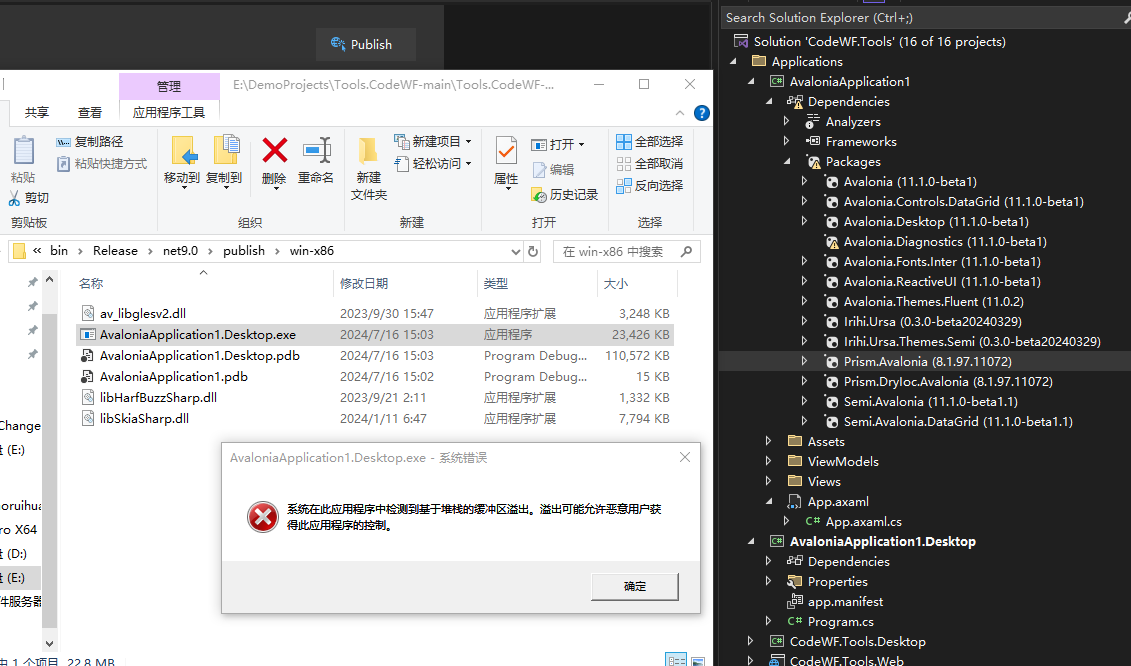
经测试Prism框架使用会报错:
使用HttpClient也会出错:

2024-08-02
通过阅读开源Avalonia主题库 Semi.Avalonia 的源码及作者
Rabbitism兔佬的PR已经解决Prism问题的,其他库问题使用方法应该类似,修改如下:主工程添加Roots.xml,内容如下:
<linker>
    <assembly fullname="CodeWF.Toolbox.Desktop" preserve="All"/>
    <assembly fullname="Ursa.PrismExtension" preserve="All" />
    <assembly fullname="Prism" preserve="All" />
    <assembly fullname="DryIoc" preserve="All" />
    <assembly fullname="Prism.Avalonia" preserve="All"/>
    <assembly fullname="Prism.DryIoc.Avalonia" preserve="All"/>
    <assembly fullname="CodeWF.Toolbox" preserve="All" />
</linker>
主工程添加该XML配置:
<ItemGroup>
    <TrimmerRootDescriptor Include="Roots.xml" />
</ItemGroup>
HttpClient也是类似的处理方法,这里不赘述,需要你进行更多尝试。
每个公司的不同项目都是极其不同、复杂的,实际发布还需要不断测试,为了支持Windows7、Windows XP可能不得不做出使用库替换、部分API使用取舍等操作,欢迎读者将使用过程中的心得体会进行分享。
结语
.NET 9 的 AOT 支持无疑拓宽了.NET 生态的应用范围,为那些需要在老旧平台上运行高性能应用的开发者提供了强大的工具。随着技术的发展,我们期待未来更多的.NET 版本能够进一步打破界限,让编程变得更加灵活和高效。
感谢网友GSD及M$達分享的这个好消息,大石头这篇文章《各版本操作系统对.NET 支持情况》推荐大家阅读:https://newlifex.com/tech/os_net
参考AOT项目:https://github.com/dotnet9/CodeWF.Toolbox
技术交流
软件开发技术交流添加 QQ 群:771992300
或扫站长微信(codewf,备注加群)加入微信技术交流群: