preparations
Download the Visual Studio 2022 Preview Bootstrap
- 访问Visual Studio 预览版下载页面
- Select and download the Enterprise/Professional/Community version of the bootstrap
Prepare storage space
- It is recommended to reserve at least 200GB of hard disk space
- Choose an environment with good network access
Make an offline installation package
1. Download using the command line
Open the command prompt (Administrator) and execute the following command:
VisualStudioSetup.exe --layout D:\2022 --noweb --add Microsoft.VisualStudio.Workload.NetWeb Microsoft.VisualStudio.Workload.NetDesktop --includeRecommended --lang Zh-cn en-US
Parameter description:
--add:用于指定工作负载或组件 ID。 如果使用--add,则仅下载由--add指定的工作负载和组件。 如果不使用--add,将下载所有工作负载和组件。--includeRecommended,用于添加针对指定工作负载 ID 的所有推荐组件。--includeOptional,用于添加针对指定工作负载 ID 的所有可选组件。--config使用*.vsconfig文件来指定 工作负载、组件或扩展,这些工作负载、组件或扩展应包含在布局中或由布局引用。 请确保指定配置文件的完整路径。--lang:用于指定语言区域设置。
Common workload codes
- .NET 桌面开发:
Microsoft.VisualStudio.Workload.NetDesktop - ASP.NET Web 开发:
Microsoft.VisualStudio.Workload.NetWeb - .NET 跨平台开发:
Microsoft.VisualStudio.Workload.NetCrossPlat - Azure 开发:
Microsoft.VisualStudio.Workload.Azure - 数据存储和处理:
Microsoft.VisualStudio.Workload.Data
The above are some parameter examples that refer to the official website documentation, but in fact we can use simpler commands:
VisualStudioSetup.exe --layout D:\2022
The advantages of this simplified command are:
- All available components are downloaded to ensure that you don't miss out on needed features
- Contains all language packs for multilingual development teams
- Avoid missing components caused by improper parameter configuration
Although this method will take up more storage space (about 80GB, about 66GB after compression), it is the most worry-free solution when network conditions permit.
** Note: To create a layout for the entire product and use the latest and best installer, run **
VisualStudioSetup.exe --layout D:\2022 --useLatestInstaller
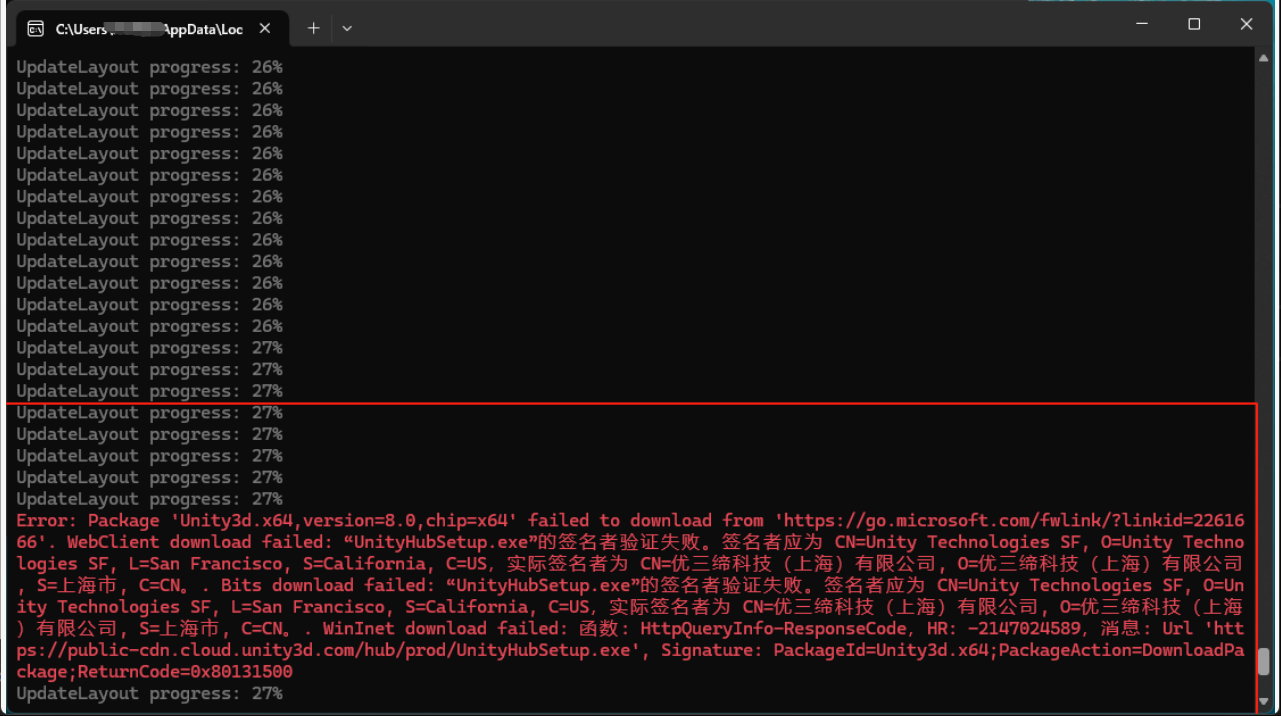
During this period, you may encounter some package download failures:

The Unity3d above failed to download due to a signature problem, but I don't do related development, so I can ignore it. The installation package I finally made can also be installed normally. If you need the corresponding package, you can study it again.
2. offline installer
On the target machine, you can directly click on "VisualStudioSetup.exe" in the directory to install.
precautions
- Ensure network stability during download
- After the download is completed, compress it and deliver it to the target machine, such as FTP
- If you need to update the layout, you can update it incrementally using the same command
- It is recommended to update offline packages regularly to get the latest security patches
Solving common problems
Download interruption
- Rerrunning the same command will continue the incomplete download
installation failed
- Check that the certificate is installed correctly
- Confirm that the target machine meets system requirements
- Check the log file to find out the specific reasons
missing components
- Check that the workload is specified correctly
- 确认
--includeRecommended和--includeOptional参数的使用
summary
Through the above steps, we can make a complete offline installation package for the preview version of Visual Studio 2022. This is particularly useful in network-limited environments and ensures that development teams use a unified development environment. Remember to update your offline package regularly to get the latest features and security updates.
** Reference: **