This article was submitted by a netizen, but the webmaster doesn't understand hardware at all.
Author: Chen Xianda
Original title: Introduction to Single-Chip Microcontrollers The Learning Path of Single-Chip Microcontrollers in Application Layer Software Development---Introduction to Basic Knowledge
Original link: www.cnblogs.com/1996-Chinese-Chen/p/16786374.html
introduction
工作了五六年,一直都是以软件为主,期间也是各个方向都玩,移动端,PC 端,网页端,后面在去年西安疫情的那一个月,突然觉得硬件也有很多可玩之处,相比于软件,看得见摸得着的东西可能更容易令人接受,做出成品也更容易有成就感,所以在那段时间我就去研究了一下树莓派,然后当时用 node 还有 c#操控树莓派来进行和传感器等电子元器件进行交互,感兴趣的可以看看我之前的文章C#控制树莓派入门 - 四处观察 - 博客园 (cnblogs.com),这篇文章仅仅用了做树莓派的入门,实际上,和我们这篇单片机的入门实际上也是有一些共性相通的地方。接下来,让我们一起了解一下单片机的入门基础知识吧。
What is a MCU
Single-chip microcomputer. The smallest computer operating system, explained by Baidu Baike, is an integrated circuit chip that uses ultra-large-scale integrated circuit technology to combine CPU with data processing capabilities, random access memory RAM, read-only memory ROM, various I/O ports and interrupt systems, timers/counters and other functions (It may also include display driving circuits, pulse width modulation circuits, analog multiplexers, A/D converters, etc.) A small and complete microcomputer system integrated on a silicon chip is widely used in the field of industrial control. From the 1980s, it has developed from 4-bit and 8-bit single-chip computers at that time to the current 300M high-speed single-chip computers.
It can be seen that a single chip microcomputer can basically be regarded as a small computer, with capabilities such as storage, calculation, input and output, timing timers, etc. Of course, our complete computer interacts with us through IO. Interaction, by connecting it to the IO port with a mouse or keyboard, you can perform input and output on the computer. Then the input and output on an ordinary single chip microcomputer need to pass through the IO port on the single chip microcomputer. It's those pins for communication. You can see the following figure. This is an ESP32 MCU. It includes so many IO pins, collectively called GPIO. So what is this GPIO? The full name of GPIO is General-purpose input/output, which translates to a universal input and output interface. There are a total of 40 gpio interfaces on this MCU.
MCU interface
According to the GPIO classification, it can be divided into:
POWER, power interface. The development board in the figure below has a 3.3V and a 5V power interface on it, which can be used as input or output power supply, used to supply power to the MCU, or connected in complex series to supply power to all electronic components in the overall project.
GND: The wire ground terminal interface. The POWER on it is the positive pole, then GND is the negative pole in the circuit, or the grounded line.
GPIO: It can be used as a general input and output interface and can be used to interact with electronic components. For example, to light up an LED, you can use the output high and low bits of the GPIO to light up the LED. The high and low bits are used to release current or turn off current to electronic components. It is a switch. I won't explain too much here. We will do experiments step by step in the future to let everyone learn.
ADC: Analog-to-digital converter, which converts the voltage of an input analog signal into a digital, converts the input analog voltage or current into a digital representing the magnitude of the voltage or current, obtains the collected data, and then converts it to a specific digital, such as temperature sensors, air pressure sensors, etc., all convert the obtained analog signal voltage into a specific digital.
CONTROL: Control pin. Usually, the MCU has an EN button to restart the MCU. If the line is connected to this EN pin, the MCU can be controlled to restart.
UART: A type of serial communication, universal asynchronous transceiver (Universal Asynchronous Receiver/Transmitter), the same UART has two pins, one is RX and the other is TX pin. RX is used to receive data, and the TX pin is used to write data. You can see that the full name of R is Receiver is used to receive, and the full name of T is Transmitter. Used to transmit data. If we have a USB to TTL module, we can use A PC to communicate with our MCU to send and receive data. I forgot to mention that when usually used for serial communication, the RX pin must be connected to the communication party's TX pin. The TX pin and the RX pin are connected, that is, the two MCU A and B require UART serial communication. Then A's RX interface must be connected to B's TX interface, A's TX interface must be connected to B's RX interface. A receives data from B's TX, A sends data from A's TX, and then A writes it to B's RX, unless there are special changes to electronic components, usually RX is connected to TX, and TX is connected to RX.
SPI: is the abbreviation of Serial Peripheral Interface. It is a high-speed, full-duplex, synchronous communication bus that only occupies four wires on the pins of the chip. They are
- (1) MISO-Master Input Slave Output, master device data input, slave device data output;
- (2) MOSI-Master Output Slave Input, master device data output, slave device data input;
- (3) SCLK-Serial Clock, clock signal, generated by the master device;
- (4) CS-Chip Select, a slave device enable signal, controlled by the master device.
First of all, in terms of the number of slave lines, SPI has two more lines than UART. At the same time, on devices, SPI can support full duplex of multiple devices, but the performance of a synchronous communication bus may not be as good as UART, but between devices, SPI is more selective than UART. An SPI master device sends data to slave devices through a set address. The same SPI line can be used to control multiple electronic components.
I2C: A multi-master-slave serial bus, also known as I2C, is a communication bus invented by Philips and belongs to a half-duplex synchronous transmission type bus. The IIC bus is a very common data bus. Multi-machine communication can be completed using only two lines, one SCL clock line and the other bidirectional data line SDA. There are two lines, one SDA is used to transmit data, and the other SCL clock line is used to control data transmission and reception, response, etc. TOUCH: The ESP32 board has ten different capacitive touchpads on it. DAC: The inversion of ADC. ADC is an electronic component that converts an analog signal into a digital signal, and DAC is a component that converts a digital signal into an analog signal and thus into a voltage. FLASH: esp32 comes with different sizes of memory, and you can also partition it yourself. It seems that there are 4M, 8M, and 16M, which are used to store some small files and temporary files. PWM: Pulse width modulation, input different waveforms, you can use this to control the speed or speed modulation of some electronic components, and control it by different duty cycles of PWM high and low levels.
The above is an explanation of all GPIO functions of the ESP32 series single-chip computers. In the future, I will take you to interact with different sensors to obtain data. The MCU purchase connection is placed at the bottom. I have always bought from this store, not for trust, haha
[Mobile phone Tianmeow] m.tb.cn/h.UdRqdqk? tk=MoLs2BOBtEQ CZ3457 "ESP32 Development Board WIFI+ Bluetooth 2-in-1 Dual-Core ESP32 Core Board Wireless Bluetooth Development Board"
Microprocessor Conclusion
In fact, for single-chip computers, what I think is to communicate with electronic components through these GPIO pins, transmit and receive data and transmit messages through those bus communication methods, and control them through the high and low levels of different pins. In short, MCU development requires understanding some commonly used basic circuit knowledge, otherwise it will easily burn out circuit boards and electronic components. If you have money, you can do whatever you want, haha.
environment construction
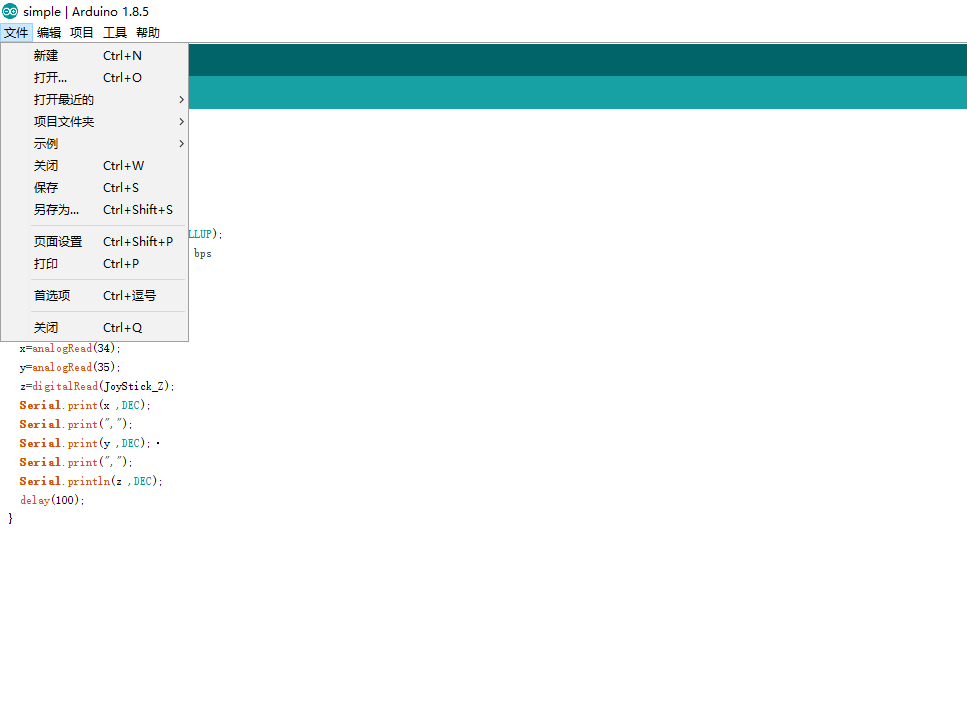
Above, we explained what a MCU is, what pins are on the MCU, and what functions they have. Then, let's explain a configuration of the ESP32 development environment on Arduino. click Preferences

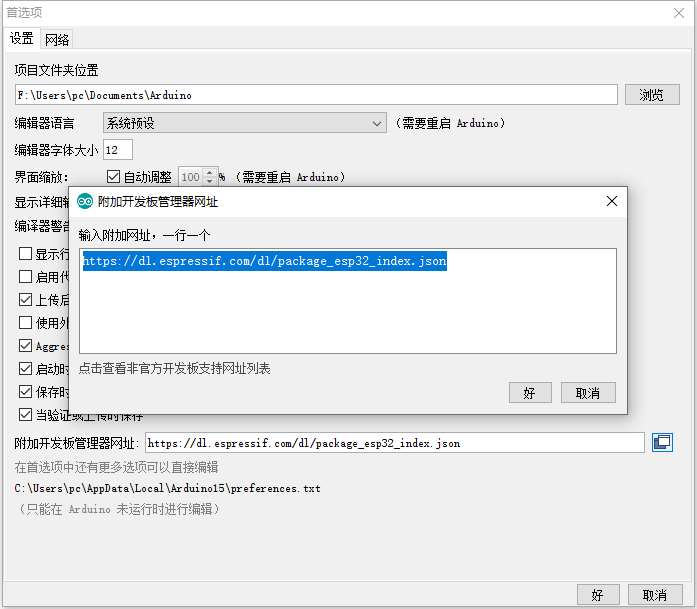
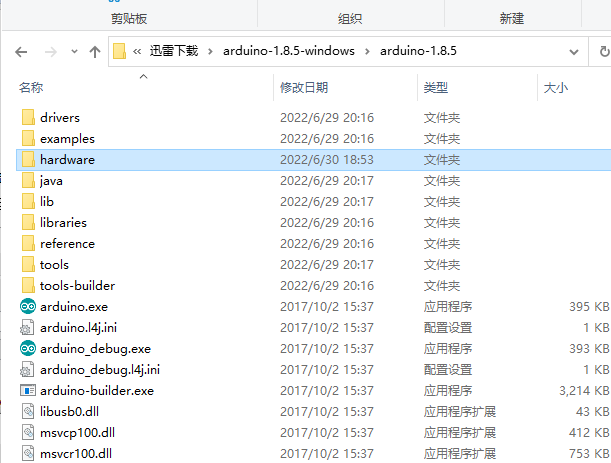
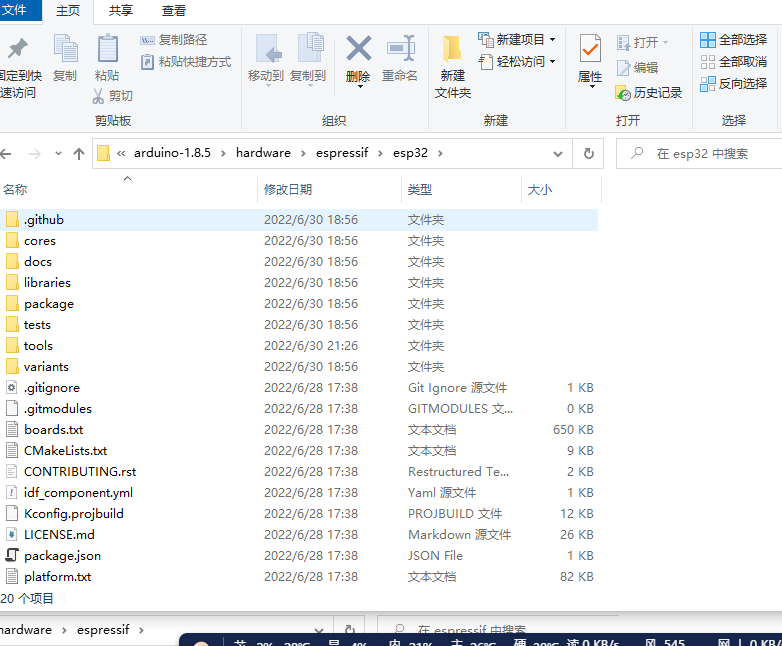
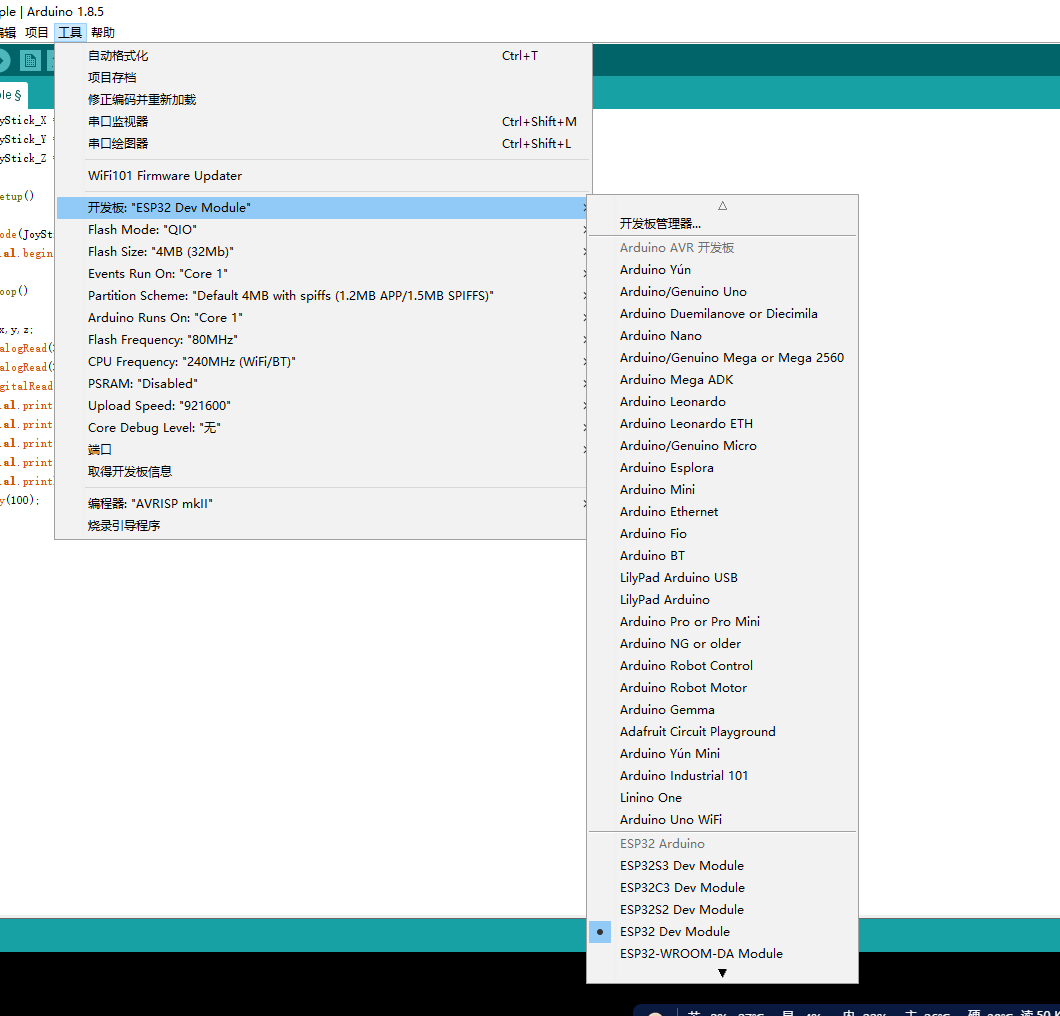
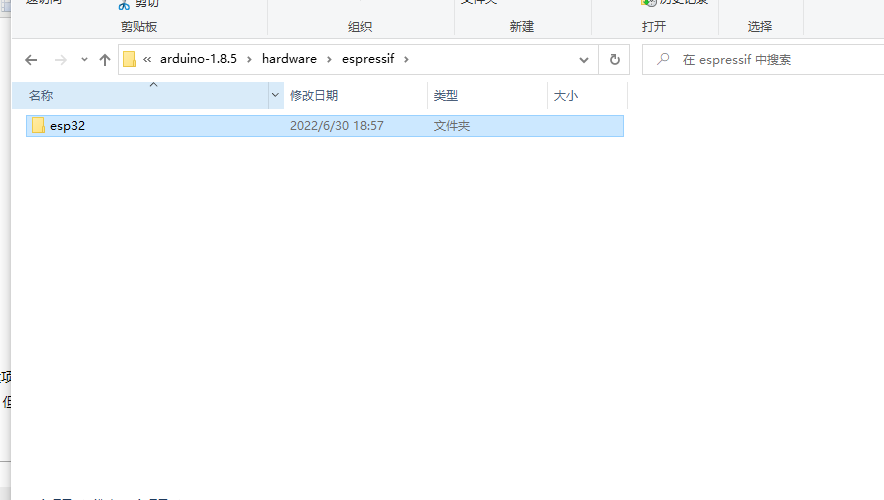
Here you can configure the project folder, the new project storage folder, and the development board configuration. Click the additional development board website and write https://dl.espressif.com/dl/package_esp32_index.json in the pop-up interface. This website is used to configure the relevant development packages for ESP32. Then you can search for ESP32 in Tools, Development Board, and Development Board Management, and then click Install, but you need a ladder to download it here, otherwise the download will be very slow. You can go to GITHUB to download it yourself and then place it in Arduino to create a new hardware folder. The folder name and path are the same as what I pictured. Otherwise, the environment configuration fails and the configuration information cannot be read.
github 下载地址:https://github.com/espressif/arduino-esp32,下载后将里面的文件放进hardware/espressif/esp32文件夹中去,然后点击tools/get.exe,会去下载配置环境等待结束就可以找到ESP32的开发板,这中间下载速度可能会很慢,我会把所有的东西一并上传,然后下载稍作修改后就可以使用了。
Download address: 121.43.235.192:8082/s/Be88gki4eSFSMFs


conclusion
In fact, you can also use VSCODE to develop this. After configuring it on Arduino, you can download the Arduino plug-in Vscode and use Vscode to configure it. It depends on the developer. At the same time, VSC development can also directly use the native c language for development.
可以参考 i 乐鑫官网给出的步骤,快速入门 - ESP32 - — ESP-IDF 编程指南 v4.4.2 文档 (espressif.com),这个文档还是很不错,使用原生 c 语言进行开发,其难度也相较 Arduino 难一些,我是刚开始使用这个环境开发的,后来换成了 Arduino 相对简单一些,同时还可以像 c#的 nuget 一样去搜索自己想要的库,同时也有例子,相对简单一些。
In the follow-up articles, I will play with some simple electronic components. This year, I made a total of three smart cars, and I bought a lot of electronic components. In the future, I will take everyone to learn and play one by one, and then if necessary, I will also broadcast some explanations to facilitate and better introductory learning. Interested friends can continue to pay attention, and those who don't understand the environment can also add this group to find me. This group is used for small friends who are interested in single-chip computers. Exclusive group, Everyone learns together and makes progress together. Currently, we are playing with ESP boards, and we will also use the 51 or STM series later. If you are interested, you can study together and learn together.