UDP packet length, theoretical length of UDP packet
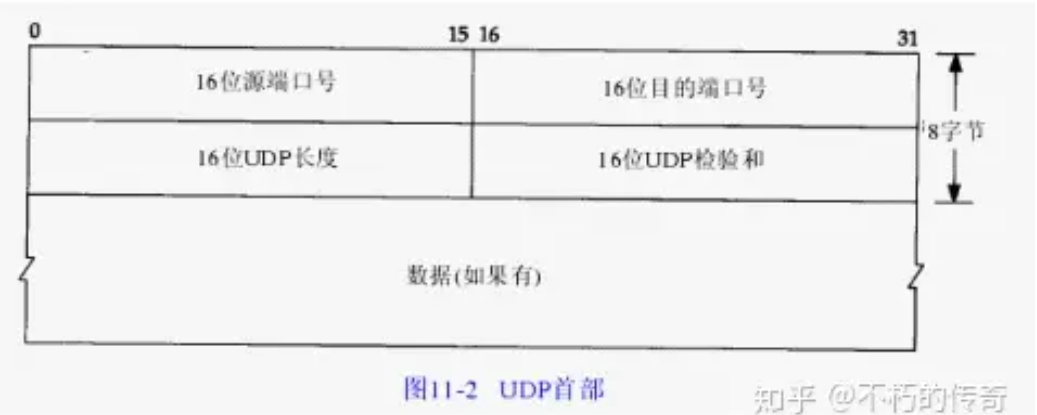
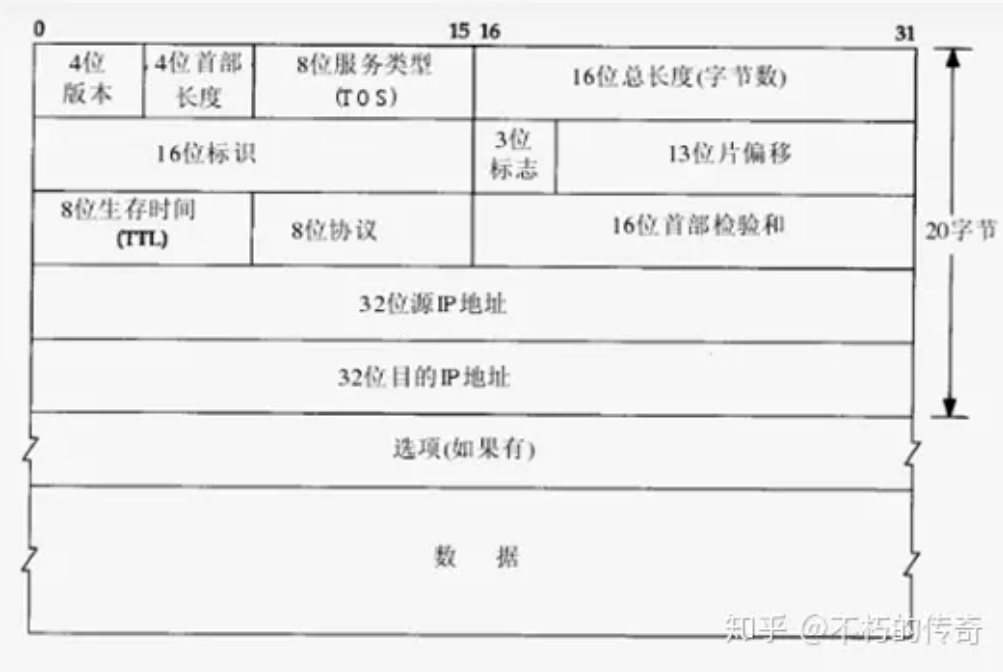
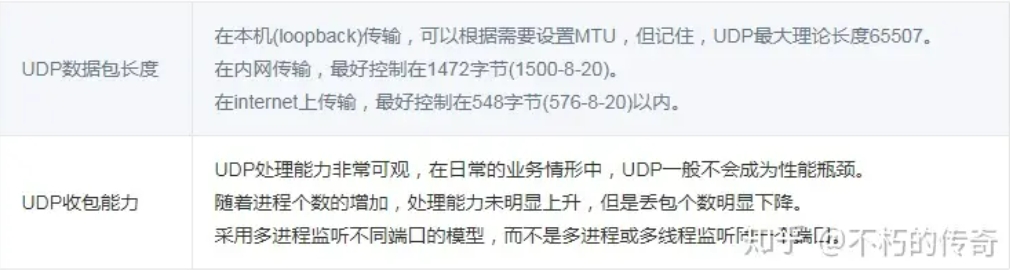
What is the theoretical length of a udp packet, and what should the appropriate udp packet be? It can be seen from the header of udp data packets in Chapter 11 of Volume 1 of TCP-IP Detailed Explanation that the maximum packet length of udp is 216-1 bytes. Since the udp header takes up 8 bytes, and the ip header after encapsulation at the ip layer takes up 20 bytes, this is the maximum theoretical length of the udp packet. It is 216-1-8-20=65507.

However, this is only the maximum theoretical length of a udp packet. First of all, we know that TCP/IP is usually regarded as a four-layer protocol system, including the link layer, network layer, transportation layer, and application layer. UDP belongs to the transport layer. During transmission, the entire udp packet is transmitted as a data field of the underlying protocol. Its length is restricted by the underlying ip layer and data link layer protocols.
MTU-related concepts
The length of an Ethernet data frame must be between 46 and 1500 bytes, which is determined by the physical characteristics of the Ethernet network. This 1500 bytes is called the MTU(Maximum Transmission Unit) of the link layer. The Internet Protocol allows IP fragmentation so that a packet can be broken into fragments small enough to pass through links with a maximum transmission unit smaller than the packet's original size. This fragmentation process occurs at the network layer and uses the value of the maximum transmission unit to send packets to the network interface on the link. The value of this maximum transmission unit is MTU (Maximum Transmission Unit). It refers to the maximum packet size (in bytes) that can pass through a layer of a communication protocol. This parameter of maximum transmission unit is usually related to the communication interface (network interface card, serial port, etc.).
In the Internet Protocol, the "path maximum transmission unit" of an Internet transmission path is defined as the minimum value of the maximum transmission unit of all IP hops on the "path" traveled from the source address to the destination address.
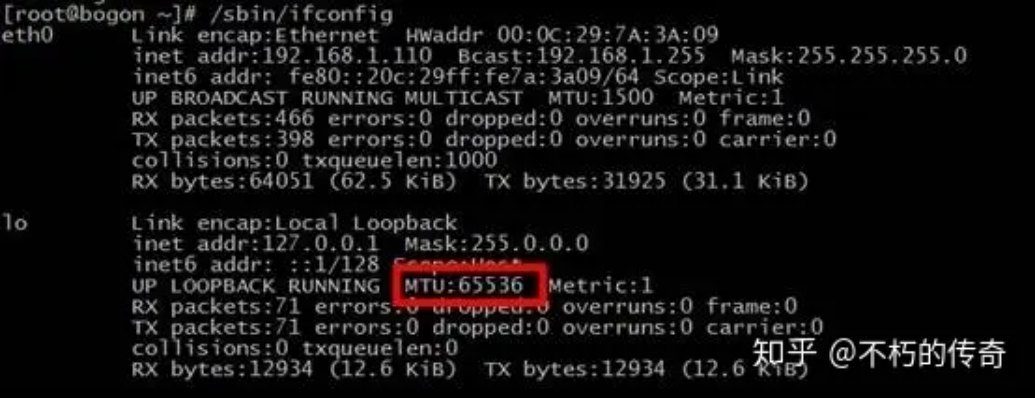
** It should be noted that the MTU of loopback is not subject to the above restrictions. Check the MTU value of loopback: **

[root@bogon ~]# cat /sys/class/net/lo/mtu
65536
Impact of IP subcontracting on udp packet length
As mentioned above, due to the constraints of the network interface card, the length of mtu is limited to 1500 bytes, which refers to the data area of the link layer. Packets greater than this value may be fragmented, otherwise they cannot be sent. However, packet-switched networks are unreliable and have packet losses. The sender of the IP protocol does not make retransmission. The recipient can only reassemble and send it to the upper protocol processing code after receiving all fragments, otherwise, in the opinion of the application, these packets have been dropped.
Assuming that the probability of network packet loss is equal at the same time, then a larger IP datagram must have a greater probability of being dropped, because as long as a fragment is lost, the entire IP datagram will not be received. There is no fragmentation problem for packets that do not exceed the MTU.
The MTU value does not include the 18 bytes of the header and trailer of the link layer. Therefore, this 1500 bytes is the length limit of the network layer IP datagram. Because the header of an IP datagram is 20 bytes, the maximum length of the data area of an IP datagram is 1480 bytes. This 1480 bytes is used to put TCP segments from TCP or UDP datagrams from UDP. Because the header of a UDP datagram is 8 bytes, the maximum length of the data area of a UDP datagram is 1472 bytes. This 1472 bytes is the number of bytes we can use.

What happens when we send UDP data greater than 1472? This means that the IP datagram is larger than 1500 bytes and larger than MTU. At this time, fragmentation is needed at the sender IP layer. Divide the datagram into slices so that each slice is less than MTU. The receiver IP layer needs to reorganize the datagram. What's more serious is that due to the characteristics of UDP, when a piece of data is lost during transmission, the receiver cannot reassemble the datagram. This will cause the entire UDP datagram to be dropped. Therefore, in an ordinary local area network environment, it is better to control UDP data below 1472 bytes.
This is different when programming the Internet, because routers on the Internet may set MTU to different values. If we assume that the MTU is 1500 to send data, and the MTU value of a certain network is less than 1500 bytes, then the system will use a series of mechanisms to adjust the MTU value so that the datagram can reach its destination smoothly. Since the standard MTU value on the Internet is 576 bytes, when programming UDP on the Internet, it is best to control the UDP data length to within 548 bytes (576-8-20).
UDP packet loss
Udp packet loss refers to the packet loss of the tcp/ip protocol stack of the linux kernel during the processing of udp packets after the network card receives the packet. There are two main reasons:
The udp packet format is incorrect or the checksum check fails.
The application has no time to process udp packets.
For Reason 1, errors in the udp packet itself are rare and the application is uncontrollable, so this article will not discuss it.
First, we introduce the general udp packet loss detection method, using the netstat command and adding the-su parameter.
# netstat -su
Udp:
2495354 packets received
2100876 packets to unknown port received.
3596307 packet receive errors
14412863 packets sent
RcvbufErrors: 3596307
SndbufErrors: 0
From the above output, you can see that one line of output contains "packet receive errors". If netstat -su is executed every once in a while, the number at the beginning of the line is found to be getting larger, indicating that a udp packet loss has occurred.
** The following describes the common reasons why udp packet loss occurs when the application has no time to process it: **
1、linux内核socket缓冲区设的太小 # cat /proc/sys/net/core/rmem_default
# cat /proc/sys/net/core/rmem_max
You can check the default and maximum values of the socket buffer.
How appropriate are the settings for rmem_default and rmem_max? If the performance pressure on the server is not large and there are no strict requirements on processing delay, set it to about 1M. If the performance pressure of the server is high or there are strict requirements on processing latency, rmem_default and rmem_max must be set carefully. If they are set too small, packet loss will occur. If they are set too large, snowballs will occur.
- The server load is too high, occupying a large amount of CPU resources, and cannot process udp packets in the Linux kernel socket buffer in a timely manner, resulting in packet loss.
Generally speaking, there are two reasons why a server is too loaded: too many udp packets are received; and there are performance bottlenecks in the server process. If you receive too many udp packages, you should consider expanding your capacity. Performance bottlenecks in server processes fall within the scope of performance optimization and will not be discussed too much here.
- Disk IO is busy
The server has a large number of IO operations, which will cause process congestion. The cpu is waiting for disk IO and cannot process udp packets in the kernel socket buffer in time. If the business itself is IO intensive, consider optimizing the architecture and using cache reasonably to reduce disk IO.
There is a problem that is easy to ignore here: many servers have the function of logging on the local disk. Due to improper operation of operation and maintenance, the level of logging is too high, or some errors suddenly occur in large numbers, resulting in the number of IO requests to write logs to the disk. Very large, the disk IO is busy, resulting in udp packet loss.
For operation and maintenance misoperations, the management of the operating environment can be strengthened to prevent errors. If your business does need to record large amounts of logging, you can use in-memory logging or remote logging.
- Insufficient physical memory, swap occurs
Swap switching is essentially a kind of disk IO busy. Because it is special and easy to be ignored, it is listed separately.
This problem can be avoided as long as the use of physical memory is planned and system parameters are set reasonably.
- Disk full prevents IO
The use of the disk is not planned well and the monitoring is not in place, resulting in the server process being unable to IO and being in a blocked state after the disk is full. The most fundamental way is to plan the use of disks to prevent business data or log files from clogging the disks, and at the same time strengthen monitoring, such as developing a universal tool to continuously warn when disk utilization reaches 80%, leaving sufficient response time.
UDP packet receiving capability test
test environment
Processor: Intel(R) Xeon(R) CPU X3440@2.53GHz, 4 cores, 8 hyperthreaded, Gigabit Ethernet card, 8G memory
model 1
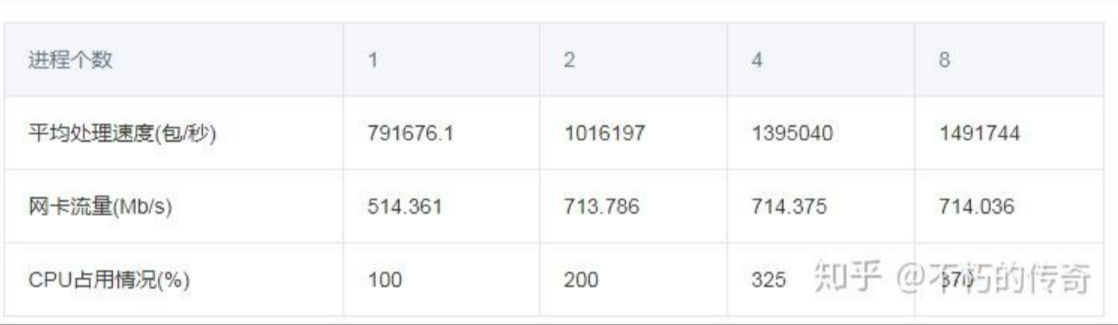
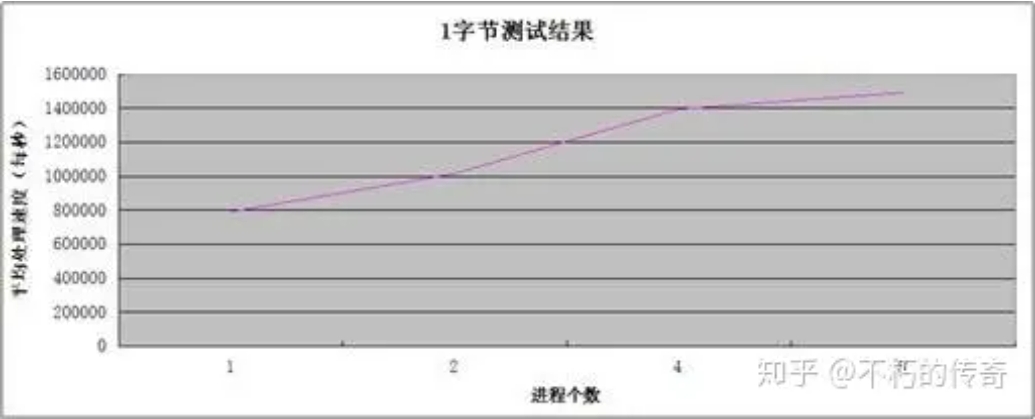
Stand-alone, single-threaded asynchronous UDP service, no business logic, only packet receiving operations, except for UDP header, one byte of data.
test results


** Phenomenon: **
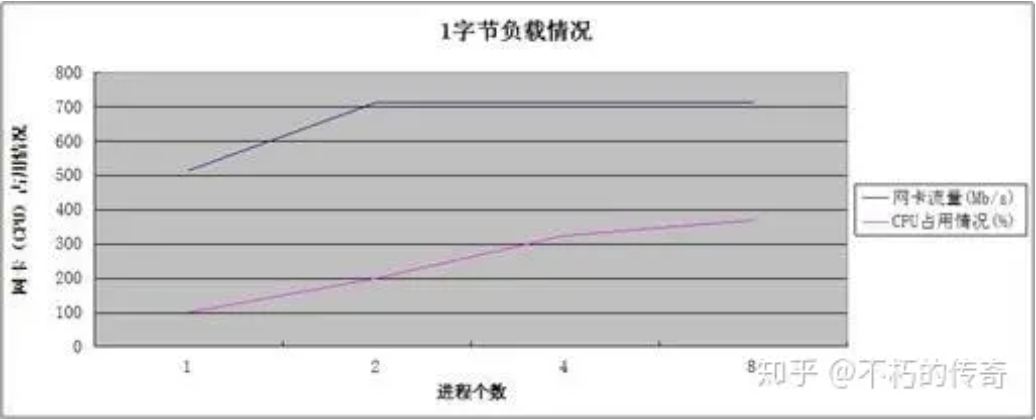
The stand-alone UDP packet receiving and processing capacity can reach about 150w per second.
Processing capabilities increase as the number of processes increases.
When processing reaches its peak, CPU resources are not exhausted.
** Conclusion: **
The processing power of UDP is still very considerable.
For Phenomena 2 and 3, it can be seen that the performance bottleneck lies in the network card, not the CPU. The increase in CPU and the increase in processing power come from the decrease in the number of packet packets (UDP_ERROR).
model 2
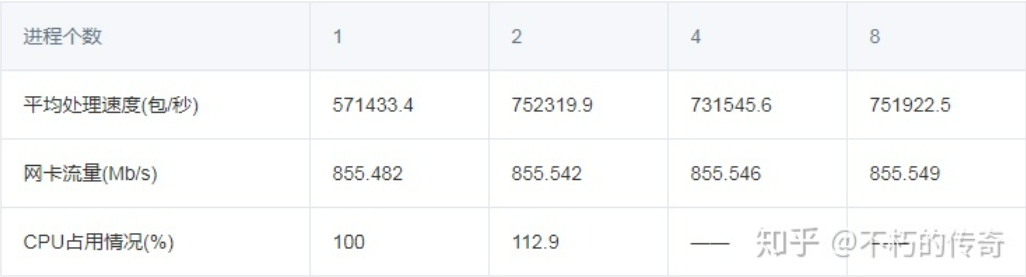
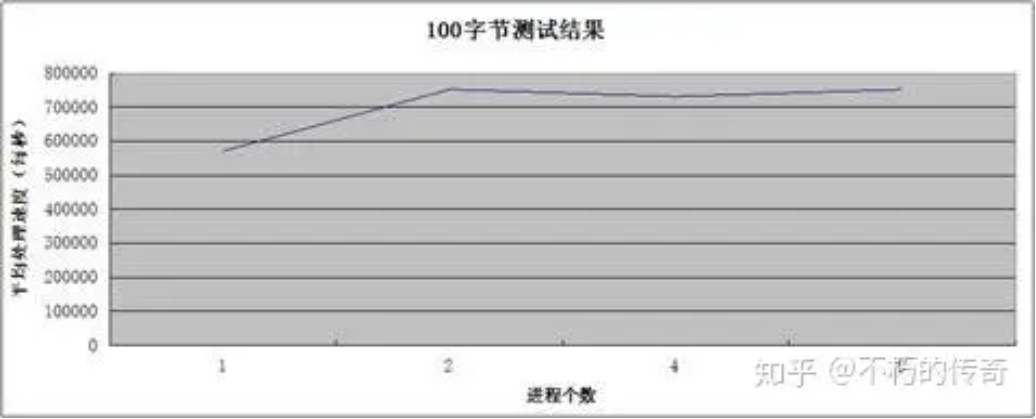
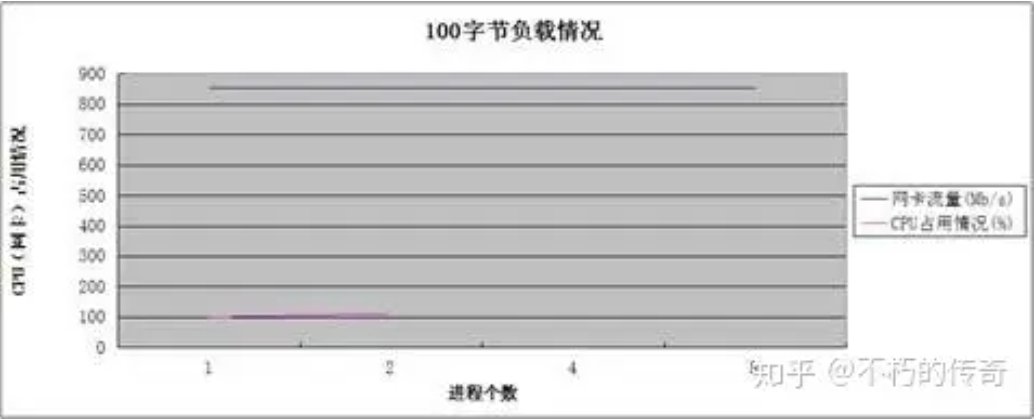
Other test conditions are the same as Model 1, except for the UDP header, 100 bytes of data.
test results


** Phenomenon: **
The packet size of 100 bytes is more in line with ordinary business situations.
The processing power of UDP is still very considerable, and the peak value of a single machine can reach 75w per second.
During 4 or 8 processes, the CPU usage was not recorded (network card traffic was exhausted), but it is certain that the CPU was not exhausted.
As the number of processes increases, the processing power has not improved significantly, but the number of packet losses (UDP_ERROR) has dropped significantly.
model 3
Stand-alone, single-process, multi-threaded asynchronous UDP service, multiple threads share one fd, no business logic, except for UDP header, one byte of data.
Test results:

** Phenomenon: **
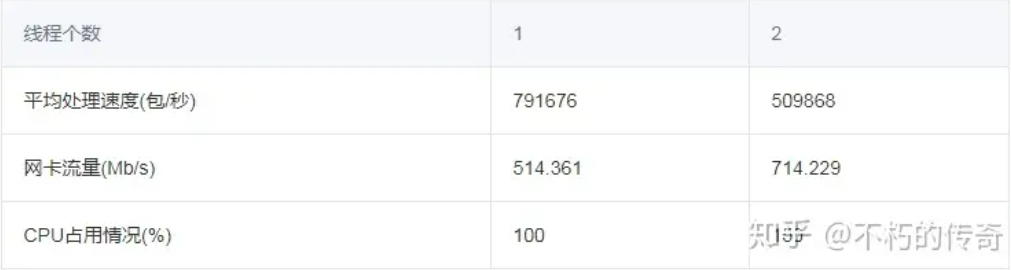
- As the number of threads increases, processing power decreases instead of increasing.
** Conclusion: **
Multiple threads sharing a single fd will cause considerable lock contention.
Multiple threads share a single fd. When a packet comes, all threads will be activated, resulting in frequent context switching.
** Final conclusion: **
UDP processing power is very considerable. In daily business situations, UDP generally does not become a performance bottleneck.
As the number of processes increases, the processing power does not increase significantly, but the number of packet losses decreases significantly.
During this test, the bottleneck lies in the network card, not the CPU.
** adopts a model in which multiple processes monitor different ports, rather than multiple processes or multiple threads monitor the same port. **
summary