Talk about C#starting the implementation process as an administrator

Talk about C#starting the implementation process as an administrator

Being an administrator is not just about starting a process, but the situations you encounter in the actual development process may be much more complicated.

最后更新 3/10/2024 10:05 PM
nobody
预计阅读 6 分钟
分类
.NET
标签
.NET C# administrator

preface

This article was submitted by a netizen (@nobody). Welcome to leave a message for technical discussions.

Being an administrator is not just about starting a process, but the situations you encounter in the actual development process may be much more complicated. For example, when a user opens an application, it starts it in an administrator manner, so there is no need to start it in an administrator manner at this time; for example, when a user uses it unattended, it needs to consider the prompt behavior of the administrator to raise power, and only when it is "promoted directly without prompting", it will start it in an administrator manner; For example, the administrator launch method will be passed. For example, application A launches application B as an administrator, then application A launches application B. Under normal circumstances, application B obtains the administrator rights of application A by default.

This article mainly introduces the implementation process of starting in an administrator manner when unattended. In other cases, it should be possible to achieve it as long as flexible combinations are made.

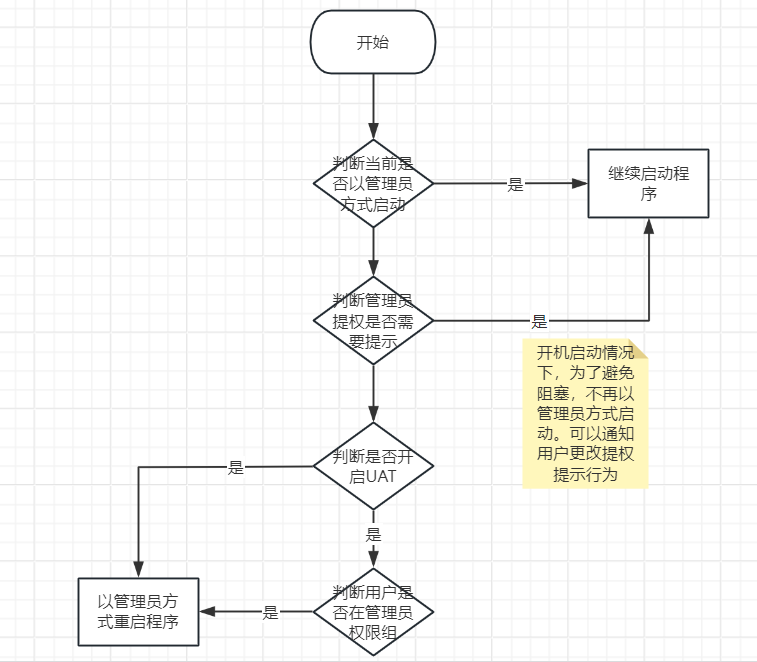
The main characteristics of unattended are that the application program starts automatically, crashes and restarts, and the program executes automatically. There must be no operations in the program that block the launch or execution of the program, such as pop-up prompts for the user to confirm or allowing the user to enter an account and password. To solve the unattended situation, the main solution ideas are as follows:

It should be noted that if the user's power-raising behavior is not "directly promoted without prompting" and must be activated as an administrator, the power-raising behavior must be changed. You can make changes by running "gpedit.msc" → Computer Configuration →Windows Settings → Security Settings → Local Policies → Security Options → User Account Control: Administrator's Promoted Prompt Behavior in Administrative Approval Mode.

implementation steps

The following is the code implementation method for the steps designed in the process:

  1. Determine whether the current application is launched as an administrator, the code is as follows:
public static bool IsRunAsAdmin()
{
    WindowsIdentity windowsIdentity = WindowsIdentity.GetCurrent();
    WindowsPrincipal windows = new WindowsPrincipal(windowsIdentity);
    if (windows.IsInRole(WindowsBuiltInRole.Administrator))
    {
        return true;
    }
    return false;
}

**note: This code determines whether the user is started as an administrator, not whether the user is an administrator. Because although the user is an administrator, when launching the application, it may not be launched as an administrator. Online searches determine whether the user is an administrator, and most of the searches are this code. **

  1. Start as an administrator. This is the most basic code, and the code is as follows:
public static void RunAsAdmin()
{
    ProcessStartInfo startInfo = new ProcessStartInfo();
    //设置以管理员方式启动标记
    startInfo.Verb = "runas";
    //使用shell启动进程
    startInfo.UseShellExecute = true;
    startInfo.FileName = Process.GetCurrentProcess().MainModule.FileName;
    Process.Start(startInfo);
}

**note: Verb is the flag of being started by an administrator. In addition to setting Verb, you also need to set UseShellExecute=true to use the shell to start the process. Otherwise, administrator privileges will be passed when starting. That is, if the original application was not started by an administrator, then it will not be started by an administrator after being delivered, and starting by an administrator will fail. There are also many properties that can be set for the launch object, and readers can study it for themselves. **

  1. Determine whether UAC (User Account Control) is currently enabled. Turning off UAC means that the current user has administrator privileges. The code is as follows:
public static bool IsUACEnabled()
{
    //注册表项
    RegistryKey key = Registry.LocalMachine.OpenSubKey(@"SOFTWARE\Microsoft\Windows\CurrentVersion\Policies\System", false);
    if (key != null)
    {
        //获取子键EnableLUA的值,1表示开启了UAC
        object value = key.GetValue("EnableLUA");
        if (value != null && value.ToString() == "1")
        {
            return true;
        }
    }
    return false;
}
  1. Determine whether the current user is in the administrator privilege group, the code is as follows:
public static bool IsInAdminGroup()
{
    WindowsIdentity windowsIdentity = WindowsIdentity.GetCurrent();
    WindowsPrincipal windowsPrincipal = new WindowsPrincipal(windowsIdentity);
    var claims = windowsPrincipal.Claims;
    //声明集合中有用户组的信息,S-1-5-32-544代表管理员组
    return claims.Any(c => c.Type == "http://schemas.xmlsoap.org/ws/2005/05/identity/claims/denyonlysid" && c.Value == "S-1-5-32-544");
}
  1. To determine the behavior of a UAC administrator to prompt for increasing permissions, you need to determine whether the behavior is "directly promoted without prompting". The code is as follows:
public static bool IsUpPermissionWithOutTip()
{
    //注册表项
    RegistryKey key = Registry.LocalMachine.OpenSubKey(@"SOFTWARE\Microsoft\Windows\CurrentVersion\Policies\System", false);
    if (key != null)
    {
        //获取子键ConsentPromptBehaviorAdmin的值,0表示开启了不提示直接提升,就不会造成阻断
        object value = key.GetValue("ConsentPromptBehaviorAdmin");
        if (value != null && value.ToString() == "0")
        {
            return true;
        }
    }
    return false;
}

The above are the 5 methods extracted based on the main processes. In the actual development process. You may also consider the issue of unlimited restart after an administrator boot fails. Exception situations are not considered in the method, and users need to handle exceptions according to their own needs.

summary

This article is mainly about the implementation methods under unattended conditions based on the author's development experience. Readers should flexibly assemble them according to actual needs during the development process, or add functions or logic that are not mentioned above. There may also be blind spots in the author's relevant knowledge, or he may not have enough logical considerations. Please correct him.

Keep Exploring

延伸阅读

更多文章
同分类 / 同标签 4/22/2026

Support for. NET by operating system versions (250707 update)

Use virtual machines and test machines to test the support of each version of the operating system for. NET. After installing the operating system, it is passed by measuring the corresponding running time of the installation and being able to run the Stardust Agent.

继续阅读
同分类 / 同标签 2/7/2026

Summary of experience in using AOT

From the very beginning of project creation, you should develop a good habit of conducting AOT release testing in a timely manner whenever new features are added or newer syntax is used.

继续阅读