
Markdown Rendering in Avalonia UI

Markdown Rendering in Avalonia UI

This article will detail how to use Markdown.AIRender for Markdown rendering in Avalonia UI, including installation, style referencing, example demonstrations, and various features (such as support for black/white themes, accent colors, etc.). It also delves into its ongoing internationalization features, aiming to help developers better integrate Markdown content into Avalonia applications, provide a better user experience, and enhance the application's global adaptation capabilities. Additionally, it compares related Markdown rendering libraries to provide users with a reference for choosing the right tool.

Last updated 1/17/2025 5:57 AM
沙漠尽头的狼
7 min read
Category
Avalonia UI
Tags
.NET C# Avalonia UI Markdown Internationalization

Using Markdown Rendering in Avalonia UI for General Articles

Markdown rendering can be used for general article display, such as AI responses that are in Markdown format. You can use Markdown.Avalonia or Markdown.AIRender. This article introduces the latter; you can click the link to learn how to use the former.

Installation

Using Markdown.AIRender makes it easy to implement Markdown rendering in Avalonia UI. You can easily add Markdown.AIRender to your project via the NuGet package manager.

Install-Package MarkdownAIRender

This installation command will automatically download and install the required dependencies, laying the foundation for subsequent development work.

Referencing Styles in Application Styles

Including the Markdown.AIRender style file in the Avalonia Application styles is an important step to ensure it works correctly. Here is a specific code example:

<Application
    ...>
    <Application.Styles>
		<StyleInclude Source="avares://MarkdownAIRender/Index.axaml" />
    </Application.Styles>
</Application>

This integrates the Markdown.AIRender styles into your application, keeping them consistent with the overall style of your app. It applies the default styles of Markdown.AIRender to the relevant elements, providing style support for subsequent Markdown rendering.

Example

First, we need to prepare the Markdown content. You can read it from a local file or fetch it from the network. Here is a sample Markdown content:

## Changelog

### V0.0.1.1 (2024-12-28)
- 🔨 Use MarkdownAIRender to render Markdown

### V0.0.1.0 (2024-12-25)
- 😄 Add changelog
- 🔨 Export Excel by default overwrites existing files
- 🐛 Fix the issue of only being able to export rendered table data

This is a typical Markdown content containing changelog information, using some emojis and common Markdown syntax like headings, lists, and version information.

Next, in the axaml file, use the MarkdownRender element to render the Markdown content:

xmlns:md="https://github.com/AIDotNet/Markdown.AIRender"
<md:MarkdownRender Value="{Binding Markdown}" />

Here, the Value property passes the Markdown content to the MarkdownRender element via data binding, which renders it based on the provided Markdown content and displays it on the interface. This binding method gives you more flexibility to update the Markdown content; for example, when the Markdown property changes, the rendered content updates accordingly.

Rendering Effect

With the above configuration, you can achieve a beautiful Markdown rendering effect, as shown below:

This rendering effect demonstrates the basic capability of Markdown.AIRender, converting Markdown content into visual UI elements, providing users with clear and readable information display.

More

Supports Light and Dark Themes

In addition to basic rendering functionality, Markdown.AIRender also supports light and dark themes, offering more choices for different user needs and design styles.

This GIF shows the switching effect between light and dark themes, allowing you to see how the application interface changes according to different themes, meeting different users' visual preferences.

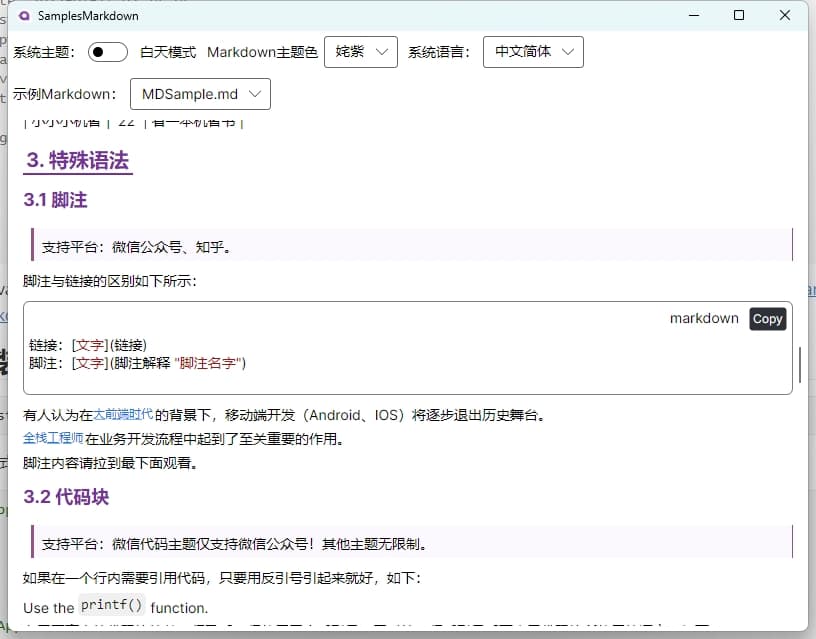
Supports Markdown Theme Color

Referencing the online markdown editor, currently incomplete and under further development:

Support for theme colors allows you to further customize the rendering effect of Markdown based on the overall tone and style of your application. By adjusting the theme color, you can make the Markdown content better integrate into the application's design language, providing a more coordinated and personalized user experience.

Internationalization

In multilingual application development, internationalization is an important consideration. Markdown.AIRender is improving its internationalization support for elements like the "Copy" button for programming languages in Markdown. This will make your application more global, allowing users from different countries or regions to better use your app.

In the process of implementing internationalization, we not only need to consider translating interface elements but also the internationalization of functional elements, such as the text and tooltips for the copy button. For Markdown.AIRender, although this functionality is still being improved, in the future it will provide better support for internationalizing your Markdown content. This will help you provide a consistent user experience in different language environments, expanding your application's user base.

Repository Address

You can find the complete code and more information about Markdown.AIRender at https://github.com/AIDotNet/Markdown.AIRender. Here, you can view the latest updates, ask questions, or contribute code to jointly advance the project.

Additionally, during development, you may encounter various issues. Here are some possible solutions and suggestions:

Problem Solving and Common Issues

  • Performance Issues: If you encounter performance problems when rendering long Markdown content, you can consider loading and rendering Markdown content in segments, or optimize the rendering algorithm of Markdown.AIRender. You can try using asynchronous loading to avoid blocking the UI thread, ensuring a smooth user interface.
  • Style Issues: If you are not satisfied with the rendered style, you can modify the styles in the Index.axaml file or override the corresponding style rules to better meet your needs. You can add or modify style properties such as font size, color, spacing, etc., through Avalonia's style mechanism.
  • Compatibility Issues: Ensure that your Avalonia version is compatible with Markdown.AIRender. If you encounter compatibility issues, check the Issues page of the Markdown.AIRender GitHub repository to see if other developers have encountered similar problems, and try using the latest version of the library or updating the Avalonia version to resolve the issue.

In summary, Markdown.AIRender is a highly promising library that provides rich functionality and good extensibility for Markdown rendering in Avalonia UI. As development progresses, we can expect it to bring more powerful features and better user experience.

Future Outlook

In the future, we hope to see Markdown.AIRender continuously improve and expand its functionality, such as:

  • Providing more theme options and custom theme capabilities, allowing users to easily create unique Markdown rendering effects.
  • Further improving internationalization support, not only for elements like buttons but also for multilingual processing of code blocks, quotes, and other elements within the entire Markdown content.
  • Improving performance to render large-scale Markdown documents faster and more efficiently.

Through continuous optimization and improvement, Markdown.AIRender will bring more convenience and better experience to developers and users.

I hope this article helps you better use Markdown.AIRender for Avalonia UI development. If you have any questions or suggestions, feel free to leave a comment in the comments section or communicate with us on GitHub.

Keep Exploring

Related Reading

More Articles
Same category / Same tag 8/9/2025

Lang.Avalonia: Avalonia multi-language solution, seamlessly supports three formats: Resx/XML/JSON

This is a multi-language management library designed specifically for the Avalonia framework. It reconstructs multi-language support logic through a plugin-based architecture, not only supporting traditional Resx resource files but also adding support for XML and JSON formats, while providing type-safe resource references and dynamic language switching, making multi-language development simpler and more efficient.

Continue Reading